
Audio playing on mobile 
Autore: Stephen C.
Visite 739,
Followers 1,
Condiviso 0
I use the Video/Audio object to play sound clips, setting it to Autoplay when visible. That all works fine on computers, but on phones/tablets the page opens with the sound muted. Unfortunately, the mute/unmute button is never visible until the user expands the screen, when it magically pops up so it can be unmuted. I have tried various settings without success. Any help appreciated.
Postato il
(It > En) ... there are cases and cases, ... you should post the link to this page online so we can evaluate...
.
Hi, ciao
.
Autore
Here is an example page:
https://www.colchesterrecalled.co.uk/jackashton.html
Hello Stephen,
I checked the website, and although visiting the example page directly does not autoplay the audio track (neither on PC nor on smartphone, but this is normal as no other interaction with the website has occurred when opening the page directly), but if I am browsing, for example https://www.colchesterrecalled.co.uk/cds---magazines.html and then visit one of these extracts
the audio track starts on autoplay, both on the computer and on my smartphone.
What browser and mobile device did you use?
I remain available.
... I confirm what Eric analyzed....
... + .. if you're interested in activating the sound when you click the Play button with one of my EXTRA codes, let me know...
.
ciao
Autore
I'm afraid that you have missed my point, as it is not the autoplay function that is giving me a problem. It is the fact that on smaller devices, like smart phones, the MUTE icon is not initially visible and by default is seems to be muted. The viewer therefore has no sound but can't see the unmute icon until the screen is expanded. See attached picture which hopefully explains this. It wouldn't be so bad if the default was unmuted, but I can't see how to efferct this. This is the case on all the major browsers I have tried e.g. Safari, Firefox, Chrome, Edge
.... OK... never mind...
... my code could have activated the audio by clicking Play...
... so wait for the experts...
.
I don't have a smartphone to test.
I noticed that the audio and video object is placed on the left, leaving an empty space on the right, which is also present in the smartphone simulation. Maybe this space for the mute icon is missing, but that's just a guess since I can't test it.
Autore
The audio/video control is the only one in its row and there doesn't seem any way to align it left/right or centre.
I have tried changing its dimensions (for which there are settings), but that makes no difference.
It's a bit of a mystery but I'll keep exoerimenting!
Thanks for all you help KolAsim and Daniel.
Hello Stephen,
apologies for the misunderstanding.
When visiting https://www.colchesterrecalled.co.uk/jackashton.html and the other page you provided a screenshot of, this is the result, but I am using an Android smartphone:
Did you instead notice this on an iPhone or iPad, or also on Android phones/tablets?
I remain available.
Autore
Please see attached image showing two screen shots. The one on the left is what initially appears, and the mute/unumute control it not visible. Unfortunately it seems to default to Muted, so although the clip is actually playing it cannot be heard. The image on the right shows that the mute/unmute icon becomes visible only when the screen is expanded. This is on iPhone using Safari, Edge or Chrome. On Firefox it is fine, just like your Android picture. Maybe the default muting is connected to some setting in the browsers, but I can't think why this would make the icon invisible.
... On my Android+Chrome smartphone, this is exactly what I see:
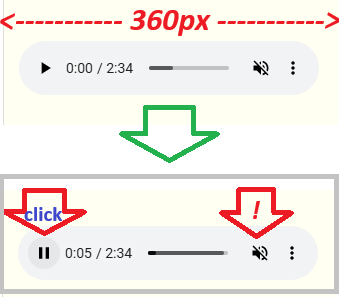
1) ... Play stopped + Mute audio;
2) ... Click on Play > start audio with mute;
3) ... Click on the audio icon > start sound;
... With my code, clicking on Play also activates the sound.
.
See four simple examples here:
>> https://kolasim.websitex5.me/audioK/index.html
.
ciao
.
Autore
KolAsim
What you see on your Android+Chrome is exactly what I get on my iPhone+Firefox, but unfortunately iPhone+(Safari,Edge,Chrome) do not show that audio button until expanded!
Can you offer me your code to try please?
Stephen
... OK... my code used for the example on page (3) is this:
<script>
/* ---K--- */
$(document).ready(function() {
$('audio').on('play', function() {
$('audio').get(0).muted = false;
});
});
</script>
...!... there should be only one AUDIO object on the page...!...
.
ciao
.
Hello Stephen,
I could reproduce the issue with a test project as well, checking with an available iPhone, and I reported this to development team.
I remain available.
Autore
On researching some converations on the wider internet I have discovered the reason for this situation. Apparently, on some browsers if an audio clip is set to autoplay then it will automatically be muted. Because the mute/unmute icon sometimes is not visible on iPhone until the screen is expanded, this means that the viewer can not hear anything and is not immediately presented with the ability to unmute.
I have fixed the situation now on my website by setting all the audio clips to be a Manual start, and they are then always unmuted.
Thanks to everyone who has responded and assisted me - much appreciated.
... OK ...
.
Autore
..but it still does not solve the problem of why the mute/unmute button does not always display on iPhone. It's not a big deal because the sound will stop when the viewer leaves the page.
... you can use the Play/Pause button...
... have you tried my code...?...
... with a variant of my code, instead of showing the player you can show two buttons/icons in its place, one for Play and one for Pause, therefore without seeing the player bar...
.
Autore
KolAsim - I struggled a bit with your code, but did find that this simple biy of HTML does the trick.
<audio controls>
<source src="/MyFile" type="audio/mp3">
</audio>
... OK ... Ciao