
When I scroll down, a menu appears and I don't know how to get there and change 
Autore: Jeff B.
Visite 778,
Followers 1,
Condiviso 0
When I scroll down only mobile format, a menu appears and I don't know how to get there and change the format.
The company logo is too big and Hamburger as well in wron position so I have 2 menu. One easy acces but the second I have no idea.
Postato il
Hello Jeff,
from what you describe, this seems to be an issue with the Sticky Bar and its contents in different breakpoints.
Please check its settings in Step 2 - Template ---> Sticky Bar.
I remain available.
Autore
How to access to contact form. Also email in the contact setup not working any more I try difrent email still the same not sending (email work fine not using website) I delete all file in cpanel still not help maybe I miss something. How to I check all emails in website x5 pro?
Thanks
Jeff
Hello,
if by "access Contact Form" you mean its settings, you must double-click the object.
To make sure the e-mail delivery works, it is recommended you use an address associated with your domain in the e-mail settings in Step 5 - Export ---> Upload website to the internet ---> Parameters ---> E-mail, and you may also want to disable "Allow sending from alternative senders" as not all default configurations of hosting support this.
I remain available.
Autore
I tried uploading old websites before, but I knew it wasn't a problem with the website I built.
The email isn't working. This happened after deleting all the files in public_html, and then the email isn't forwarded.
It seems there's a problem with CPanel. My host is CreazyDomain, and no one knows how to use CPanel anymore.
I don't know what to do. I have two websites, one of which is working, and I'm afraid to touch it because if there's a problem after the "Website X5 Pro" update, I try not to touch working site until it becomes clear what the problem is.
The question is, does anyone have any idea what to do? It's a bummer, I have to delete the "contact form" from the website and leave the email open on spems.
Could be SMTP (Simple Mail Transfer Protocol) setup in website?
Thanks for help.
Hello Jeff,
could you check the settings I mentioned in my reply?
What configuration are you using there?
I remain available.
Autore
Yes I Done what you ask. The the same email and disable "sending from alternative senders"
I spend 4 hours, I try everthing.
I live in Germany and am with Hosteurope, where I have been using cPanel web hosting for some time and, based on the instructions from the support staff, I changed the script type for emails to "PHP Mailer (recommended)".
Although I also have an email inbox with the web hosting provider, I forward the emails to my long-time email provider so that I have all emails in one email inbox.
Autore
Thanks, but that won't solve my problem, and I'd like to know if it's the website or the hosting. I'm comparing the contents of two of my email accounts in cPanel, and the working one has more data than the non-working one. Maybe I should delete/reset the entire cPanel and start over.
Hello Jeff,
could you please provide a screenshot?
Additionally, could you check the Control Panel of your website? You can access it with the credentials of any user set as administrator in Step 1 - Settings ---> Access Management in your project, by adding /admin at the end of the URL of the website.
In here, go to Website Test and, at the bottom of the page, an e-mail log is found.
Do you see any error displayed there?
Autore
"Unable to connect to DB this the answer". I check on website.
I checked if the email address is entered in Access Management, but it's not activated. I get an error. This means the admin isn't activated on the website. Now where is the error? And how do I fix it?
Please check the picture attached.
I have another website and I did a test and it works, but the message appears that there is a MySQL error, but the email works
Autore
I managed to activate it, so I can log in to my website and test it, but check the image at the bottom. I'm getting errors in the mail function, so back to the topic: what should I do?
Hello Jeff,
the Unable to connect to DB error means that incorrect Data Management parameters are present in the project, so I recommend reviewing this aspect too.
The error in question is a rather generic error that could be caused by a configuration that does not match the e-mail server requirements.
I recommend contacting your provider to make sure of what script they recommend, for example you might need to use SMTP/Authenticated SMTP.
I remain available.
Autore
The database error no longer exists, I fixed it. SMTP authentication doesn't exist, so that's your issue. I need someone who knows CPanel, where the problem might be. My hosting, if it's WordPress, yes, if not, then fogeret. Seven years ago, everyone knew what to do.
Hello Jeff,
what do you mean by "SMTP authentication doesn't exist, so that's your issue."?
Unfortunately you did not provide the screenshot of your current settings, so the situation is unclear.
Autore
cPanel does not have a central "SMTP Authentication ON/OFF" toggle. Instead, SMTP authentication is always required by default and is handled by your email client (like Outlook, Apple Mail, or Gmail)
So qustion is how the situation is unclear? If you mention issue that is with SMTP, definitely not because email work fine except from website. So please what screen shoot you need? I will do anything
thanks
Jeff
Hello Jeff,
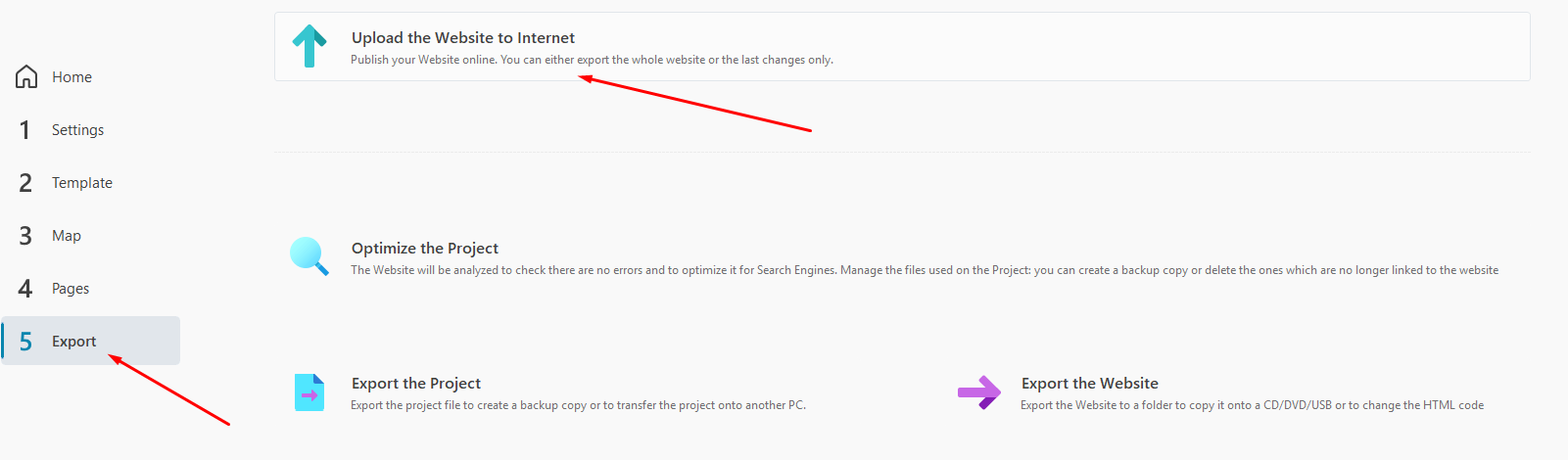
cPanel should not be related to the situation, as the e-mail settings the website will try to use for delivering messages are determined by what you are using in your project, specifically in Step 5 - Export ---> Upload website to the internet ---> Parameters ---> E-mail.
Autore
The paramets are the same what i use before and everthing was working.
Maybe I shuld delate (I have two accounts email in this website) and start over!
Hello Jeff,
the screenshot only shows the URL and Destination Folder, could you check the E-mail settings?
Autore
this is fTP setings. I try all type script no change
Autore
Now when I run test:
[2026-05-27 10:45:13] Cannot send email with internal script
[2026-05-27 10:43:47] Could not instantiate mail function.
Autore
PHP Version 8.2.30 and good working version is 8.2.11 maybe this is issue
Hello Jeff,
considering the errors you saw, you must contact your hosting provider so that they can check what errors have occurred in these past attempts and recommend the script you should use and the proper settings.
Autore
They don't see anything, they changed PHP to a smaller version but it didn't change anything and there's nothing more they can do because the email works, so for them the problem is only with the website design and I have to contact Devoloper website to resolve the issue.
Hello Jeff,
unfortunately "Could not instantiate mail function" is not an error caused by the software: the website will simply use the parameters you have used in the project to attempt delivery of e-mails through the mail server, and if an error occurs it is caused by the e-mail server's configuration, or some kind of restriction or block with your current configuration.
When you choose SMTP or Authenticated SMTP instead of PHP Mailer, fill in all of the necessary parameters, and then export, is the error on the control panel the same, or a different one?
A little story.
When I switched from simple basic web hosting to cPanel web hosting at my web host, I had to show the support employee by phone and TeamViewer which parameters were needed in WebSiteX5.
I previously set up secure SMTP, which also worked with basic web hosting, but with cPanel I had to switch to the simple PHP mailer so that the emails worked again.
Autore
I can't understand what happened; there were no problems. I even tried the old website with the same result. I opened a new email and the problem is the same. When I changed the secure SMTP, there were more errors, so I went back to PHP Mailer. I need to connect a second monitor and compare the configuration in cPanel working website. I found another thing in cPanel Export settings: "Save as JSON file, Save as PHP file, Save to browser's storage Settings will be saved in your browser's local storage." I don't know what this is about. I asked if resetting cPanel back to original was the last resort. Of course, they don't recommend it. So, any stupid idea?
Hello,
what do you mean by "When I changed the secure SMTP, there were more errors, so I went back to PHP Mailer."?
What did you see exactly?
Autore
Check attached picture
Hello,
once again, this is not an error generated by the software: it means that a connection with the SMTP mail server was attempted, but failed, and this is usually caused by factors such as wrong SMTP address or port, encryption mode or similar issues.
Unfortunately only the hosting provider can properly assist you with this matter and confirm that you are using the correct settings when you try to use SMTP, unless other users with the same hosting provider have recently encountered the same problems and can chime in here.
I remain available.
Autore
It looks like a dog chasing its tail. If the email is working correctly, but the website is having trouble communicating with the server, then where's the problem? Of course, anyone would say the website has a problem if the code is so poorly formulated. So, my question is, is it possible to downgrade the March version of the X5 Pro website?
Aloso check this link it will tell you how to fix it:
https://github.com/PHPMailer/PHPMailer/discussions/2557
Hello Jeff,
as I mentioned there were no recent changes on our end in this regard, and no other users reported e-mail issues with the past few updates, so the issue likely lies with the hosting, but unfortunately no details on what was investigated by them were provided.
Several versions released in march, however you would also need a backup that has remained at an earlier version, or you will not be able to work on your project.
Do you have a backup available, for example an IWZIP file generated in march?
@Jeff B.: Has it been clarified with the web hosting provider whether cPanel really works with SMTP or whether you have to switch to “PHP Mailer” like I did?
Autore
Good question but there is no answer because no one knows "Crezy Domain" support they are hiding that there is no problem on their side because email works without any problems and SMPT or PHP are not their problem, only the website and they even want to talk to the developer of this program.
Autore
https://www.crazydomains.com.au they every were in UK as well
The email setting “PHP Mailer (recommended)” could be tested, as no access data would have to be entered.
-----
Hello Daniel,
unless I misunderstood, Jeff already tried with PHP Mailer as well, with the outcome being the error "Could not instantiate mail function."
Autore
I try all, still the same
Hello Jeff,
unfortunately this was not answered: what exactly did the hosting provider's support check and what was the outcome?
Did they check error logs of some kind, for example?
As mentioned earlier, these errors are usually caused by something in the server's configuration, but unfortunately no details about what they investigated has been provided so far, save from the fact they they believe the cause lies in WebSite X5.
Additionally, regarding the option to revert to a past version: as I said several versions were released in march, however you would also need a backup that has remained at an earlier version, or you will not be able to work on your project.
Do you have a backup available, for example an IWZIP file generated in march?
Autore
Support has no idea. Everything's fine for them. This is Australia, and IT staff have little knowledge of this, mostly from India or Malaysia. And since they're underpaid, the best IT people have left. My hosting is running out this year, so I'm looking for a new one, maybe "GoDaddy." Or maybe you can recommend someone who would know what to do here!
Autore
I have backup 26-02-2026
Hello,
you can download the installer of one of the versions released in march here, please import che backup you mentioned and check the behavior of e-mails there:
https://static.incomedia.eu/websitex5.com/v2026.1/2026.1.3.0/wsx5_pro.exe
Hi Jeff, I am an X5 user from New Zealand. I have a personal site, a Band site and my wife's business site. We were using a local hosting provider but they were bought out by Crazy Domains. I managed to extricate my two sites from them (and now use another local provider) but my wife's site still uses Crazy Domains (NZ and Australia are the same as far as I know).
Here are her email settings (I used the Contact Form on her site to test):
Email Script Type: PHP Mailer (recommended)
Sender email address: My wife's email address, which is tied to her domain (ie not a Gmail or other like that. We use the Roundcube webmail provided by Crazy Domains)
The "Allow sending from alternative senders" is TICKED
When I use her contact form to send a message I get a form reply in my (Yahoo) inbox. She gets my contact form submission in her Roundcube inbox. All works as it should.
The settings in her Contact Form Object (in the "Send" tab) are:
Data Submission - Send data by email
Sender email address is TICKED and "EMAIL" is selected in the Dropdown.
User Email Address is my wife's email
I leave Subject and Message blank but I am sure you could add those in.
On the RHS of this page is the "Confirmation email for the user" section
"Send a Confirmation email to the User" is TICKED
"Sender email address" is TICKED and my wife's email address is put into that box.
"User email address" has the word "EMAIL" selected in the Dropdown
I include a SUBJECT message "Thank you for contacting me..." and a short "I will get back to you as soon as possible in the "Message" box
"Include the collected data" is TICKED
I don't use the Captcha and I select "Show a confirmation message after sending" in the final dropdown.
I use X5 Pro 2026 1.8
Let me know if anything is helpful from this.
Wayne
Autore
Thanks for the help, but in my case, the only solution was to change hosting and switch to Godaaddy, where they have bigger brains, sorry, more brains to think about. I have two websites. One has been running for many years, but I remember at the very beginning I had the same problem and there was a smart person who knew what needed to be changed and added to make it work. Now, if it's not WordPress, forget it. There's only one answer: we learned on WordPress, and the fault lies solely with Website X5 Pro, not them.
Autore
I need help from website x5 users, does anyone have good hosting even in Europe, maybe in Poland I am a European citizen because here in Australia it is an ignorant mass when it comes to complicated matters and there is no one to talk to.
Maybe there are users who look after customers and have experience with different web hosts to make a recommendation.
I live in Germany and have been with Host Europe for many years. However, I can't say whether the other web hosts are better.
-----
Overview with AI
Host Europe is part of the American GoDaddy group, one of the largest web hosting and domain providers in the world.
GoDaddy acquired the then Host Europe Group in 2017. In addition to the German Host Europe GmbH, the Host Europe Group also includes other well-known brands...
-----
One of the Moderators, "Esahc" is based in Australia. You might want to check out his profile and contact him - he is always ready to help out. I haven't seen him post here for a while though.
Wayne, it is nice tto be remembered. I am still here and awaiting an opportunity to help, but most of the moderators and users here are far quicker and more knowledgeable than I at this stage. Jeff has contacted me and I will try and assist. I too have just started experiencing email difficulties (with older sites) and am about to do battle. Maybe a solution will become clear. If so I will report here.
For the record I have spent much time with Jeff's website without any success. I can confirm that Jeff carried out every step recommended in this post, and I repeated each of those steps without success. The configuration is almost identical to Wayne's example with appropriate changes. I have asked that Jeff request the deletion of his hosting account and then the creation of a new one because of the outside possibility there is a corruption in one of the system files in the root.
Hello Esahc,
if the errors he showed earlier are still present in the e-mail error log of the Control Panel, the issue likely lies with something regarding the e-mail server, if the provider cannot offer support perhaps switching to another provider as he intended to do would be the best option.
Eric, I agree, but it is worth a shot considering Jeff has a second website on the same host which is not afflicted.