
No H1 For My Home Page? 
Autor: Giulio V.
Visitado 1152,
Seguidores 1,
Compartilhado 0
I found out my homepage has No H1. I have tried everything with no success at all.
In my header I have "Pro Line Systems-Auto Body Shop Equipmentt" set to H1
Am I doing something wrong?
Publicado em
Hello Giulio,
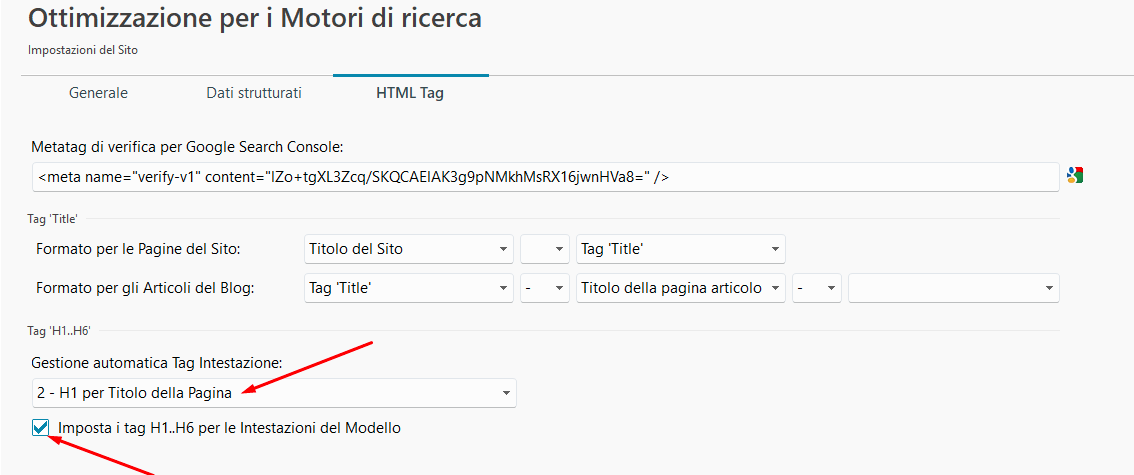
what settings are you using in the HTML Tag section of the SEO settings found in Step 1?
I remain available
Hi, see if this guide can be useful to you, it's also in English if you want, bye.
Autor
Attached is a screenshot of my settings. I hope this helps to figure this out. Always something to fix.'
Thank you for your help.
Hello Giulio,
looking at the settings, the page title should be applied as H1, could you please give the URL of your page to take a look?
Autor
Hi Eric
The page is my Homepage with no H1. https://prolinesystems.net/index.html
I have it set to, (Pro Line Systems - Auto Body Shop Equipment) as the H1, but still shows up as page not having an H1.
Thank you for helping me get through this.
For the title object, H1 can be set in the options, see screenshot below
----- Page source code -----
----- WebSite X5 settings -----
Hello Giulio,
unlike other pages, your homepage is not displaying a title the same way, what settings are you using in the Properties?
Since I'm not an SEO expert, I can't evaluate whether it makes sense for all pages to have the same H1 tag.
@Eric C.: Apparently Giulio V. wants the title object with an H1 in the header area! which would result in the same H1 tag being present on all pages, if I understood Giulio V.'s question correctly.
Hello Daniel,
let's wait for a clarification: if he wants to apply "Pro Line Systems - Auto Body Shop Equipment", as this is in the header it would then be applied to all pages as you say, however he specifically mentioned the homepage, plus the other pages, which do show their title, already have their respective title as H1.
Autor
Gentlemen, I appreciate your help very much.
But I have tried many changes, and the home page still shows no H1 when tested.
I have three title items in the header, which I use for the 3D effect. But set only the
"Pro Line Systems - Auto Body Shop Equipment" as the H1. I'm not sure if this matters.
I have attached an image of the settings I have right now, but I think it may not be set correctly.
If there is anything else I need to provide, please let me know.
Why we can't set just the home page "Pro Line Systems - Auto Body Shop Equipment" as the H1 is very frustrating.
Thank you, I'll be anxiously waiting.
Autor
Eric asked what I have for page properties. Please see the attached file. Thank you.
Hello Giulio,
unfortunately the screenshot is the same as the previous one, rather than a screenshot of the Properties of the homepage.
To be clear, should this be the H1 for all pages? As "Pro Line Systems - Auto Body Shop Equipment" is in the header, should you make this a H1, it would be applied everywhere, so in order to only have this for the homepage it would be best to add a separate title in the page itself.
On the homepage, the first text below the header is displayed in bold and marked as H2.
On the other sides, the first text below the header is displayed normally and marked as H1.
This is probably a hint for troubleshooting.
Since I can't estimate what needs to be set in the screenshot to achieve a specific result, the Incomedia employees would have to help here.
Hello Giulio,
apologies, I had not noticed the other reply when posting my message.
Could you provide me with a copy of the project itself?
You can export it in Step 5 - Export, choosing the “Export the project” option to generate an IWZIP file, making sure not to use the options to include backup and preview files so that the size of the file is reduced.
You can then upload the file with SwissTransfer, TransferNow or similar services, and provide a download link to support @ incomedia.eu (without the spaces).
Additionally, could you confirm what you would like to achieve exactly? Should the H1 be the Pro Line Systems - Auto Body Shop Equipment text in the header, even tough this would apply to the entire website and not just the homepage, or would you like a situation similar to the other pages, with something like this as the H1?
Thank you.
Autor
Hi Eric
All I know is the home page needs an H1, am I correct. So I ask your professional opinion, which way is best for SEO?
I will work on getting the file sent to you. But what is the exact email I should send it to you.
*** / Is there a .com or .net needed?
Thank you for your help with this, you can't understand how much we appreciate your attaention to this matter.
Autor
Hi Eric
I sent you the project file through Transer Now.
Hello Giulio,
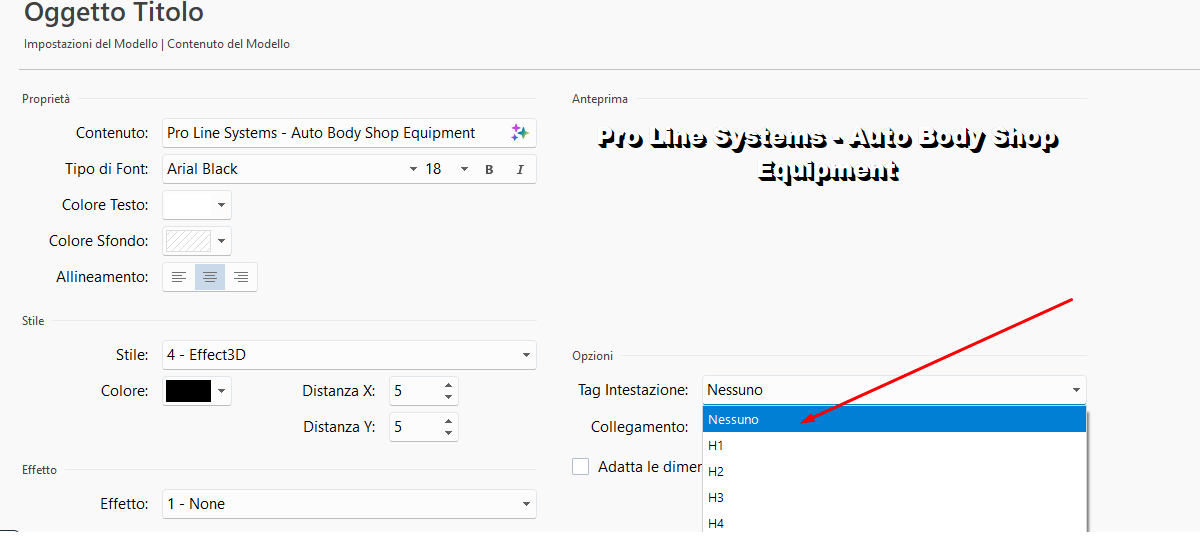
thank you, I checked the project and sent it back in my reply.
I disabled the H attribute set for the title in your Header and enabled H1 for page titles and automatic H1/H2/H3 and so on for the texts you set as Heading 1/Heading 2/Heading 3.
As the homepage behaves differently and does not show the Page Title the same way as other pages, I then set this heading in the Text object at the top of the homepage as Heading 1, so that it is now set as H1 because of the aforementioned setting.
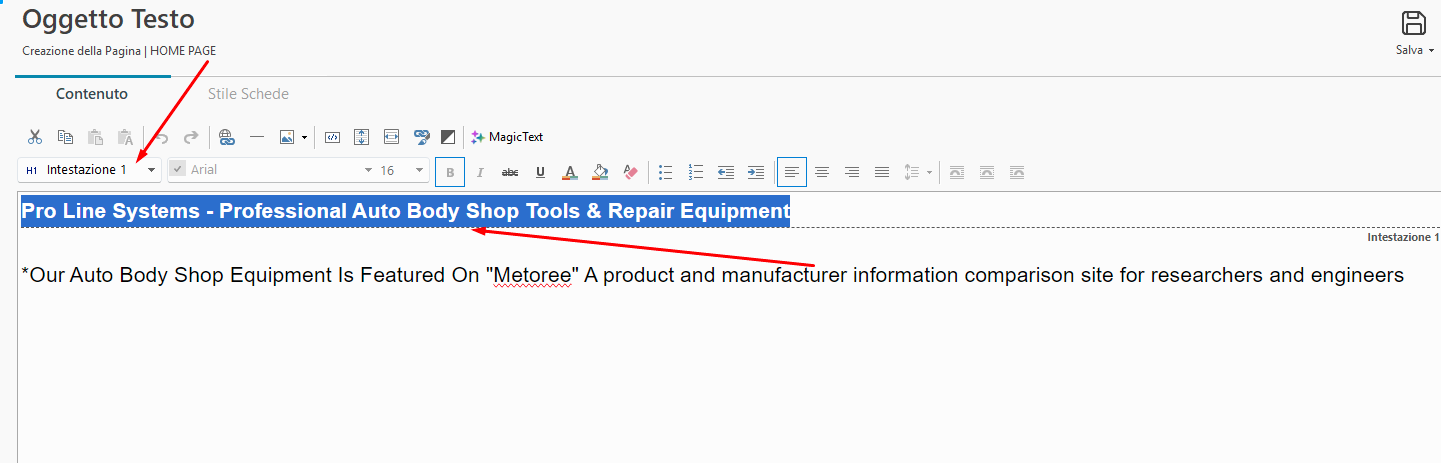
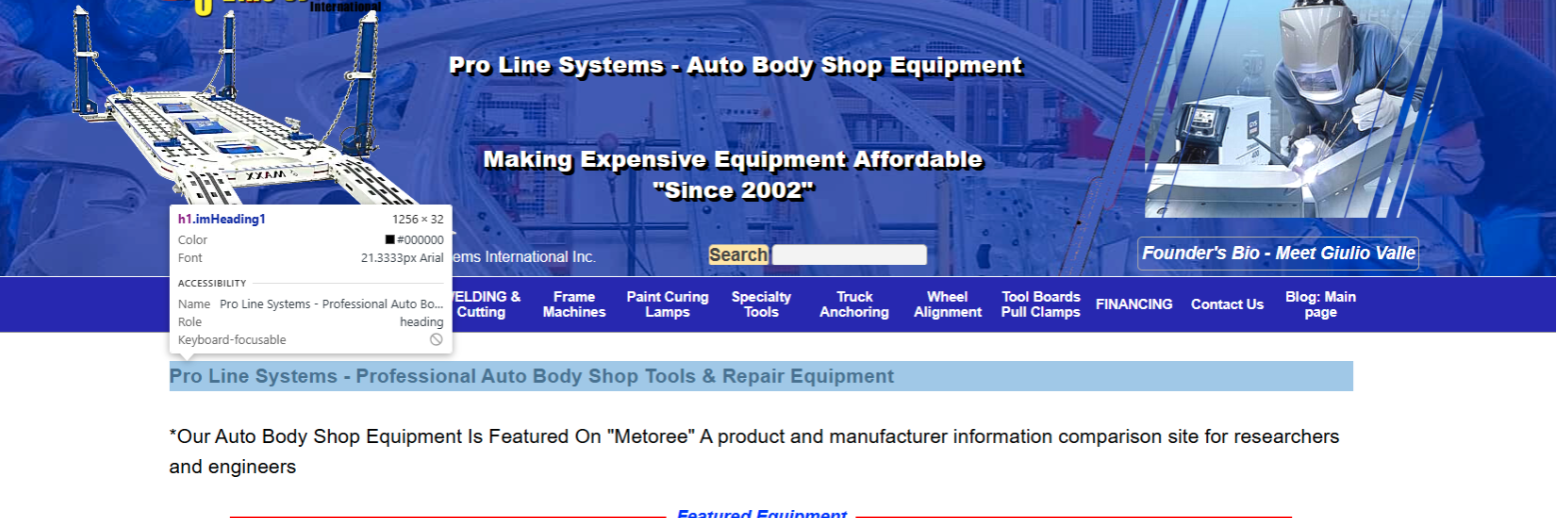
Autor
Hi Eric
I tried downloading the corrected file you sent me, but it won't work.
When I do get the project download, do I simply your project file to my server?
Thank you so much...
Autor
Dear Eric and Daniel, I have a new problem. Besides, the H1 not showing on my home page.
When I change things on my web pages and upload them, they are not updating at all.
Could it be the X5 Pro software got corrupted somehow?
This is probably why the changes you recommended me to make for the H1 for the homepage, which I implemented, aren't registering.
Can you please help me out of this mess as soon as possible?
Transfer changes securely to the web server and browser:
In WebSiteX5, while holding down the left Ctrl key, click on "Preview" at the top, this will cause the pages to be rebuilt.
Then export the entire website, not just the updated files.
Use the keyboard shortcut Ctrl + F5 in the browser to retrieve the pages from the web server and not from the browser cache.
Manually add HTML code in the text object:
If the heading on the homepage cannot be defined as H1, then add HTML code to the heading in the text object and click the HTML symbol so that it is outlined in blue.
Example of heading with HTML code:
<h1>Heading</h1>
Addition to the post above:
In WebSite X5, while holding down the left Ctrl key, click on “Preview” at the top and wait until the progress bar at the bottom has run all the way through. This will cause the pages to be recreated.
Hello Giulio,
your screenshot shows TransferNow, however I sent back the project with SwissTransfer, so you should land on this page when clicking the link:
This file will need to be imported into WebSite X5, and this copy of the project will then appear in the list of available projects.
I recommend following Daniel's recommendation about this other matter you mentioned, as it may be an issue with older pages being stored in your browser's cache.
Autor
Hi Gentlemen,
I am sorry and frustrated to inform you that so far, what was recommended by Daniel did not help at all.
I even followed the directions very closely and did the procedure 2 times just in case I made a mistake.
After completing the suggestions, I made a change to some pages, and they just don't show.
I am at my wits' end and feel totally defeated.
What would the next step be? It's like the uploads are going to a different place.
Thank you for hanging in there for me.
I looked at it again with the web development tool (see screenshot below), it looks like the text was marked with Header 2 via text formatting.
Here the text formatting would simply have to be marked with Header 1.
Since I use the German version of WebSiteX5, the names in translation might be slightly different than in the English version of WebSiteX5.
------
Autor
Hi Daniel
I hope you won't give up on me. Your assistance with this matter is very much appreciated.
Please understand, I am not as expierienced as you are. I changed the the H1 on the page to H2. Then uploaded it and made changes on the pages and nothing is being updated.
Remember I mentioned I uploaded an older backup? It is about 6 weeks old, and I tested it and it works as it should.
I made several changes since that older backup file and I hope I don't have to revert back to it and loose the hard work I did since then.
So what would be the next step to conquer this mess?
I have attached a screenshot of the search engine HTML Search Optimizations. I hope this helps in some way.
Thank you Daniel.
Autor
I forgot to mention that Eric sent another web file he made changes to, but there was no download link.
Maybe wait until Eric posts a download link of the changed file to see if the problem is solved.
Incomedia employees will be back online during office hours in Italy, i.e. in about 9 hours.
Hello Giulio,
the download link was sent by e-mail on friday in reply to yours, did you not receive the message?
I sent it again now in the same e-mail conversation.
Autor
Hi Eric
Do you really think the changes you made to the file will actually fix the problem of changes I make on web pages not showing up?
FYI: Last week, I put together a blog post and noticed the photos and text changes were not responding properly.
At first, everything was going well then I couldn't reposition the photos or wrap text around the photos.
Although working on the blog everything looks great, but viewing it online, the Photos and text wraps are in different places. Also, the bullets are gone.
I'm trying to provide as much information as possible to help you, and I very much appreciate your impressive support.
I will download your fixed file and will let you know the outcome.
Best regards, Giulio
Hello,
that version of the project is for the H1 matter.Please download and import it, use CTRL + F5 to regenerate its files, then export it choosing to upload all files, and then let me know about one or more pages that do not seem to have been updated, I will check to see if it is a cache-related issue.
I remain available.
Autor
Hi Eric
I decided to roll back to the last backup to avoid you and me going crazy. Although the backup was 6 weeks old, I had to update a lot of things, and now it works as it should.
If you could be so kind as to provide the detailed steps I need to change, or add for the search engine optimization settings, to fix the missing H1, it would be greatly appreciated.
Thank you very much. Giulio
Hello Giulio,
I am sorry to hear this.
Did you also try the clean reinstall I recommended?
In any case, the changes I mentioned in this earlier reply would still apply:
If you click the Read more button you will see the whole message with all screenshots I added
Maybe show the contents of the object with the relevant text as a screenshot so that we can see what formatting the text has.
----- Relevant text -----
Pro Line Systems - Professional Auto Body Shop Tools & Repair Equipment
--------------------------
On the homepage the text is in bold as H2, on the other pages it is not in bold as H1.
It could be that on the homepage the first text was formatted as Header2.
(It > En) ... if you haven't been able to solve the H1 problem with the previous suggestions, perhaps you could solve it with these instructions:
https://help.websitex5.com/en/v2021.1/pro/index.html?seo_tab3.htm
... if you can't solve it with these instructions either, then you could mire it in a second with the simple EXTRA code...
... if you're interested in proceeding with the EXTRA code, please let me know, and if so, it's very simple, but basically it's just a matter of pasting this:
<h1 id="imPgTitle"> Pro Line Systems | Auto Body Repair Tools & Equipment </h1>
...
.
ciao
.
Autor
I am still having the same terrible problem that when I make any changes to my web pages and upload them, the changes do not update.
I thought I had everything fixed, but I still have the same problem. To make it worse, I have a manufacturer that wants to place their products on my website and I can't do it. This is very important to figure this out immediately, or I will lose their contract.
I have been with Incomedia X5 Pro since the early days,And I LOVE it! I don't want to blame the software, but I need someone to help get this issue resolved as fast as possible.
The Good News is, we did resolve the issue where the H1 was missing on the homepage. So, thank you all for your suggestions.
Please, Plese. help me get over this debacle as quickly as possible.
Does the problem that no changes can be seen on the uploaded website only affect the shop or also normal pages?
Is there a link to the page or product in question and, as a comparison, a screenshot of what it should look like so that we can see the problem and possibly offer a solution?
I assume that in WebSite X5 you clicked on "Preview" at the top while holding down the left Ctrl key and waited until the progress bar at the bottom had run all the way through.
And was the website then completely exported to the Internet?
Alguns servidores tem sistema de cache nativo, demoram um tempo pra reestabelecer as alterações. Aqui uso as teclas Control + Shift + R pra atualizar a visualização.
Autor
I contacted GoDaddy, who hosts my site. The tech asked for a page that was not updating. so I gave him an updated page that did not show any updated content.
He said my page showed 2 versions. Nitrogen Plastic Welders & Nitrogen Plastic Welder. He said he removed the "S" from Welders. And disabled the welders file and uploaded it. I immediately went online and the correct updated page showed the updated content.
I am hoping this could trigger someone's thoughts on what we need to fix this mess.
Thank you for hanging in there for me. I really need to add more pages for a manufacturer's products but can't until we unlock this mystery.
Claude AI said there is a file called "New" that looked unusual. I attached the screenshot.
Please help...
Hello Giulio,
when updating your pages, are you also changing their file names in the Properties?
This should be the only way to generate two instances of a same page, but with different names, such as in the care for the welder/welders.
Additionally, you never confirmed whether you followed the steps I provided for the clean reinstall.
I remain available.
Autor
Hi Eric
I thought I did the steps for the clean reinstall. I am getting confused with all these instructions and the need to get this resolved as soon as possible.
When that didn't fix my issue, I removed the "Old" and went back to the original project name - Pro Line Systems Int'l Inc 3 1_optimized_v2024_1—and uploaded the entire website. That did not fix the problem either.
I don't know if this is significant or not.
Can I send you my project file so you can see what is going on?
Please take a look at the attached search optimization photo if it is set up properly.
Thank you for your support.
Hello Giulio,
please send me the project, and provide me with examples of some pages that are not being updated, so that I can confirm the situation after an export.
I remain available.
Autor
Dear Eric
I wanted to let you know that I think we conquered the problem.
You asked me to send you the project and send examples of pages that were not being updated. So I made some changes to several pages and started to upload to check things out for you.
Before the upload started, a message appeared. WARNING! This is about to access your htaccess file. Do you want to continue? So I clicked on YES to continue the upload.
I then started to add content to about 5 pages with text and photos and uploaded them again, and all the changes I added to those pages appeared.
I went back to those pages and deleted some of the changes and they were gone as expected.
So it appears the problem solved itself, but what do you think caused the updates on the pages to be working properly now?
The only page not accepting my updates is the Nitro Plastic Welders. Remember I mentioned the GoDaddy support host
He said my page showed 2 versions. Nitrogen Plastic Welders & Nitrogen Plastic Welder. He said he removed the "S" from Welders. And disabled the welders file and uploaded it. I immediately went online and the correct updated page showed the updated content. But now it won't show any updates. So it seems we need to reverse what he did.
Hello Giulio,
it may have been an intervention on the name of one of the pages?
Please check the Properties of this page, what name do you see there for its generated file?
If you then check the contents of the hosting space, what files do you see with the same, or a similar, name?
I remain available.