
Image disappear after latest site work upload. 
Автор: Mandar V.
Просмотрено 1319,
Подписчики 1,
Размещенный 0
Hello WX5 masters,
Need your help.
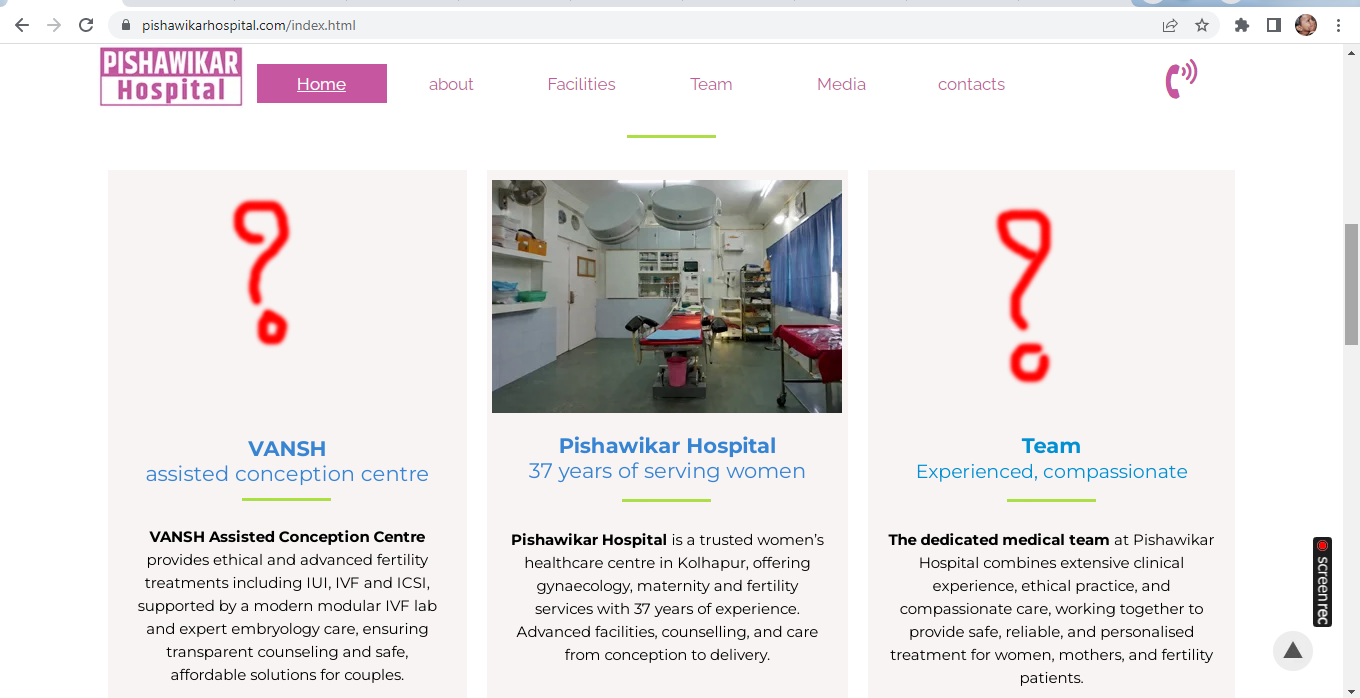
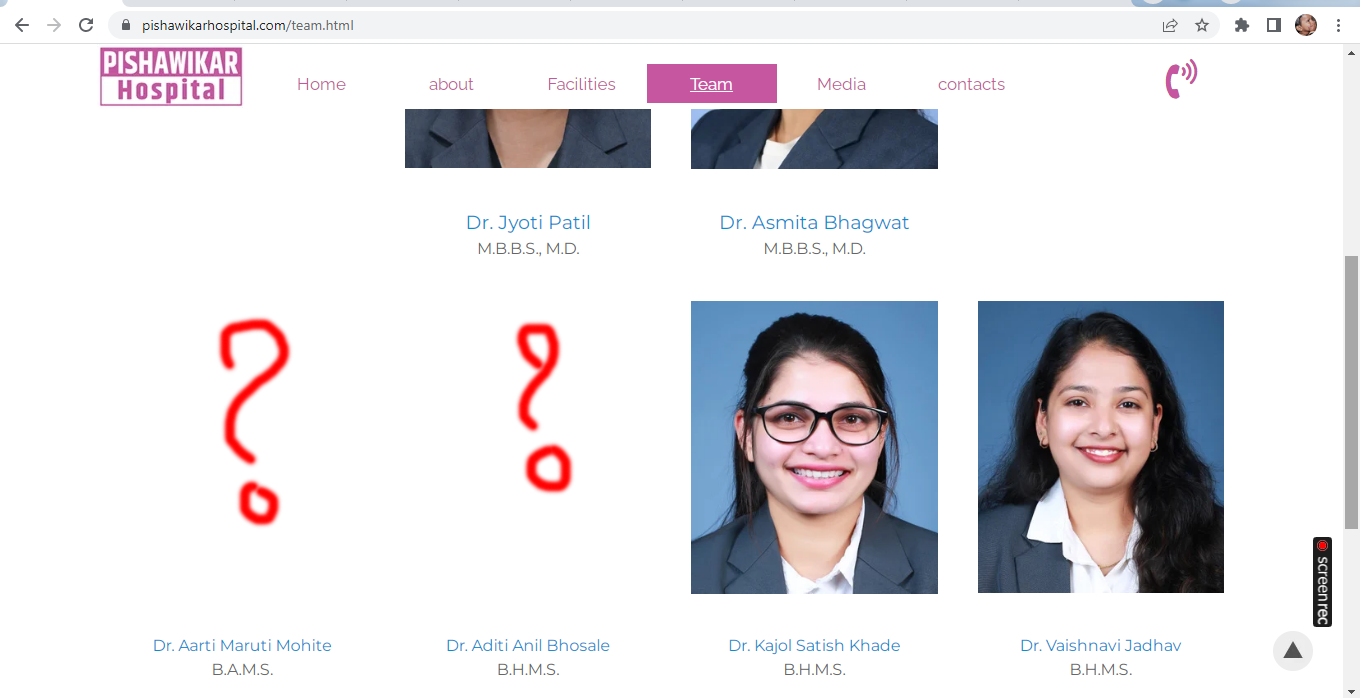
Facing a strange issue since last couple of days. Image disappear after latest website work is uploaded.
Please find a screenshot -
Размещено
The problem with the missing images can also be found on my websites.
If the images can still be found in Website X5 and in the preview of WebSite X5, then click on "Preview" at the top while holding down the left Ctrl key and wait until the lower scroll bar has completely scrolled through. This will restructure the pages.
Then export the entire website to the Internet, not just the updated files.
Request the files again from the web server in the browser using the key combination Ctrl + F5, then the images should be visible again.
Sometimes the images in WebSite X5 are missing in the image objects or as a background image in the line style; reinserting the images helps here.
Some other users also have the image problem.
Автор
Thanks.
After exporting the complete website, images appear which were not appearing previously. But some other image gets disappeared. What to do please.
What if the now missing images are added again in the corresponding objects in WebSite X5?
I had the same problem and had to add all the images again across multiple pages. It was such a time-waster.
Автор
Dear Daniel W.
If I add missing images and upload the website some other images go missing.
Dear Nigel B.
Sorry to say, but Website X5 support team is not at all active. They are just selling a product and earning money. Not interested to give a support to their customers who are suffering because of their ignorance.
The program keeps losing images, but I don't know why and Incomedia probably won't do anything as long as only a few users report missing images.
So far the only thing that has helped is adding the missing images and checking whether all the images on all pages are still there after the Ctrl + F5 key combination.
Автор
Thanks.
But in that case previous missing images are seen, and some other images go missing.
It's like WX5 is playing Hide and seek.
Автор
Now Google map disappeared.
And Support team has already disappeared.
Hey guys
have you tried to re construct the full project by a CTRL + Preview .... wait ....
and export again all files
Axel
@Axel: I tried various things but couldn't find a general rule to prevent losing the images.
It looks like the program is losing the images or the links in the objects to the images.
The program code may have become too large and the developers have lost track.
Автор
Thanks Axel, Daniel W.
If a 6 page website's program code is too large, then I am worried about my next website design. It has 130+ pages. It has at least 4 photos per page.
Please suggest, shall I continue with WX5 or go for some other way to develope a website?
Regards
By program code I mean the code from WebSiteX5 that is used for the user interface on the computer and not the code for the website itself.
Maybe Incomedia will now take note of the errors with the images and not act as if a few users are too stupid to use WebSite X5 properly.
Even if I often work on a project and make changes or additions, which is not uncommon, the program shouldn't lose any images.
I've been working with WebSiteX5 for several years, but I only noticed the missing images a few weeks ago when images disappeared several times in one day.
Автор
Thanks Daliel W.
Lets hope for the good and wait for WX5 supprt to help us.
I am also using this software since launch of version 8. I guess it was 2008 or 2009.
Here is a screenshot -
Hello Daniel,
I know the issue is very bothersome, and the reason we have not been able to find a solution yet is because this has, so far, been impossible to replicate and analyze on our end, meaning that local factors are the likely cause of this, rather than a general error in the software.
We will keep analyzing projects with the issue to try and find out what the cause could be, hoping to be able to prevent this from occurring again.
Hello Mandar,
could you provide us with a copy of the project, with examples of some pages which are currently missing images?
You can export it in Step 5 - Export, choosing the “Export the project” option to generate an IWZIP file.
You can then upload the file with SwissTransfer, TransferNow or similar services, and provide a download link to support @ incomedia.eu (without the spaces).
Thank you.
Автор
Yes Eric C.
Pishawikar Hospital Kolhapur.iwzip is send via email using WeTransfer.com
Kindly confirm the same.
Regards
Hello Mandar,
I received and downloaded the project.
Could you point me towards some pages where you have encountered the issue, so that I can take a look?
I remain available.
Автор
On Home page,
https://pishawikarhospital.com/index.html
after scrolling down, issue was with VANSH & Team images.
On Team page,
https://pishawikarhospital.com/team.html
after scrolling down, the issue was with Dr. Aarti Maruti Mohite & Dr. Aditi Anil Bhosale photos.
On Contact page
https://pishawikarhospital.com/contacts.html
the issue was with Google map.
You'll find these screenshots in the first post of this discussion page.
The images and Google Maps are available on the linked online pages.
Has the problem already been resolved or have the pages with the missing images not been exported to the Internet yet?
Автор
Thanks Daniel W.
Everything is online after more times uploading. I keep praying almighty not to miss any content in the website.
Initially some images disappeared. But after more attempts I found that everything is now OK.
Client has suggested to add a mobile number in it. I am not afraid of adding it.
Regards
Hello Mandar,
both in preview mode and after a test export on my hosting space, I could not notice any missing images on any of the pages, just like on your currently online version of the website.
Should you encounter the situation again please let me know.
I remain available.
I want to chime in here again.
Yesterday I noticed in my demo shop that the images were missing from 3 test pizza products and when checking with the web developer tool I found that instead of the pizza images there was an empty test image file with a size of 5 x 5 pixels as a WebP file.
As far as I know, I used this empty test image file with 5 x 5 pixels for a test, but probably not as product images in the shop.
I have now deleted the empty pixel images that were displayed as blue empty squares in the products under "Image" and replaced them with the new pizza images.
Is it possible that the internal image management of WebSiteX5 messes up the images if you often work on the project and the internal image management often loads the images into memory?
Автор
Thanks Eric C.
At the moment everything is OK. Tension arises while I make some change in the site and upload it.
What to do?
Автор
Thanks Daniel W.
Whatever you have suggested is too technical.
I'm really poor in technical education.
@Mandar V.: My post about the missing pizza images in my demo shop was a tip for the Incomedia employees where they could find the error.
Автор
Yes sure Daniel W.
Thanks for it. Your tips are important. But I'm doubtful whether WX5 support mambers take it seriously or not.
Do you remember where else you had used this image for test purposes, perhaps?
Thank you.
It's been too long that I don't remember where I used that little blank image.
I do several tests here for the community almost every day and write down the most important posts with a short description on paper.
However, I don't write down the pictures.
Sorry - I made the error with the empty images myself.
After a search in the long menu of the demo shop, I came across pages where I had inserted blank product images for testing purposes.
So there are no errors in the pictures in the shop, an error on my part.
I will take this as an opportunity to clean up the demo shop so that the menu is smaller again.
Here is an example in the shop where no image is displayed, but it can be seen in the preview, see the screenshots (2) and (3).
This product belongs to the "Images" category and is 1 of 3 images, see screenshot (1)
The other two images are displayed in the "Image" product settings.
After the website has been completely exported to the Internet, all 3 images can be seen.
Closed WebSite X5 and started it again after some time, but the one image is still only displayed as an icon.
I added the same picture to the product again so you can see the difference, see screenshot (4)
----- (1) -----
----- (2) -----
----- (3) -----
----- (4) -----
Hello Daniel,
in this current state, if you right click and try to save the image displaying only the blank icon, do you get an error?
I had already deleted the image that was only shown as a symbol in screenshot (4).
But I found another image in my demo shop that also only appears as an icon.
If I want to save the image by right-clicking and "Save as...", I get this error message, see (A)
But an image is displayed in the preview, see screenshot (B)
----- (A) -----
----- (B) -----
Hello Daniel,
this likely means there is an issue with the project's library.
Could you send me a copy of the current version of the project to support @ incomedia.eu (without spaces) to take a closer look, and tell me which is the project in this screenshot?
Thank you.
My Project-IWZIP was send per Swisstransfer.com to your e mail adress.
My Projekt in the Screenshots is "Projekt 3" and this is my demo shop, see
>> https://findelinks.de/123shop-hosteurope/
Hello Daniel,
apologies for the distraction, I meant to say "tell me which is the product in this screenshot", rather than project.
It is "Produkt 2", see Screenshots (A) and (B) above or see the product page online
>>https://findelinks.de/123shop-hosteurope/product/?produkt-2
Hello Daniel,
thank you, I sent the project to the development team for review.
I remain available.
Автор
The same problem again. Now it's high time for you to take thisa issue seriously and on a priority basis.
SOS SOS SOS SOS SOS SOS SOS...
Hello Mandar,
please send me a copy of this project for review, to analyze this and attempt to find our more.
I remain available.
Автор
The first thing is I'm struggling very badly to get this project done. Client want it urgently.
What happened of the previous project which I sent you on 19th of this month?
You have not at all provided any solution to this problem. Then why do you want another project?
You remain available but your availibity is not of any use.
I am sorry to say this; but this is my keen observation.
Support team is not at all of any use.
What happened of my installing an Indian Payment gateway issue? The ticket is still pending.
You and your team remain available but don't solve any issue.
Hello Mandar,
1) This was my reply regarding the previous project: I was unable to replicate the issue, as all images were regularly visible in it, and so no further analysis was possible.
2) I am waiting for your reply on your other post regarding the payment method.
Автор
Preview is OK in my case also. After uploading, image disappears. And I have shown you the screenshots and the live link also.
Below was my reply.
And now tell me about this -
Hello Mandar,
is there any other page with a similar issue? On https://ambabai.com/MD/mining.html it seems you have now added the image again, and so it is displayed.
If you can reply on the other post, so that I can provide support regarding installing the software on another computer, it will be possible to check whether this occurs on both devices.
Hello Mandar,
is there any other page with a similar issue? On https://ambabai.com/MD/mining.html it seems you have now added the image again, and so it is displayed.
If you can reply on the other post, so that I can provide support regarding installing the software on another computer, it will be possible to check whether this occurs on both devices.
Автор
At present there is no any issue in the web page; but it suddenly arises. And I am sure you and your support team is unable to resolve this issue. After uploading so many times and checking all the pages again and again, some times all images appear, some times a few images disappear.
You only write "I remain available" but there is no any use of your or your support team's availability.
As you are not resolving the problem... the problem remain available.
I am learning WordPress since last 3 months. Not at all interested to use WX5 any more.
A very strong WordPress community support. Available nationally as well as internationally. You just say I remain available, but don't resolve any problem. And you say that WX5 is an option to WordPress. Not at all. As I am using WX5 since so many years, I need some time to learn WordPress. I'm learning it seriously.
Thanks to your useless support. It encouraged me to learn WordPress.
Pending issues -
1. Installing WX5 to my laptop is pending.
2. Adding Indian payment gateway to a website is pending. (I am about to loose this work).
Now it doesn't matters you remain available or you remain unavailable.
Hello Mandar,
I am unable to provide further support without replies on your end: I asked a question regarding the current installation status on the other post, so that it would be possible to attempt to use version 2025.1 for both this issue and the support for PayU, but unfortunately no answer was given:
https://helpcenter.websitex5.com/ru/post/274990
@Mandar V.: I tested Wordpress a few years ago and found myself going in circles in the admin area, so I stopped the test.
If you have enough time and the brains to familiarize yourself with Wordpress, you should do that too.
For other users, WebSiteX5, for example, remains an option to create websites quickly and easily if you can accept the small quirks.
Автор
Yes daniel W.
WX5 is certainly a good option. Thats why I using it since a long time.
But only if they truely support by resolving problems arising time to time. Just remaining available is not enough.
My problem started on 17th January. Today is 29th January.
They just remain available and ask useless questions to make a time pass. No problem resolved even after 12 days.
Feeling really very sad.
Hello Mandar,
I understand your frustration, but unfortunately technical issues of different nature require different types of solutions, and while for some users it is simply a matter of reviewing their projects, recommending a different setting or reporting a bug that can be replicated and analyzed, in some cases local factors affect the situation, making the situation more difficult as they are not general bugs in the software, but rather issues linked also to specific user configurations.
As we have been so far unable to replicate the image generation error you encountered and analyze it for a fix, my suggestion of checking the situation with your other computer (which would also be helpful for your other matter, as version 2025.1 supports PayU) still stands.
Let us know if you wish to cooperate and answer on the other post, so that we can go ahead and provide help in installing the latest version available to you on the other device.
Автор
Thanks.
I am not only frustrated, but feeling sad also. Now you are telling me to use another computer and check whether the same error appears. I don't have another computer. Still if you want me to check it on another computer, I will send a quotation of a new computer. Pay for me and I will bring it home. Then I will surely check if same error appears on it or not.
Second issue is, installation is pending on my laptop.
I copied the downloaded file. Double clicked it for imstallation, but nothing happens.
Hello,
in the other post, you mentioned:
"Thank you
To upgrade to version 2025.1 I need to change my PC, which I am not going to do.
I have a laptop with Windows 10 but unable to install WX5 on it. Nothing happens after double click the icon of WX5 to install it."
Perhaps there was a misunderstanding, I had assumed you were currently working on a computer, and also had a different one, a laptop, where installation was not possible.
Is this not the case and you were referring to the same device?
Автор
Surprised again to see you confused. Since day 1, I have written very clearly about my PC & laptop.
Hello,
there is no mention of this in your most recent posts, unfortunately, save for the message I mentioned earlier.
In any case, could you please reply the unanswered question on https://helpcenter.websitex5.com/ru/post/274990 regarding your Windows 10 laptop?
If you go to the paths C:\Users\YourUserName\AppData\Local, are the folders Incomedia\WebSite X5 – Pro present there?
At the path C:\Program Files can the folder WebSite X5 – Pro be found?
Автор
Dear Eric C.
Please see these screenshots and let me know what shall I do?
Hello,
please go to the Control Panel in Windows with the laptop on which you cannot use WebSite X5 and check the installed apps, do you currently see multiple instances of the software, similarly to here?
In your case, the item called only "WebSite X5 - Pro" should show 2025.1 as the version, and you should have WebSite X5 v2022.3 - Pro and WebSite X5 v2024.4 - Pro
Please uninstall only the one named WebSite X5 Pro, then go to Program Files and delete the WebSite X5 - Pro folder if still present.
Also go to C:\Users\YourUserName\AppData\Local (you did not provide screenshots for this) and delete the folder with the same name, it would be WebSite X5 - Pro without specifying a version.
Restart the PC, and with VPN (if you use one), antivirus and firewall temporarily disabled, run as admin the installer you can find here: https://www.websitex5.com/download/v2025.1/2025.1.6.0/wsx5_pro_v2025.1.exe
Make sure that WebSite X5 is set as an exception for VPN/antivirus/firewall afterwards, so that it is possible to leave them active when using the software.
I remain available.
Автор
Thank you, But I am confused.
Can you please do it for me with a remote access?
Hello,
we can exceptionally provide remote support with AnyDesk for installation issues yes.
When would you be available? Our offices are open from 8:30 to 13:00 and frolm 14:00 to 17:30 (Italian time).
Автор
Ok. Thank you Eric C.
Shall we plan it today during your first hours please?
Is there any way to catch you in time? How to inform you? How to share remote PC address?
Let me know.
Thanks.
Hello Mandar,
I sent an e-mail to your Gmail address for the details.
Автор
Yes. Replied your mail. PLease have a look.