
Remove title on blog article page 
Автор: Tonnie S.
Просмотрено 774,
Подписчики 1,
Размещенный 0
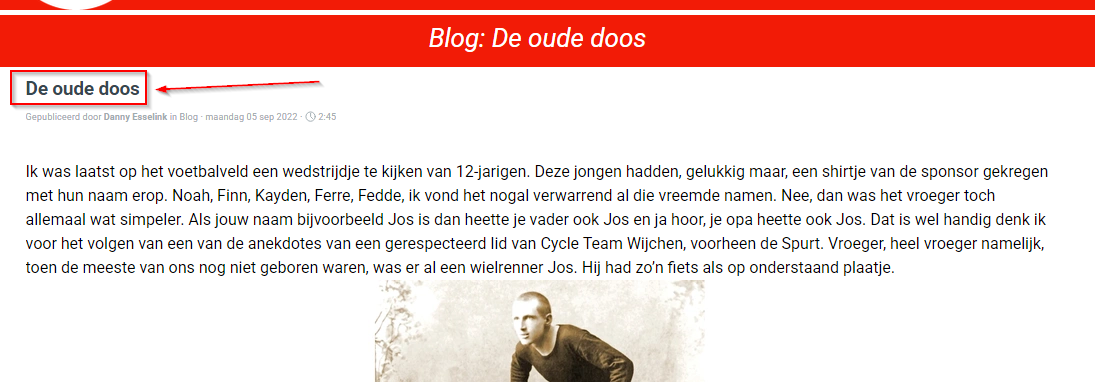
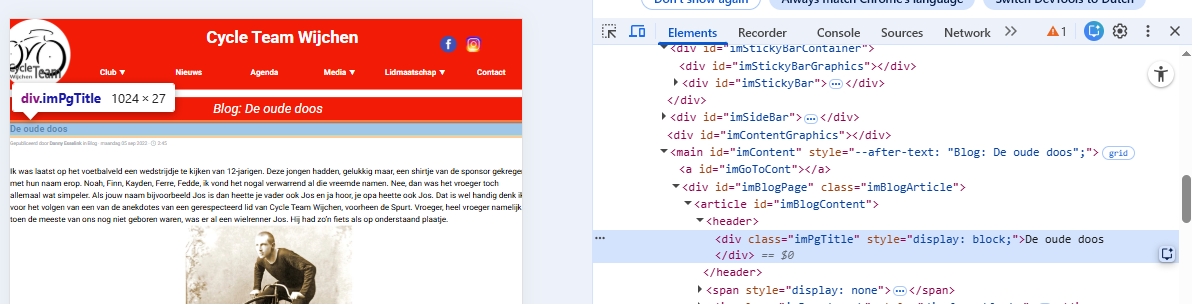
From the blog's main page, I access the blog article page. I've added the blog title in a separate red line. However, the blog title is also placed just below that. So, it's there twice now. I want to remove it. The object name of the title that needs to be removed is imPageTitle. My question is, can this title be removed with code? If so, what is the code? And where do I put it?
Размещено
Hi Tonnie,
thank you for getting in touch.
Could you please post the link to this page?
Thanks! Kind regards
Автор
Hello Elisa, https://tonnie-stevens.websitex5.me/cyql.html Thats the page.
do you mean something like that?
.imPgTitle {
display: none!important;
}
ciao,
1) ... in Step 1, select the BLOG;
2) ... in the BLOG tab, select the Post;
3) ... open the Post edit window;
4) ... in the General tab, select the Title and delete the text, leaving a blank space.
... ... done! ... as per STAMP...
...!... or, since you already use one of my exclusive EXTRA codes, you can simply add one or the other of these two codes, as you prefer:
... title only:
<style>
#imPgTitle {display:none !important;}
</style>
... title and imBreadcrumb:
<style>
#imPgTitle , .imBreadcrumb {display:none !important;}
</style>
.
ciao
.
If I'm not mistaken, you've already entered some code. Just give it more importance by entering it as in my !important
Hi!
I can't seem to see the title anymore, did you already use the provided code?
Thanks!
Good morning Elisa, the title is still visible on the blog by visiting the page, the code entered by the user does not have the right importance as suggested in my previous post, regards.
Автор
Hello, in the preview it's gone. But when i exported it to the internet, not.
Tonnie
... ciao Tomas, you should follow my suggestions... Hi Tomas, you should follow my suggestions. My code doesn't appear to have been applied in online articles...
... You have two options:
1) - without the code, following my previous points 1), 2), 3), 4);
2) ... or with my EXTRA code, which is always guaranteed, and in this case you've already made use of my exclusive invention with the second, the dynamic red bar...
... Well, if you want to use my EXTRA code that I posted before, you must insert it after or after my previous code, that is, in Step 3 in the Properties of the Special BLOG Page, in the Expert tab, third option, Before the closing of the /HEAD tag, exactly as you did last time...
... If you need further clarification or suggestions, please let me know...
.
ciao
.
... + + ... I noticed that your blog posts are handled differently by my program and I don't know why...!!!...
... so my modified code, adapted to your current posts, looks like this, try it and let me know:
... remove only the title:
<style>
.imPgTitle {display:none !important;}
</style>
... remove the title and Breadcrumb:
<style>
.imPgTitle , .imBreadcrumb {display:none !important;}
</style>
.
ciao
-
Автор
@KolAsim, the solution without the code, does not work. In the blog's main page is the tittle now also gone.
For the second solution: i have tried your first code:
<style>
#imContent{margin-top:60px;}
#imContent::after {content: var(--after-text, "BlogTitel"); position: absolute; width: 100%;top: -55px; height: 38px;background-color: #f21b06;text-align: center;font-size: 26px;font-style: italic;padding-top: 7px; padding-bottom: 7px;color: white;/*K*/}
#imPgTitle {display:none!important;}
</style>
In the preview it works fine, the tittle is gone in the blog's article page. But on the internet it doesn't work.
Then i've tried it with your second code:
<style>
#imContent{margin-top:60px;}
#imContent::after {content: var(--after-text, "BlogTitel"); position: absolute; width: 100%;top: -55px; height: 38px;background-color: #f21b06;text-align: center;font-size: 26px;font-style: italic;padding-top: 7px; padding-bottom: 7px;color: white;/*K*/}
.imPgTitle {display:none !important;}
</style>
In the preview it doesn't work, the tittle is still on the blog's article page. But on the internet it works!!!!
It's very strange, but it works, and that's what matters to me.
Thank you all for your input. It's a fantastic forum, where I always get great help.
... great! ... OK ... I checked ... online now with my latest code it works... ... bye, ciao...
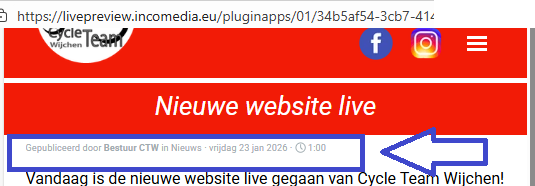
... the apparently useless Breadcrumb is still there; ... if you want you can delete it, you already have the code...
.