
Login/Logout object with any kind of recaptcha? 
Автор: Sinisa B.
Просмотрено 658,
Подписчики 1,
Размещенный 0
Hi,
Does anyone know how to protect the login/logout object using any version of reCAPTCHA, or even the (outdated) "built-in" Incomedia version that requires entering characters?
Thanks in advance for any replies!
Размещено
(It > En) ... ciao, ... perhaps I had already shared some of my ideas on similar factors with you...
... x [Login & Logout], anyway, there is an exclusive and unique invention of mine, even though it ended up in the hands of those hypocritical fakes (falsoneria)...
... you can see it in action here: https://kolasim.websitex5.me/protezione_captcha/
... the code is in plain text, and you can retrieve it from the page's source code at line 209...
.
cheers, ciao
.
Автор
@ KolAsim
I got the code—I'll try if I can set it right to be able to use it on my login form.
Thank you very much!
OK ... Ciao
Автор
@ KolAsim
I’ve uploaded the script to the site, and the CAPTCHA generation is working fine.
However, upon clicking on the button "VERIFICA" >>> the page `/imlogin.php` returns the below error:
(I have double-checked if I entered the correct username + password, along with the correct characters generated by your script)
-------------ERROR message -------
The server encountered an internal error or misconfiguration and was unable to complete your request.
Additionally, a 500 Internal Server Error error was encountered while trying to use an ErrorDocument to handle the request.
--------------------
Is there anything else I need to configure in the script besides the "pluginAppObj" name?
BTW- I paste the script "Before closing the BODY tag" section.
Since I don't want to post the URL of my site here, I can send it to you however you prefer.
Thanks in advance for your help!
ciao, ... unfortunately, without a link, I can't try to assess the situation...
... in my example, I placed the code in an HTML code object positioned below the login/logout section...
... I think the code might also work just before the closing <body> tag; you'd need to run some tests to verify...
... the 500 error could be due to the server or an inadequate PHP version...
.
ciao
.
Автор
@KolAsim
The PHP version is OK - the login works without the captcha script.
On the link below you can find the URL of the site, and your user name + password.
NOTE: THE LINK IS VALID JUST ONCE!
https://eu.onetimesecret.com/secret/7b4ulijvu8kmmfctsiqwz27mdmhl4ta8nv9l19cmvs4o57oake2jsr7merozo7
... Sorry, I don't understand what to do and how to do it. I didn't see the login and logout options, and you didn't provide me with temporary login information...
.
ciao
.
Автор
@ KolAsim
----G translate HR > IT ----
Mi dispiace molto. Hai cliccato sul link qui sopra? Contiene l'URL del sito web e le credenziali di accesso. Dato che il link è valido solo una volta, è possibile che qualcun altro ci abbia cliccato sopra...
Comunque, hai un indirizzo email a cui potrei inviarti l'URL e le credenziali di accesso? Come ho detto, non vorrei pubblicarle qui...
Grazie in anticipo!
ciao, ... no special checks are needed...
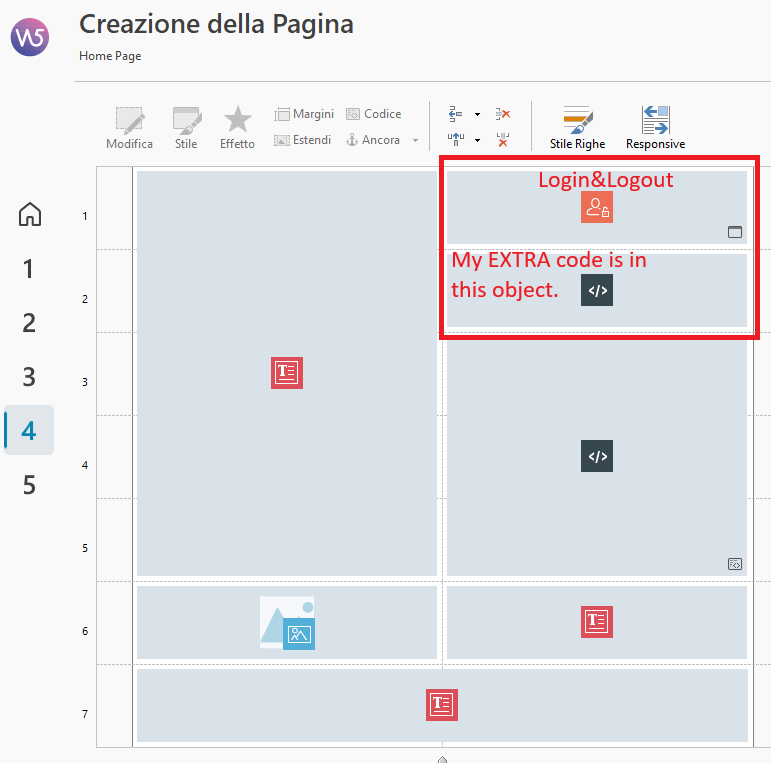
... first, you need to verify that your site is working and that the login/logout function works correctly without any code...
... if the site works, then you can apply my code.
... the structure is simple: a login/logout object and an HTML code object, exactly as you see in the screenshot of my online example's structure...
cheers, ciao
.
Автор
@KolAsim
OK, grazie mille per l'aiuto.
L'unica cosa che mi resta da fare è inserire il tuo script nella pagina come mi hai mostrato. L'ho inserito nella sezione "Prima di chiudere il tag BODY".
ciao, ... OK ... it also works in the Page Properties | Expert | Code option:
> Before closing the BODY tag.
.
ciao
.
Автор
@KolAsim
Avevi ragione: il login non funzionava.
Onestamente non so perché sia successo, dato che avevo semplicemente copiato un progetto WSX5 contenente un oggetto di login perfettamente funzionante e volevo aggiungervi un controllo CAPTCHA.
Si è trattato di un problema con i permessi del file assegnati: r-w-e.
Tuttavia, ho trovato strano che fossero cambiati... Probabilmente WSX5 assegna quei permessi specifici quando si caricano i file per la prima volta.
Comunque, ora funziona alla perfezione: grazie!
KolAsim, solo una osservazione:
quando inserisco *di proposito* un nome utente o una password errati ma fornisco il CAPTCHA *corretto*, WSX5 apre la pagina (/mlogin.php?loginstatus=-2) per inserire le credenziali giuste; tuttavia, quella pagina *non* prevede un controllo CAPTCHA...
È possibile includere il controllo CAPTCHA anche nel caso in cui l'utente abbia inserito una password o un nome utente errati, ma un CAPTCHA corretto?
Grazie in anticipo!
... I didn't consider it because you only reach that page after passing the CAPTCHA check... ... anyway, as soon as I find some time, I'll look into the situation... . bye .
.
Автор
Sì, capisco: solo l'utente non saprà se ha inserito la password o il nome utente sbagliati finché non risolverà il CAPTCHA... Questo può essere un po' confusionario per l'utente... KolAsim, se riesci a risolvere questo problema, per favore pubblica una soluzione - grazie!
... scusami, non ho avuto tempo, e poi me ne sono dimenticato...
... appena potrò gli darò un'occhiata e poi ti farò sapere...
ciao
.
... OK ... il codice che ho sviluppato e da applicare nelle proprietà della pagina speciale "accesso riservato" nella opzione Prima della chiusura del tag /head è questo:
... OK ... the code I developed—to be applied in the properties of the "restricted access" special page under the "Before the closing </head> tag" option—is this:
<script>
/** CAPTCHA extra per imLOGIN WSx5 by KolAsim **/
(function () {/*K>*/ "use strict";
const loginFormSelector = "#imLoginForm";
const loginButtonSelector = "#imLoginForm_submit"; let uniquecharLogin = ""; let captchaAttivoLogin = false; let captchaSuperatoLogin = false; let allowOriginalLogin = false; const styleK = ` <style> #contenitoreCaptchaLoginK { display: none; text-align: center; margin-top: 15px; } #PseudoRecaptchaLogin { margin: auto; width: 260px; border: 1px solid #ccc; padding: 10px; font-family: Arial, sans-serif; background: #f9f9f9; box-sizing: border-box; } #recaptchaBoxLogin { display: flex; align-items: center; gap: 10px; justify-content: flex-start; } #checkRobotLogin { width: 20px; height: 20px; } #loadingBoxLogin { margin-top: 10px; font-size: 14px; color: #555; display: none; } #captchaMessageLogin { margin-top: 8px; min-height: 20px; font-size: 14px; } #sfondoLoginK { position: relative; width: 200px; height: 60px; margin: 10px auto; overflow: hidden; text-align: center; } #contenitoreLoginK { position: absolute; top: 0; display: flex; width: 200px; height: 55px; background-repeat: no-repeat; background-size: cover; background-position: center center; } #contenitoreIMGLogin { position: relative; top: -75px; border: 1px solid #333; width: 200px; height: 200px; background-image: url("https://cdn.pixabay.com/photo/2016/05/27/09/18/background-1419306_640.jpg"); background-repeat: no-repeat; background-size: 200px 200px; background-position: center center; filter: blur(1px); } .boxLogin { width: 50px; height: 50px; display: flex; align-items: center; justify-content: center; font-size: 50px; text-shadow: -2px -2px 5px white, 2px 2px 5px black; font-weight: bold; font-family: Times, serif; } #userInputLogin { position: relative; font-size: 32px; padding: 0; } #captchaInputLogin { width: 150px; font-size: 24px; box-sizing: border-box; } #captchaBtnLogin { width: 150px; font-size: 20px; color: aqua; background-color: brown; margin-top: 8px; cursor: pointer; } .reloadLogin { display: inline-block; width: 32px; height: 32px; margin-left: 8px; vertical-align: middle; cursor: pointer; } .reloadLogin:hover { transform: rotate(90deg); } .reloadLogin:active { transform: scale(.9) rotate(180deg); } </style> `; const captchaHTML = ` <div id="contenitoreCaptchaLoginK"> <div id="PseudoRecaptchaLogin"> <div id="recaptchaBoxLogin"> <input type="checkbox" id="checkRobotLogin"> <label for="checkRobotLogin"> Non sono un robot </label> </div> <p id="captchaMessageLogin"></p> <div id="sfondoLoginK"> <div id="contenitoreIMGLogin"></div> <div id="contenitoreLoginK"></div> </div> <div id="userInputLogin"> <input type="text" id="captchaInputLogin" placeholder="Captcha" autocomplete="off"> </div> <div> <img class="reloadLogin" src="https://www.iconpacks.net/icons/2/free-icon-convert-3215.png" title="Ricarica Captcha" alt="Ricarica Captcha"> </div> <input type="button" id="captchaBtnLogin" value="VERIFICA"> <div id="loadingBoxLogin"> Verifica in corso... </div> </div> </div> `; function initCaptchaLogin() { const form = document.querySelector(loginFormSelector); if (!form) { return false; } if (document.getElementById("contenitoreCaptchaLoginK")) { return true; } document.head.insertAdjacentHTML( "beforeend", styleK ); form.insertAdjacentHTML( "afterend", captchaHTML ); console.log( "CAPTCHA K: inizializzato correttamente" ); return true; } function generateLogin() { const contenitore = document.getElementById( "contenitoreLoginK" ); const input = document.getElementById( "captchaInputLogin" ); const message = document.getElementById( "captchaMessageLogin" ); const img = document.getElementById( "contenitoreIMGLogin" ); if (!contenitore) { return; } contenitore.innerHTML = ""; input.value = ""; message.innerHTML = ""; uniquecharLogin = ""; const chars = "ABCDEFGHIJKLMNOPQRSTUVWXYZabcdefghijklmnopqrstuvwxyz0123456789"; for (let i = 0; i < 4; i++) { uniquecharLogin += chars.charAt( Math.floor( Math.random() * chars.length ) ); } contenitore.title = uniquecharLogin; setTimeout(function () { uniquecharLogin .split("") .forEach(function (c) { contenitore.insertAdjacentHTML( "beforeend", '<div class="boxLogin">' + c + '</div>' ); }); const colori = [ "Red", "Orange", "Yellow", "Green", "Blue", "Violet", "Indigo" ]; const boxes = contenitore.querySelectorAll( ".boxLogin" ); boxes.forEach(function (box) { box.style.transform = "rotate(" + (Math.random() * 60 - 30) + "deg)"; box.style.color = colori[ Math.floor( Math.random() * colori.length ) ]; }); img.style.transform = "rotate(" + (Math.random() * 360) + "deg)"; }, 500); } function mostraCaptchaLogin() { const container = document.getElementById( "contenitoreCaptchaLoginK" ); const checkbox = document.getElementById( "checkRobotLogin" ); const message = document.getElementById( "captchaMessageLogin" ); const loading = document.getElementById( "loadingBoxLogin" ); const captcha = document.getElementById( "contenitoreLoginK" ); const input = document.getElementById( "captchaInputLogin" ); container.style.display = "block"; checkbox.checked = false; captchaAttivoLogin = false; captchaSuperatoLogin = false; message.style.color = ""; message.innerHTML = "Completa il controllo prima di accedere."; loading.style.display = "none"; captcha.innerHTML = ""; input.value = ""; } function verificaCaptchaLogin() { const input = document.getElementById( "captchaInputLogin" ); const message = document.getElementById( "captchaMessageLogin" ); if (!captchaAttivoLogin) { message.style.color = "red"; message.innerHTML = "Conferma prima di non essere un robot."; return false; } if (input.value === uniquecharLogin) { message.style.color = "green"; message.innerHTML = "Captcha accettato ✔"; captchaSuperatoLogin = true; return true; } else { message.style.color = "red"; message.innerHTML = "Captcha NON accettato!"; captchaSuperatoLogin = false; return false; } } function waitForLoginForm() { if (initCaptchaLogin()) { installEvents(); return; } setTimeout( waitForLoginForm, 300 ); } let eventsInstalled = false; function installEvents() { if (eventsInstalled) { return; } eventsInstalled = true; document.addEventListener( "click", function (e) { const button = e.target.closest( loginButtonSelector ); if (!button) { return; } if (allowOriginalLogin) { allowOriginalLogin = false; return; } if (captchaSuperatoLogin) { e.preventDefault(); e.stopPropagation(); allowOriginalLogin = true; setTimeout(function () { button.click(); }, 50); return; } e.preventDefault(); e.stopPropagation(); mostraCaptchaLogin(); }, true ); document.addEventListener( "change", function (e) { if ( e.target.id !== "checkRobotLogin" ) { return; } const checkbox = e.target; const loading = document.getElementById( "loadingBoxLogin" ); if (checkbox.checked) { loading.style.display = "block"; loading.innerHTML = "Verifica in corso..."; captchaAttivoLogin = false; captchaSuperatoLogin = false; setTimeout(function () { loading.innerHTML = "Verifica completata ✔"; captchaAttivoLogin = true; generateLogin(); }, 1200); } else { captchaAttivoLogin = false; captchaSuperatoLogin = false; loading.style.display = "none"; document.getElementById( "contenitoreLoginK" ).innerHTML = ""; document.getElementById( "captchaInputLogin" ).value = ""; document.getElementById( "captchaMessageLogin" ).innerHTML = ""; } } ); document.addEventListener( "click", function (e) { if ( e.target.id !== "captchaBtnLogin" ) { return; } e.preventDefault(); e.stopPropagation(); if (!verificaCaptchaLogin()) { return; } const container = document.getElementById( "contenitoreCaptchaLoginK" ); container.style.display = "none"; allowOriginalLogin = true; const button = document.querySelector( loginButtonSelector ); if (button) { setTimeout(function () { button.click(); }, 100); } } ); document.addEventListener( "click", function (e) { if ( !e.target.classList.contains( "reloadLogin" ) ) { return; } e.preventDefault(); e.stopPropagation(); if (!captchaAttivoLogin) { return; } captchaSuperatoLogin = false; generateLogin(); } ); document.addEventListener( "keydown", function (e) { if (e.key !== "Enter") { return; } const target = e.target; if ( !target.closest( loginFormSelector ) ) { return; } if (!captchaSuperatoLogin) { e.preventDefault(); e.stopPropagation(); mostraCaptchaLogin(); } }, true ); } if ( document.readyState === "loading" ) { document.addEventListener( "DOMContentLoaded", waitForLoginForm ); } else { waitForLoginForm(); } /*K<<*/})();
</script>
.
ciao
.
Автор
@KolASim
Grazie mille per il tuo impegno!
Ti farò sapere quando avrò finito.
... OK ... ciao