
Adjust css Z-Index Paypal window under text 
Autor: Peter H.
Besucht 980,
Followers 1,
Geteilt 0
Hi everyone wondering if you may be able to help.
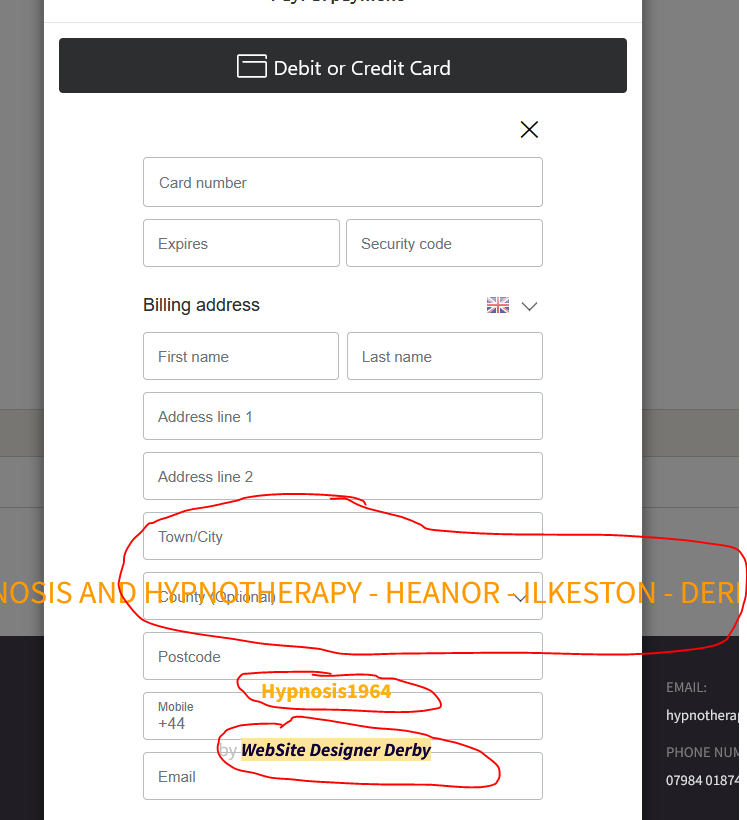
The picture is the paypal payment popup generated by my booking system plugin from php jabbers. The issue is according to Google is:
1. Adjust CSS Z-Index (Best Solution)You need to make sure the PayPal iframe has a higher stacking order (z-index) than your page elements.
- Inspect the Element: Right-click the PayPal button and select "Inspect" in your browser (Chrome/Firefox). Look for the ID of the div containing the iframe (e.g., #zoid-paypal-button-1...).
- Apply CSS: Add the following to your custom CSS file:
I have been looking at this all day and for the life of me i cant find the Z-index. If any of you very clever bods could take a look it would be amazing.
Website Link hypnotherapy1964.co.uk
In advance Thank you.
Gepostet am
According to the source code, the PayPal popup has a z-index of 1040.
In a test, the Paypal popup is too short, so I can't see if the bottom text is placed above the PayPal popup.
Autor
Hi Daniel
Any chance of explaining your comment a little better, I may be able to give more information then. Thank you for taking time to comment.
I now tried a different payment method and could see the coverage in the browser.
Then I set the z-index to 1 using the Firefox web developer tool and the problem was solved, see screenshot below
Small instructions:
Under "3 Sitemap" and mark "Online shop:Shopping cart and checkout" at the bottom of the special pages, click on "Properties" at the top and click on the "Expert" tab.
Then paste the CSS code at:
Custom Code:
Before the closing </HEAD> tag
<style>
#imCell_146 { z-index: 1; }
</style>
Since I cannot test the code, I cannot say whether any adjustments or additions may be necessary.
----- Screenshot -----
I used this information in the tests:
Name: test user
Telephone: 0123456789
Email address: test @ example.org
Delete this test customer so that no dates are blocked.
Autor
Hi Daniel thank you for the help i did find the code and enter it on the site, but it only took the orange text behind the popup and not the text below. I was hoping to lift the paypal popup above everyting else so i dont have to mess around altering several pages of code because everytime i make changes i will have to do it all again. If that make sense.
Unfortunately I can no longer do any tests.
With Paypal there is an extra PayPal window and with Cash there is no popup.
Maybe test it with this CSS code since I can't test it.
<style>
#imCell_146 { z-index: 1; }
#imFooterObjects { z-index: 1; }
</style>
Otherwise the CSS experts would have to help.
...if you don't post the link, or I can't access it to check the situation, I'm not able to evaluate it... ciao...
The link is here...
>> https://hypnotherapy1964.co.uk/index.php
... then scroll down to the calendar and click on an appointment marked yellow in the calendar.
Then continue until payment, where PayPal can be selected.
I've probably already tested too much, which is why the Paypal popup no longer appears, but rather a separate PayPal window.
... thanks, but maybe I didn't understand . I didn't see any PayPal button until the end of the process, and then a PayPal modal window opened to authorize the withdrawal, so I closed it and exited...
... it doesn't look like the program's shopping cart to me...
.
@KolAsim: The questioner may have changed the payment process so that a separate PayPal window appears and no longer has the PayPal popup on the WebSiteX5 page, which was previously disrupted by the overlapping text.
This would probably solve the problem, otherwise the questioners would have to test my CSS code and adapt it if necessary.
... OK grazie ...
.
Autor
Hi all i have put two payment methods on now first is the original and second is express checkout which when paid or cancelled returns the following JSON without returning to the website. Again any help wouls be great. The CSS code worked for the body text but not he header and footer.
I'm out of there now, maybe the CSS experts or the Incomedia staff can help.
Autor
Hi all thanks for the help. In case your wondering.
To summarise what the fix was — Website X5 Pro sets position: relative on its main page wrapper elements (#imPage, #imContent etc), which created a stacking context that trapped the PayPal modal inside it. Setting those to position: static freed the modal to float above everything on the page.
Taken 3 Days to sort it