
Disabling copyright protection no longer working 
Autor: Stephen L.
Besucht 660,
Followers 1,
Geteilt 0
For many years I had enabled copyright protection for my site. There used to be a check box that would allow one to toggle between protect - not protect. Then I desided to allow people to cut/paste text. It had a very good effect on traffic. Plus, I could get URLs for specific text by creating links to spesific locations in the article/blog post. With the new updates, it seems that ability has been taken away. Am I wrong?
Gepostet am
The lock for the right mouse button is still present, see sceenshot (2) below
Anchors can be set with WebSite X5, see instructions below
Anchors can be set in blog posts using HTML code by clicking on the HTML symbol above the text input field so that it has a blue border, see screenshot (1)
Example of an anchor in HTML in the blog post:
<h2 id="anchor123">A second heading</h2>
Example of a URL as an anchor link:
www.example.org/page-abc.html#anchor123
----- Screenshot (1) -----
----- Instruction -----
How to set a link on anchors
>> https://guide.websitex5.com/en/support/solutions/articles/44000809499
----- Screenshot (2) -----
Autor
Thanks for the reply, Daniel. But what I want is for people to cut and paste text from my website. I like that people are quoting from my website in online forums. I know from online communications that people will not lead others to my site because of that inability. I had that ability on my site before, but now it's gone.
Your website in the profil has a lock for the right mouse button, see screenshot (1), so no text can be copied here, even if you can select the text with the mouse.
In addition, the link in the profile is incorrect, see screenshots (2)
----- Screenshot (1) -----
----- Screenshots (2) -----
Wrong
Right
Sorry - incorrect translation, translated correctly here, see
----- Screenshots (1) -----
Wrong
Correct
Experienced visitors can bypass the right-click lock, so this lock is only useful for inexperienced visitors.
If you want visitors to copy the text then remove this right click lock, see my screenshot above with the settings in WebSite X5.
Hello Stephen,
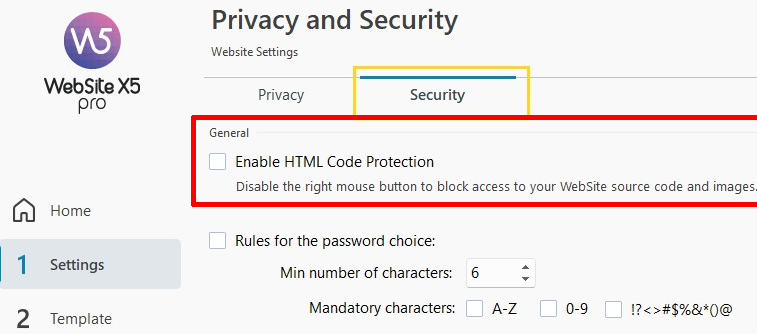
in case you missed the screenshot from Daniel as it was in a longer message with the "Read more" button, you should disable this
...if you're interested in using the EXTRA code, you must let me know, and also tell me if:
1) you want to remove right-click protection from all pages on the site;
2) you want to remove right-click protection from only some pages on the site...
.
ciao
.
Autor
Ahh. Thanks, Eric. It appears the wording was changed and I was confused. It used to include the word "copyright," but in the new beta update, it was changed to HTML. I did check that box because, in my mind, separated code from how it appears on the web page. Orrr, I'm simply becoming old with an addled mind. :^)
Thanks so much for your and others' help!!