
Facebook object had to be reloaded and rss Feed object not working 
Autor: John H.Website X5 Pro version 2026.1.9
RSS Feed object no longer working. Using simple SBS Feeds which have worked until this version. It now displays message unable to link. Linked fine in previous versions.
Facebook Timeline object needed updating on all sites. On lower resolution they no longer fit the screen. I remember, I think lol, that the old version also had a width adjustment, the new version only has a height adjustment.
I also tried version 2026.2.2 which has the same result. Had to uninstall the new version and reinstall version 2026.1.9 - I could only revert back to 2026.1.9 as this was the only one I had .iwzip files for, the older version (2025.3) had been overridden. Lot of extra unneccessary work involved. This involved 6 of my websites.
This is how Facebook Timelime now displays on my Galaxy S23 Ultra.
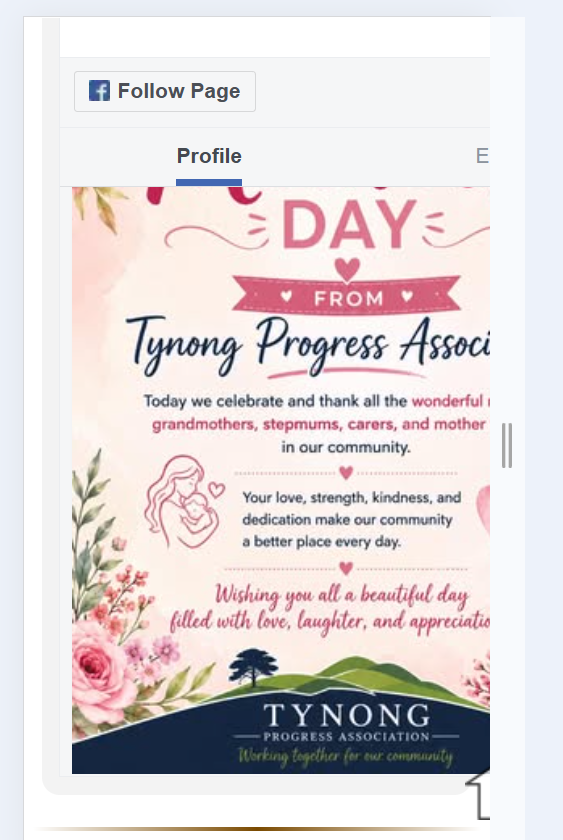
Facebook Timeline object also does not work with all Facebook pages, example https://www.facebook.com/GarfieldCommunityAssociation.3814
This will teach me to keep a seperate folder of .iwzip files for older versions.
It would be nice if the developers advised us of the changes made to objects in the changelog. We have to go through every page of every website we have to see which object has the dreaded triangle on it. No good just listing all the positives - please also list the negatives.
Any asistance would be appreciated.
Cheers
Autor
One of the affected websites: https://tynonginfo.au
You can also use an RSS feed provider, see
>> https://elfsight.com/rss-feed-widget/pricing/
(500 views per month for free, more views in paid plans)
My test page >> https://findelinks.de/123test-aufklappmenue-2/elfsight-rss-feed-widget.html
-----
I have now also tested the “Facebook Timeline” object with the Facebook page mentioned, see
My Test page >> https://findelinks.de/123test-aufklappmenue-2/facebook-timeline.html
----- Tested on PC with Firefox -----
-----
Autor
Thanks Daniel,
I already use Feedwind for one of my RSS widgets on garfieldweather.com.au - the Website X5 RSS widget did not work on that website a few years back. I only have one rss feed on that plan, but I am going to need at least 6 feeds so it would be cheaper for me to go with Feedwind. Their plan for 15 feeds is only $89 pa
For your info their plans are here: https://feed.mikle.com/plans/
So looks like the Website X5 RSS object is no longer a working option.
Now just waiting to solve the Facebook object widget. I know I can alternatively use html code for this but that is a bit of a pain as I also have to code in the appearance.
Cheers
Is it possible that it doesn't work with this Facebook address in the object "Facebook Timeline"?
>> https://www.facebook.com/people/Tynong-Progress-Association-Inc/100086708233830/
I'm not familiar with Facebook, but is there another Facebook address for Tynong ...?
Autor
Thanks Daniel,
I will try the GarfieldCommunityAssociation.3814 Facebook again tonight.
The other Facebook pages are all working properly. No issue. The problem is when viewing at low res, ie mobile phones, the width of the object is too wide. Worked up to 2025.3 I believe.
If you check tynonginfo.au on a mobile it comes out as the picture below. Too wide for the screen res and no horizontal scroll bar either.
all my websites with the Facebook Timeline object show the same extended page. Use to display within the space provided. I don't think it is a Facebook issue as all worked perfect when on version 2025.3
I had to reload the Facebook Timeline on each of these sites when updating Website X5 software. What happened to the old Facebook object we used to use??
Maybe I should upgrade to 2026.2.2 with the new AI Responsive Design, however I just read that 2026.2.3 beta already found an issue with that as well. So many updates after each other doesn't make me feel confident in the update/upgrade process. LOL
www.bunyipinfo.au
www.narnargooninfo.au
www.tynonginfo.au
Thanks and cheers
Hello John,
could you provide additional information regarding the RSS Feed?
What is the URL of the feed you were using, which lo longer works?
Regarding Facebook, I see that Tynong Progress Association Inc. has an unusual URL compared to the other page, perhaps because of some different settings in terms of its associated username, what format did you use in the object?
The Garfield Community Association, however, wad displayed normally.
I remain available.
Autor
Hi Eric,
Appologies for not getting back earlier. I know I tend to waffle on a bit, which could make my query confusing. Sorry about that.
RSS feed that was working before was: https://www.sbs.com.au/news/topic/latest/feed
Regarding Facebook Timeline (New version) I don't have a problem with loading the object. The issue is that when testing on my Samsung S23 Ultra it displays as picture below. It overlaps the screen.
This is not just Tynong but also Bunyipinfo and NarNarGooninfo. I will try 2026.2.2 again and see what happens when 2026.2.3 gets released.
Thanks and cheers.
Autor
Hi EDric,
I uploaded version 2026.2.2 and updated the website for https://bunyipinfo.au I pressed CTRL+Preview before uploading, just to be sure.
Below are screenshots of NEW Facebook Timeline, Responsive Design, Viewpoint 3 and Viewpoint 4.
Please note that I am sure there was a Width option in the old Facebook object. The Facebook page is still displaying oversized on Viewpoint 3 and Viewpoint 4 (my mobile)
Hope this now makes more sense and hope you have a solution. This all worked fine until the NEW Facebook Timeline object was introduced.
I will also try the Newsfeed object in this version and report back to you.
Cheers
Autor
This is an absolute joke.... just typed in all my extra feedback and got lost because:
Please try again later.
We apologize for the inconvenience.
Please come back later.
We apologize for any inconvenience.
Wir bitten Sie es erneut später zu versuchen.
Vielen Dank für Ihr Verständnis!
Autor
Probably server overload due to too many customers complaining. LOL
Very disappointed guys. Maybe you should put back the old version of the Facebook Object. It worked.
Please check this URL ON A MOBILE DEVICE to see difference between NEW Facebook Timeline object, which is cutting off the right side of the page, and the Facebook HTML code with width set at 280px.
https://bunyipinfo.au/facebooktest.html
Regarding the RSS Feed object - it is dead in the water. I have spent a few hours with my AI program and nothing we did worked. Guys, please remember that I am 75 years old and my time is limited. LOL
RSS feed was a bit of extra we put on our websites, but not neccessary. So not spending more time on this one. Like Daniel W said probably better off getting a professional working RSS feed.
If I get some spare time, which is looking less and less like it, I will try and replicate the working objects with an older version of X5 Pro, just have to find an older .iwzip file.
Hope this now gives you more info to fix the Facebook issue, as mentioned above why not try and reinstall the old Facebook Page object.
Cheers.
The other users have also lost posts. Since my posts often get lost when I send them, I've gotten into the habit of copying my post before I send it.
Since I don't have a Facebook account, I can't test the HTML code because the code isn't displayed to me in the Facebook page plugin.
Hello John,
thank you for the additional information.
The previous Facebook object had to be discontinued because of some changes that took place on Facebook's end, unfortunately, as they became increasingly stricted on allowing feeds to be shown externally like this.
The issue you encountered does not seem to lie with the object itself, but with a combination with other settings in the page: as you can see here https://eric-c.websitex5.me/progetti/fb-test/ it can be displayed correctly (I checked with another Samsung device, please check with yours as well).
Could you provide me with a copy of the project to check the situation more closely?
You can export it in Step 5 - Export, choosing the “Export the project” option to generate an IWZIP file, making sure not to use the options to include backup and preview files so that the size of the file is reduced.
You can then upload the file with SwissTransfer, TransferNow or similar services, and provide a download link to support @ incomedia.eu (without the spaces).
Thank you.
Following the link to that feed, I see this, could you check if you have the correct link?
Autor
Hi Eric,
Sorry for the delay in getting back to you. Busy on getting our Association name changed from Garfield Community website Inc. to West Gippsland Rail Towns Inc. which took over two days to sort. Government departments, they get paid, we as poor volunteers don't. LOL So they can take as long as it needs. I was also waiting for your latest version 2026.2.3 to be released.
I believe the Facebook issue may be compounded by some translation issues.
I acknowledge that the Facebook Timeline object works and displays properly up to and including Viewpoint 2.
See below screenshots taken directly from Website X5 Pro version 2026.2.3 - viewpoint 2 shows FB object displayed properly, ie you can see the whole Facebook timeline, correct width.
Screenshots 3 and 4 don't reduce the width of the object to fit within the screen size. Viewpoint 3 and 4 is what is displayed on my Samsung S23 Ultra mobile, Samsung A25 and a Huawei P30 Pro. So definitely and issue within the X5 Programs responsive design or the new Facebook Timeline object.
Responsive Design setup
Viewpoint 2 works fine (see Facebook blue logo displayed in full)
Viewpoint 3 (see Facebook blue logo displayed in less)
Viewpoint 4 (see Facebook blue logo hardly displayed and wording missing)
I hope this makes everyone see the different viewpoints - using screenshots directly from X5 version 2026.2.3
As I mentioned before, the old Facebook Object had a width field and the new Timeline one does not. Was the mention of the old Facebook being deprecated in any of the Changelogs? This would help with us knowing which objects no longer work with the new version of Website X5 Pro and save us having to go through each page of our projects to see which objects need to be updated, and hope they still work.
Forget about the Newsfeed object - I have had past issues with this one, and already have an account with Feedwind which I can extend to more feeds at a minimal cost.
Cheers
Hello John,
it was not in one of the changelog because it was not a change released with one of the updates of the software, usually updated or releases of new optional objects are independent of version updates.
I mistakenly took my test page down, so I do not think you were able to visit it, here it is again:
https://eric-c.websitex5.me/progetti/facebook-smartphone/
You can see here a Facebook Timeline with https://www.facebook.com/profile.php?id=61551879940860
Could you please visit it with your smartphones?
The object is displayed correctly in mobile view for me here, leading me do believe that the issue you encountered does not lie with the object itself, but with a combination with other settings in the page.
You can export it in Step 5 - Export, choosing the “Export the project” option to generate an IWZIP file, making sure not to use the options to include backup and preview files so that the size of the file is reduced.
You can then upload the file with SwissTransfer, TransferNow or similar services, and provide a download link to support @ incomedia.eu (without the spaces).
Thank you.
Autor
Must be an Australian thing. LOL Here's a photo from my Mobile using your above link.
Happy to still send you project file but cannot understand how it can be put down to a combination with other settings in the page. I have tried it with a complete blank page in the Bunyip project.
The screenshots I sent earlier were from the preview page in X5 Pro. I have also tested the other 4 projects and all have same result.
As I mentioned before, happy to send you project file just don't want you to waste your time. No mattrer how you look at it, it is a mystery that 3 mobiles here in Australia show different to what you see in Europe. Weird. LOL
For the moment I might just use the Facebook HTML code.
Cheers and please let me know if you still want the files.
Hello John,
thank you for the additional information: as I do see the error when visiting https://bunyipinfo.au/facebooktest.html but not https://eric-c.websitex5.me/progetti/facebook-smartphone/ (nor does it occur when previewing in the project I created), I wanted to confirm the situation with this other website with your devices as well.
If it's not any trouble for you, I would like the project, as the difference can already be noticed in preview mode for you.
Autor
Thanks Eric,
IWZIP file download details emailed to you directly.
Cheers
John