
Error cefsharp update beta 
Autor: Reginaldo Almeida Standupweb
Visited 43,
Followers 1,
Udostępniony 0
https://helpcenter.websitex5.com/pt/w5/changelog
error ao atualizar o 2026.1.6
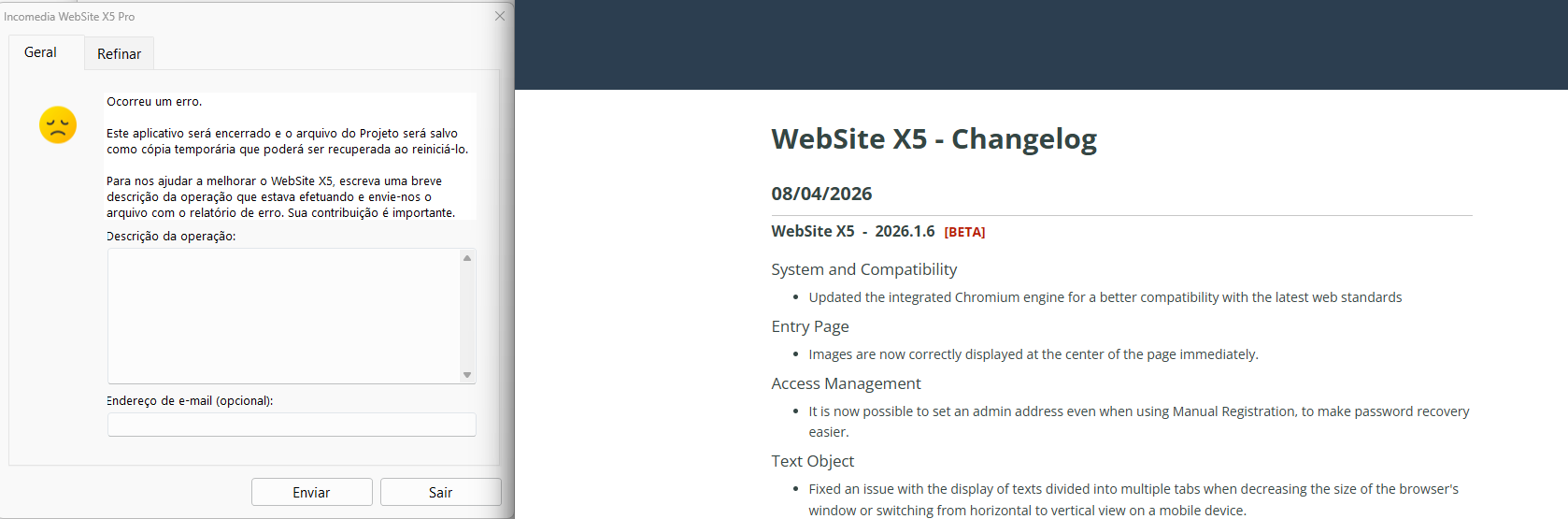
print tela
após efetuar o update beta, ao reabrir o programa o mesmo não abrir mais.
E agora qual é o procedimento?
Posted on the
Hello Reginaldo,
I am sorry about the issue.
Could you please check the situation after a reinstall of the software with these steps?
The folders to be deleted with these steps usually do not contain any projects, that by default are stored at C:\Users\YourUsername\Documents\Incomedia\WebSite X5 - Pro, but you can check their contents to make sure of this.
1) Uninstall the software normally, from the Windows panel.
2) Go to the path C:\Users\YourUserName\AppData\Local\Incomedia and delete the folder corresponding to your version of the software (it should be WebSite X5 – Pro).
3) Go to the path C:\Program Files and, if it is present, delete the folder corresponding to your version of the software (it should be WebSite X5 – Pro)
4) Do the same at the path C:\Users\YourUsername\AppData\Local\Programs, deleting the folder WebSite X5 – Pro if present.
5) Restart the PC.
6) With VPN (if you use one), antivirus and firewall temporarily disabled, run as admin the installer you can find here: https://static.incomedia.eu/websitex5.com/v2026.1/2026.1.6.3/wsx5_pro.exe
Make sure that WebSite X5 is set as an exception for VPN/antivirus/firewall afterwards, so that it is possible to leave them active when using the software.
I remain available.
Online translation:
Olá Reginaldo,
lamento pelo problema.
Poderia verificar a situação após reinstalar o software seguindo estes passos?
As pastas a serem excluídas nestes passos normalmente não contêm projetos, que por padrão são armazenados em C:\Users\SeuNomeDeUsuário\Documents\Incomedia\WebSite X5 - Pro, mas você pode verificar o conteúdo delas para ter certeza.
1) Desinstale o software normalmente, pelo painel do Windows.
2) Vá até o caminho C:\Users\SeuNomeDeUsuário\AppData\Local\Incomedia e exclua a pasta correspondente à sua versão do software (deve ser WebSite X5 – Pro).
3) Vá até o caminho C:\Program Files e, se estiver presente, exclua a pasta correspondente à sua versão do software (deve ser WebSite X5 – Pro).
4) Faça o mesmo no caminho C:\Users\SeuNomeDeUsuário\AppData\Local\Programs, excluindo a pasta WebSite X5 – Pro, se existir.
5) Reinicie o PC.
6) Com o VPN (se você usar), o antivírus e o firewall temporariamente desativados, execute como administrador o instalador que você pode encontrar aqui: https://static.incomedia.eu/websitex5.com/v2026.1/2026.1.6.3/wsx5_pro.exe
Certifique-se de que o WebSite X5 esteja configurado como exceção no VPN/antivírus/firewall posteriormente, para que seja possível mantê-los ativos ao usar o software.
Permaneço à disposição.