
Item in html object not centered and shifts position as viewport changes 
Author: Adrian B.I have a third party "button" embedded in HTML objects - but it does not show as centered, and continues to shift as the viewport changes.
I placed an HTML X in the HTML object and it stays centered, but this 3rd party button does not.
X5 button in the row above remains centered.
This must be an issue with the 3rd party code, but I see nothing in the code that would case it:
<div class="ecsp ecsp-SingleProduct-v2 ecsp-Product ec-Product-XXXXXXXXX" itemtype="http://schema.org/Product" data-single-product-id="XXXXXXXXX"><div class="ecsp-title" itemprop="name" style="display:none;" content="Firesleeve - Industrial Knit"></div><div customprop="addtobag"></div></div><script data-cfasync="false" type="text/javascript" src="https://app.ecwid.com/script.js?XXXXXXXX&data_platform=singleproduct_v2" charset="utf-8"></script><script type="text/javascript">xProduct()</script>
I have replaced some numeric identifiers in the above code with"X" for privacy reasons
Author
forgot the image
Author
Interestingly, when the html box spans 2 columns the buy button is centered.
test.firesleeveusa.com
Author
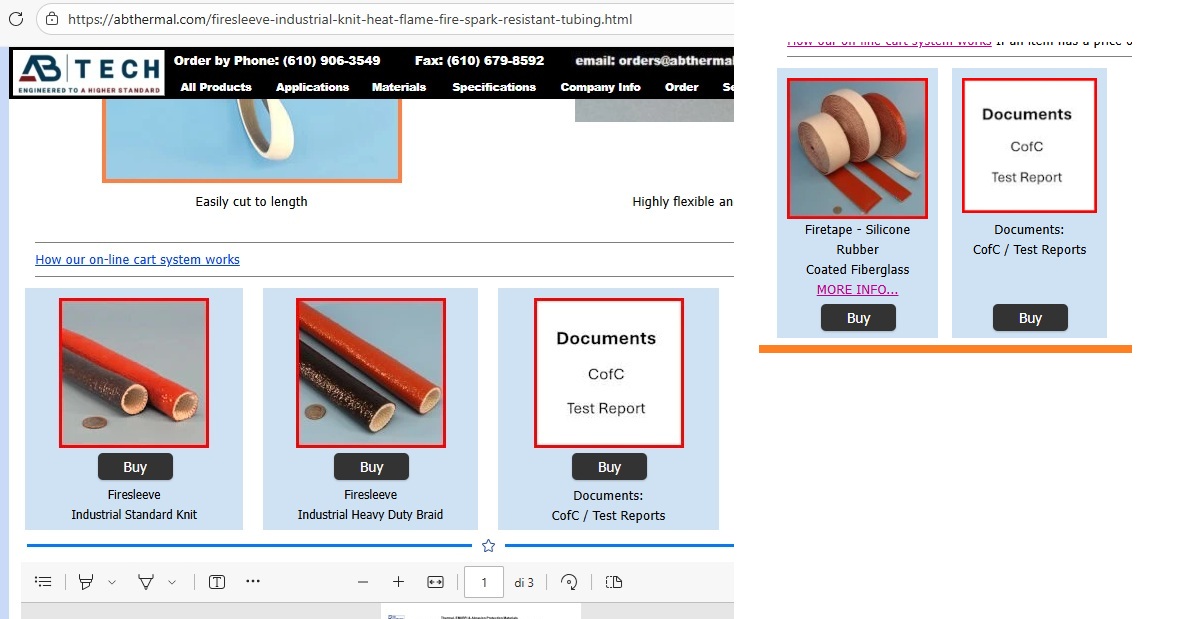
and here's a shot of the page layout
You shouldn't forget the Javascript of the third party "button", as there may be CSS code in it that influences the alignment, see the screenshots below
Is it possible that something can be set by the provider of the button?
Maybe the CSS or Javascript experts can do something.
----- (1) -----
----- (2) -----
Author
So the problem I think is the object code in X5:
here is an example container from one of my sites: (abthermal.com/firesleeve-industrial-knit-het-flame-fire-spark-resistant-tubing.html)
<div id="imHTMLObject_1240_316" class="imHTMLObject" style="text-align: center; width: 100%; overflow: hidden;">
this is not correct for style parameters.
it shoud be:
<div id="imHTMLObject_1240_316" class="imHTMLObject" style="display: flex; justify-content: center; width: 100%;">
This is allowing the button to "leak" to the right. Its ok if the html object is bigger than 25% of the page, but when it gets to 25% or smaller the button leaks.
This will be a nighmare to manually edit on the server for each container - and then gets overwritten on re-publish.
X5 please fix this......
Hello,
is there an alternate link to https://abthermal.com/firesleeve-industrial-knit-het-flame-fire-spark-resistant-tubing.html in order to check this?
I land on a Not Found page.
I remain available.
Author
typo.... het should be heat
Author
https://abthermal.com/firesleeve-industrial-knit-heat-flame-fire-spark-resistant-tubing.html
Hello Adrian,
is
<div class="ecsp ecsp-SingleProduct-v2 ecsp-Product ec-Product-XXXXXXXXX" itemtype="http://schema.org/Product" data-single-product-id="XXXXXXXXX"><div class="ecsp-title" itemprop="name" style="display:none;" content="Firesleeve - Industrial Knit"></div><div customprop="addtobag"></div></div><script data-cfasync="false" type="text/javascript" src="https://app.ecwid.com/script.js?XXXXXXXX&data_platform=singleproduct_v2" charset="utf-8"></script><script type="text/javascript">xProduct()</script>
the full code you are using in the object (save for the ID being replaces), or only part of it?
I remain available.
Author
<div class="ecsp ecsp-SingleProduct-v2 ecsp-Product ec-Product-811007502" itemtype="http://schema.org/Product" data-single-product-id="811007502"><div class="ecsp-title" itemprop="name" style="display:none;" content="Firesleeve - Industrial Knit"></div><div customprop="addtobag"></div></div><script data-cfasync="false" type="text/javascript" src="https://app.ecwid.com/script.js?73175515&data_platform=singleproduct_v2" charset="utf-8"></script><script type="text/javascript">xProduct()</script>
.... it is EXTRA to the Program, and you need to be minimally expert, and provide complete information...
...!... now we understand that there are 5 style classes in play, governed and controlled by external SCRIPT code...!...
... Therefore:
1) - or you study the source's instructions and adapt;
2) ... or, ... you apply a simple EXTRA control CSS code yourself, to get the button always in the center of the host cell...
.
.
Author
this should work..... but I dont know where to put it in X5....
<div id="imHTMLObject_1240_316" class="imHTMLObject" style="text-align: center; width: 100%; overflow: hidden;"><div style="display: flex; justify-content: center; width: 100%;"><div class="ecsp ecsp-SingleProduct-v2 ecsp-Product ec-Product-811007502" itemtype="http://schema.org/Product" data-single-product-id="811007502"><div class="ecsp-title" itemprop="name" style="display:none;" content="Firesleeve - Industrial Knit"></div><div customprop="addtobag"></div></div></div><script data-cfasync="false" type="text/javascript" src="https://app.ecwid.com/script.js?73175515&data_platform=singleproduct_v2" charset="utf-8"></script><script type="text/javascript">xProduct()</script></div></div>
Author
Eric - for your question above, yes that is the full button code for the X5 html container
Author
So i placed the modified code into the X5 html box for that product; and it has centered the button - but its thown off all the other products on that page. see attached image. The Buy button in all the other products has centered, but the placement of those items on the page has gone wonky.
I will try modifying the html in each of the other X5 html boxes for the other products, and see if that corrects it...
Eric, any suggestions or updates?
Thank you
Adrian
Author
So I put this into the next product - the Firesleeve - Industrial HD, and republished. Didn't change anything.
(test.firesleeveusa.com)
<div id="imHTMLObject_1240_316" class="imHTMLObject" style="text-align: center; width: 100%; overflow: hidden;"><div style="display: flex; justify-content: center; width: 100%;"><div class="ecsp ecsp-SingleProduct-v2 ecsp-Product ec-Product-800614313" itemtype="http://schema.org/Product" data-single-product-id="800614313"><div class="ecsp-title" itemprop="name" style="display:none;" content="Firesleeve - Industrial HD"></div><div customprop="addtobag"></div></div><script data-cfasync="false" type="text/javascript" src="https://app.ecwid.com/script.js?73175515&data_platform=singleproduct_v2" charset="utf-8"></script><script type="text/javascript">xProduct()</script></div></div>
Hello Adrian,
you could consider adding another class in the object, like this
<div class="ecwid-button">
<div class="ecsp ecsp-SingleProduct-v2 ecsp-Product ec-Product-811007502" itemtype="http://schema.org/Product" data-single-product-id="811007502"><div class="ecsp-title" itemprop="name" style="display:none;" content="Firesleeve - Industrial Knit"></div><div customprop="addtobag"></div></div><script data-cfasync="false" type="text/javascript" src="https://app.ecwid.com/script.js?73175515&data_platform=singleproduct_v2" charset="utf-8"></script><script type="text/javascript">xProduct()</script>
</div>
and add in the pages with these buttons (in the section Before closing the Head Tag) CSS code to intervene, Chat GPT or similar tools should be able to generate code for this situation for example, if you provide the initial code, such as:
<style>
.ecwid-button {
display: flex !important;
justify-content: center !important;
}
.ecsp-SingleProduct-v2 [customprop="addtobag"] {
display: flex !important;
justify-content: center !important;
width: 100% !important;
}
.ecsp-SingleProduct-v2 button,
.ecsp-SingleProduct-v2 .ecwid-btn {
float: none !important;
margin: 0 auto !important;
}
</style>
This of course may need to be adjusted depending on other aspects in your project that do not affect my test project.
A comparison image below:
Author
Thank you, will try that out
Author
Looks good in preview - button centered (this is in a different project - but same product)
The next step is to try to remove space from around the button - i have the outer and inner margins of the HTML object set to "1" for all sides - perhaps the button itself is padding itself inside the object??
Author
Eric - I wanted to say Thank You very much for all the help on this issue - your code examples have helped me to make this site look the way the want it to. And your examples have also caused me to start leaning a little html to try more things myself.
Thanks again for the great support!
Author
I have been playing around with various mods to the html below in order to try to remove the vertical padding of the button that is still present:
<style>
.ecwid-button {
display: flex !important;
justify-content: center !important;
}
.ecsp-SingleProduct-v2 [customprop="addtobag"] {
display: flex !important;
justify-content: center !important;
width: 100% !important;
}
.ecsp-SingleProduct-v2 button,
.ecsp-SingleProduct-v2 .ecwid-btn {
float: none !important;
margin: 0 auto !important;
}
</style>
Any suggestions appreciated....
image attached shows the spacing i'm trying to reduce circled in purple
...if you're interested in this result, let me know...
.
.
Author
That is EXACTLY what I am trying to achieve...!!
Adrian
Author
Some additional info about my product "card" - its made up of three components - Image object, HTML object, Text object - and the margins are set to minimums or zero in order to minimize the assembled "card " height.
By adding a line between them and putting in a text object - with the text spacer - you can better see the makeup of the card.
Notice the BUY button (the HTML object) has the most padding vertically, even though the vertical margins for that object are set to zero for both inner and outer.
Its a third party button code thats in there - which Eric modified successfully - to get it to center. Now I just want to reduce the vertical padding...
Author
Sorry, to clarify, Eric did not modify the code of the actual button, but modified the code provided by the vendor for the complete button, and also added some code for the html class that sits in the "Expert" area - "before closing the HEAD" portion of the Page Properties for that page.
<style>
.imHTMLObject .ecwid-button *{padding:0px !important;margin:1px !important}
</style>
.
Author
That worked great, thank you!
Next question......
Is there a way to place the code somewhere in X5 that makes it referenced by every landing page, instead of adding the code to each and every page in the map in the Expert section of those pages?
I read in a html reference that I could create a special file such as "stylesforbutton.css" and add the code there, and then reference that file from every page (makes global changes to that style code easier as just change in one location not every page) - but maybe somewhere x5 has a place to put that code in that makes it apply to every page in the map?
Author
It looks like this might be done from "Statistics and Code"... allows attaching a css file to every page on site...?
The code that is placed under "Statistics and Code" is usually on every page, since the statistics are supposed to cover every page.
Under "3 Sitemap" the individual pages can be given different codes, this also applies to the special pages at the bottom. Here, for example, code can be entered separately for the shop and the blog.
Author
Excellent, I'm going to try this.
Author
seems to be working great, put the button mod code into the statistics and code area, and removed ther code from the individual page, and the "global" application appears to ork fine... excellent. Thanks for all the suggestions...