
Adressen til min side viser feil med denne adressen 
Author: Tommy Korneliussen
Visited 640,
Followers 1,
Shared 0
adressen til min side viser feil med denne adressen: https://www.micropower.as/home.html
Posted on the
(It > En) ...what errors...?... ...where...?...
... apparently none are visible, everything is in order...
... attach a stamp that highlights these errors...
.
ciao
.
The part with the price will be cut off, see screenshot
-----
The CSS experts would have to solve this if it is not a problem with WebSite X5.
After updating to version Pro 2025.3.8, I exported my demo shop again to the Internet and don't see any errors, see screenshot
-----
Hello Tommy,
please make sure to adjust the settings of the Product Catalog object so that the Contents section has enough height available to fully display everything.
Online translation:
Hei Tommy,
vennligst sørg for å justere innstillingene for Produktkatalog-objektet slik at Innhold-delen har tilstrekkelig høyde tilgjengelig til å vise alt fullstendig.
... ah! ... thanks ... OK ...
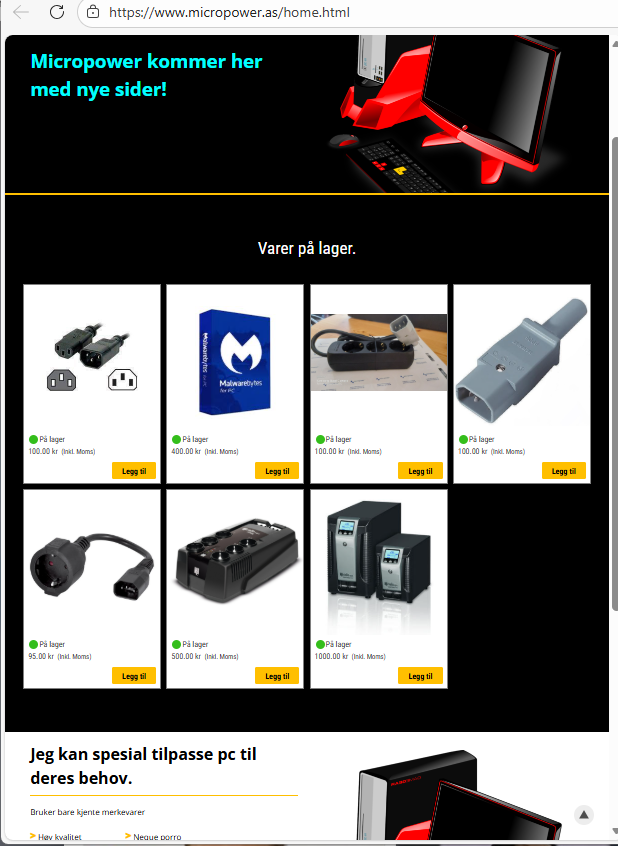
... first check the settings Eric suggested...
... then, in my opinion, the site needs some tweaking. I don't think it's responsive; it looks a bit bad at low resolutions with the products in a single column, again in my opinion...
... right now, if things stay as they are now, it could be done like this STAMP with my EXTRA code, and if you're interested, let me know...
.
ciao
.
Author
Thank you ewerybody, it works now!
But I steel have problem with the adress: www.micropower.as/home.html. I looking to loos the home!
How?
... I saw, it's working now...
... I don't notice any other problems...
... If you want to report other problems, it's best to open a new topic. This one is closed, and the STAFF will be available next Monday.
Bye, ciao
.