
Tabbed text solution 
Author: Spring Produkties
Visited 556,
Followers 3,
Shared 0
what ever I try (and even if looks in the development phase more or less OK) the attached pricelist never is nicely aligned.... What I need is : description per service aligned left (with indent compared to the header) = OK in the result, but the price should align nicely at the right side (never OK in the live view). The dots connection descriipion and the price are not mandatory. NIce if possible, but can be dropped if impossible. How to solve this with the avaible components within Website X5 PRO 2026.2 ?
Posted on the
If you do not want to use the paid object "Pice List", then use the "Table" object.
1. Align the price to the right and move them down with blank lines above the prices.
2. The names of the menus are indented with 3 spaces at the beginning.
3. Set the color of the table lines to transparent, see screenshot
-----
It's better to write the categories in their own table row, then you don't need empty lines above the prices and it's easier.
Hi Spring Products: I'm not sure what your page looks like with the price list, so I'm going to assume you have an image on the left and the price list on the right...
In that case, I would use an HTML object with the following code:
-------------------------------------------------------------------------
<style>
h2 {
text-align: left; /* left-aligned title */
margin-bottom: 15px;
padding-bottom: 5px; /* space between text and line */
border-bottom: 2px solid #333; /* continuous line below */
}
h3 {
text-align: right; /* left-aligned title */
margin-bottom: 15px;
}
.price-list {
display: grid;
grid-template-columns: 1fr auto; /* first column flexible, second adjusted */
gap: 2px 20px;
padding: 0 0 0 50px;
margin: 0;
}
.price-item {
display: contents; /* allows each row to use the defined columns */
}
.service, .price {
padding: 6px 0;
border-bottom: 1px dotted #999; /* dotted line */
}
.service {
text-align: left;
}
.price {
text-align: right;
white-space: nowrap;
}
</style>
Category 1
<h2>GEZICHT</h2>
<h3>Prijs per sessie</h2>
<div class="price-list">
<div class="price-item">
<div class="service">BOVENLIP</div>
<div class="price">35 €</div>
</div>
<div class="price-item">
<div class="service">KIN</div>
<div class="price">35 €</div>
</div>
<div class="price-item">
<div class="service">WANGEN</div>
<div class="price">45 €</div>
</div>
<div class="price-item">
<div class="service">HALS</div>
<div class="price">50 €</div>
</div>
<div class="price-item">
<div class="service">NEK</div>
<div class="price">50 €</div>
</div>
<div class="price-item">
<div class="service">KAAKLIJN, inclusief gakkebaarden</div>
<div class="price">60 €</div>
</div>
<div class="price-item">
<div class="service">VOLLEDIG GEZICHT, zonder hals</div>
<div class="price">110 €</div>
</div>
<div class="price-item">
<div class="service">VOLLEDIG GEZICHT, met hals</div>
<div class="price">150 €</div>
</div>
</div>
<br><br>
Category 2<br>
<h2>BOVENLICHAAM</h2>
<h3>Prijs per sessie</h2>
<div class="price-list">
<div class="price-item">
<div class="service">BUIKLIJN</div>
<div class="price">35 €</div>
</div>
<div class="price-item">
<div class="service">TEPELZONE (rond de tepels)</div>
<div class="price">35 €</div>
</div>
<div class="price-item">
<div class="service">HANDEN</div>
<div class="price">50 €</div>
</div>
<div class="price-item">
<div class="service">BORSTEN</div>
<div class="price">60 €</div>
</div>
<div class="price-item">
<div class="service">OKSELS</div>
<div class="price">60 €</div>
</div>
<div class="price-item">
<div class="service">DECOLLETE</div>
<div class="price">60 €</div>
</div>
<div class="price-item">
<div class="service">SCHOUDERS</div>
<div class="price">85 €</div>
</div>
<div class="price-item">
<div class="service">BOVENARMEN</div>
<div class="price">85 €</div>
</div>
</div>
<br><br>
-------------------------------------------------------------
This is how it looks in the preview, and the list is responsive.
The code is easy to edit.
I hope this helps.
-----
The price list with the "Table" object should only be wide enough so that there are no line breaks on narrow screens, as the menu text and prices no longer fit together.
The table can also be used for store opening times, consultation hours and similar narrow lists.
My test page >> https://findelinks.de/123test-aufklappmenue-2/preisliste-mit-tabelle.html (de)
(It > En) ... ...to have the text properly lined up, you must use a monospaced font like Courier New in the text:
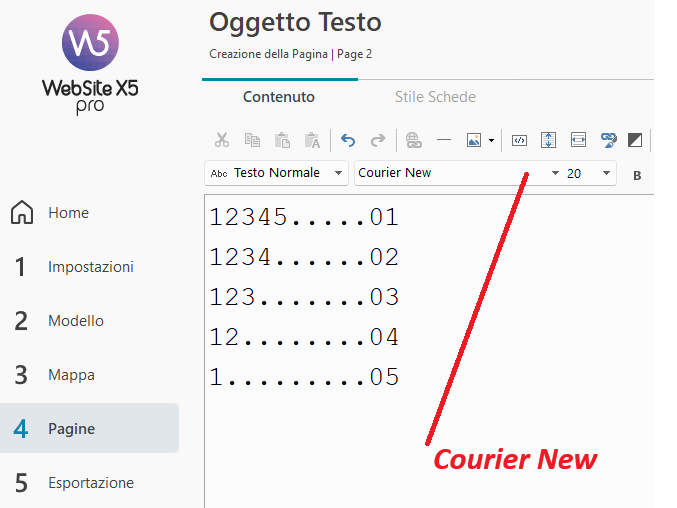
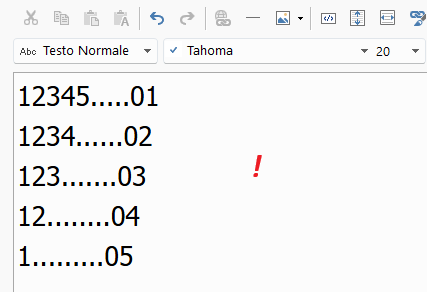 .
. .
.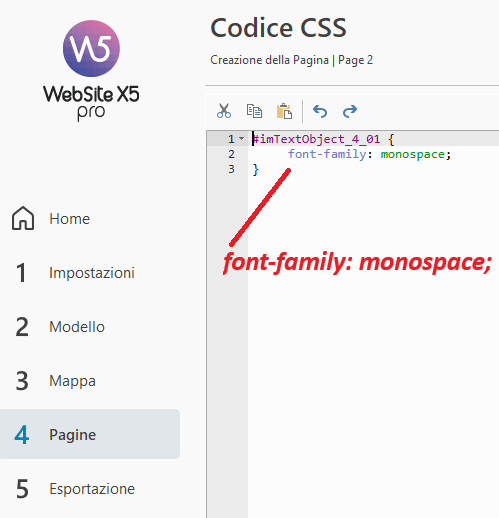
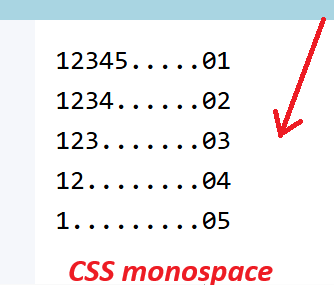
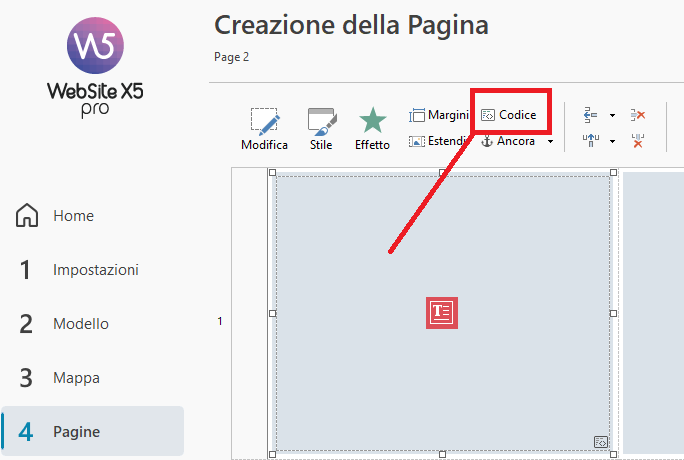
...or if you use other fonts, you must set the monospace code in the CSS:
.
ciao
.