
Icon colour in contact Mobile wighet is not appearing 
Author: Mandar V.
Visited 447,
Followers 1,
Shared 0
Hello WX5 masters,
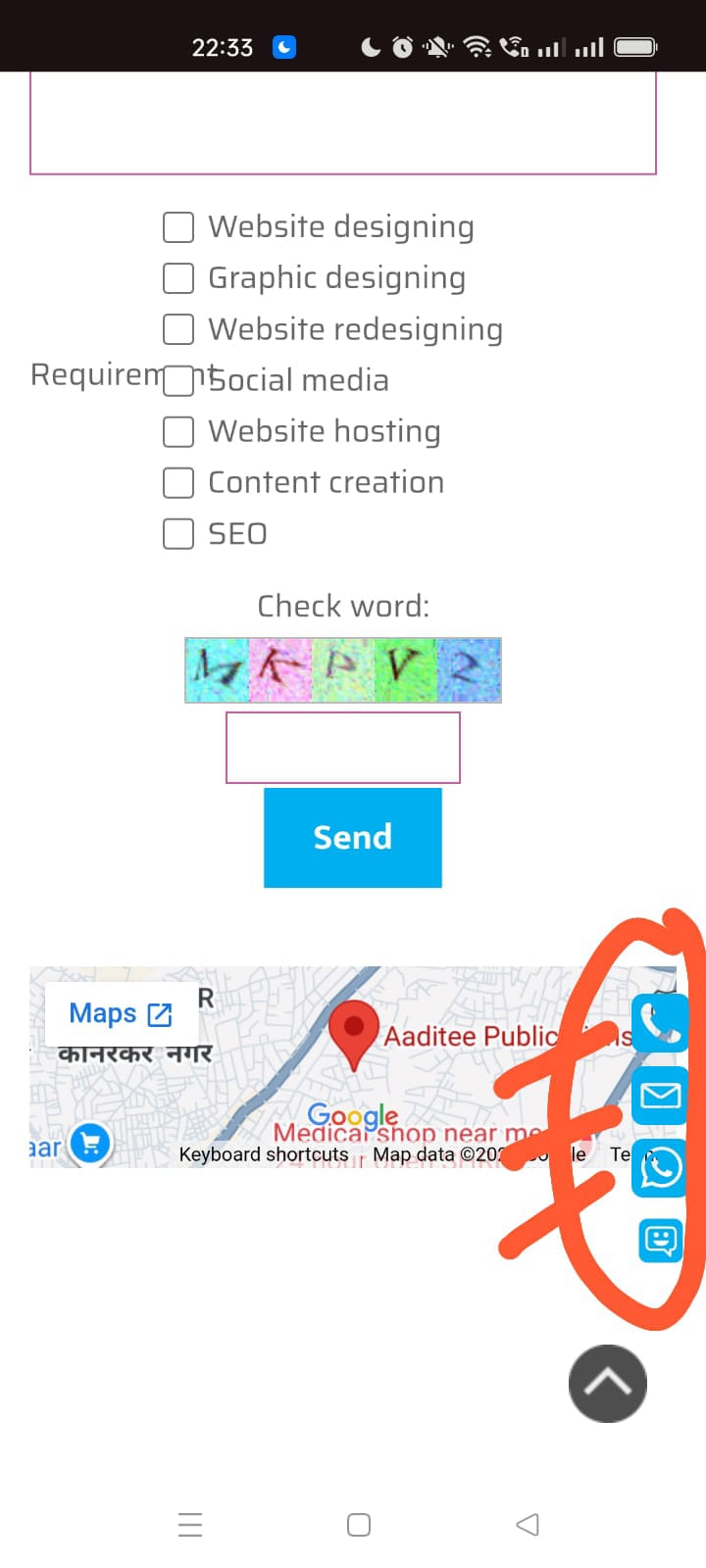
Icon colour in contact Mobile wighet is not appearing. I have added Background colour blue and icon colour R 243 G 243 & B 243. But icon appears transperant. So the text or other object on page are visible through the icon. Please guide me what to do.
Screenshot attached for your convenience and understanding.
Regards
Posted on the
Which object is used on the page shown in the screenshot?
I created a test page using the "AddToAny Sticky" object, see
>> https://findelinks.de/123test-aufklappmenue-2/social-media-buttons.html
Since I don't have a mobile phone, I can't test it with that.
I noticed that my test page doesn't display this object in the Firefox browser, but it does in Chrome and Edge.
Perhaps the Incomedia staff could explain why this object is not displayed in Firefox.
Author
Thanks Daniel W.
Let's wait for Incomedia staff to resolve this issue.
Thanks with regards
... to be able to evaluate any EXTRA code, you need to post the LINK to the page in question...
.
ciao
.
Author
Thanks.
I wanted a white colour inside the blue. But when I select white, it appears transperant. Somehow I have managed by putting a slightly different colour. So instead of appearing it transperant, it looks better with the different colour. But this is not a wayout. Here is a link for your convenience -
https://tubecraft.co.in/
Hello Mandar,
from what I can see, you are currently using 255/253/255 for the icons instead of 243/243/243 or 255/255/255 (white), and the icon is not transparent like this.
Did the issue occur with white as well as the initial color?
I tested both white and the color you initially used, but could not replicate the issue.
Could you please tell me whether the object was placed in the header/footer or the page itself, and whether there is any custom code in the page or the project overall, to understand what difference in configuration there might be compared to my test project?
I remain available.
(It > En) ... I don't know where I should be checking, because the ones I saw on my smartphone are properly opaque—not transparent—and have a different color than the ones in your LINK; they are green, not blue:

.
ciao
.
Author
Thanks.
It's opaquebecause not pure white. A different shade nearby to white.
Hello Mandar,
a reminder in case you did not read this reply as well.
... sorry, perhaps I didn't understand what the problem is when looking at the link...
... by "opaque," I mean that it isn't transparent like the one shown in your screenshot...
... your screenshot doesn't match the situation online...
... my screenshot represents the current reality....
.
ciao
.