
Mensaje para kolasim 
Autor: ALEJANDRO VALENTI
Visitado 644,
Followers 1,
Compartido 0
Ciao Master!
Vorrei chiederti di dare un'occhiata a questo...
https://codecanyon.net/item/cdivs-adaptive-and-animated-canvas-dividers-of-blocks/25882494
Allego un file zip contenente lo strumento, che include il builder, la documentazione e gli esempi.
Genero un esempio e ti fornisce il file JavaScript che devi aggiungere alla pagina dove vuoi che appaia. Tuttavia, per quanto mi sforzi, non riesco a capire come aggiungere lo script correttamente.
Potresti aiutarmi mostrandomi, con un esempio, dove dovrei inserire lo script affinché funzioni?
Grazie mille!
Cordiali saluti
Publicado en
Autor
archive
Autor
Ho provato ad allegare il file zip tre volte, ma non lo accetta. L'ho caricato sul mio server così puoi scaricarlo direttamente.
https://globaldima.com/Kolasin.zip
Autor
Sentiti libero di condividerlo con qualsiasi utente ne abbia bisogno
ciao,
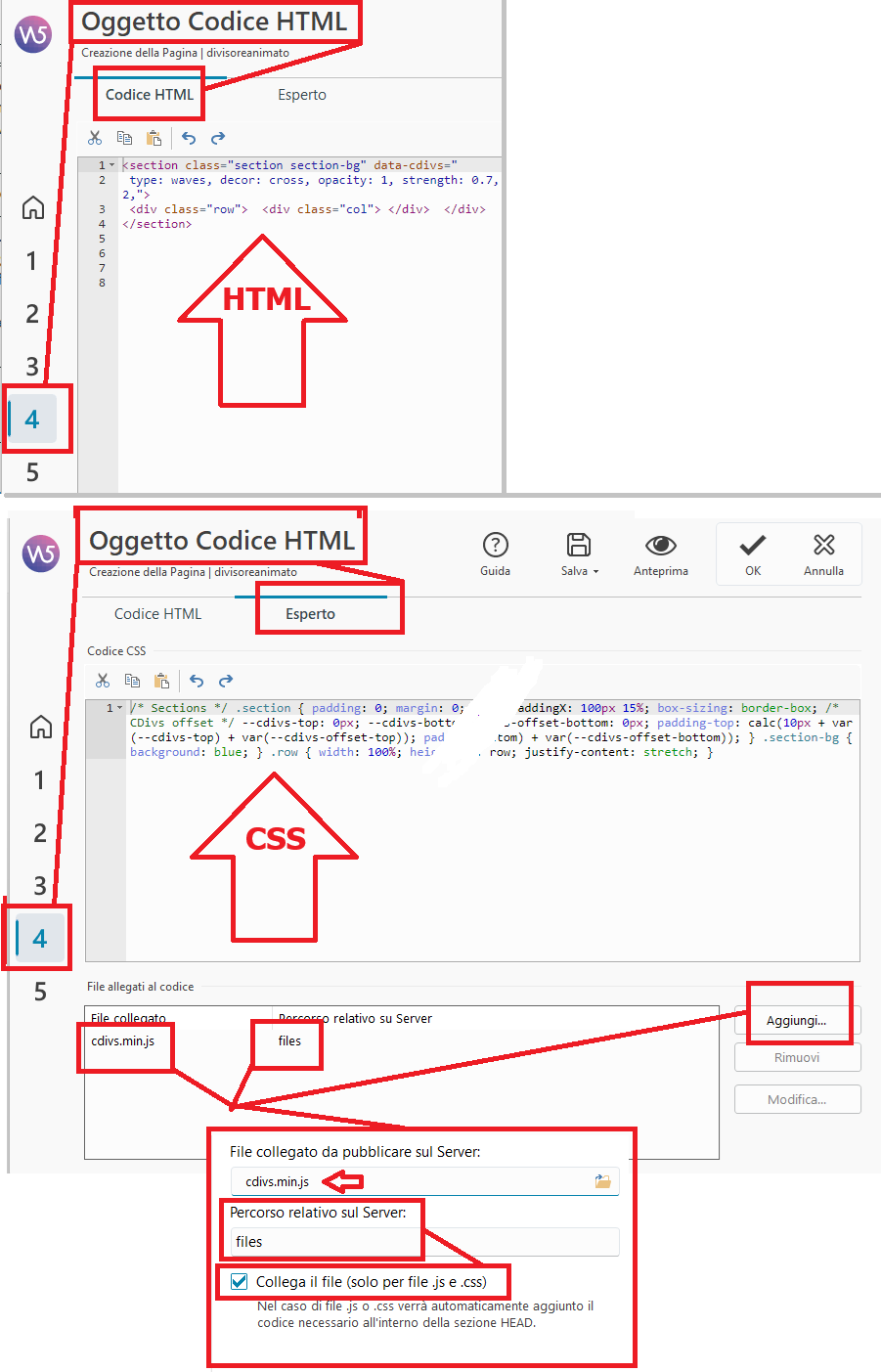
x Oggetto Codice HTML -> tab HTML :
-------------------------------
<section class="section section-bg" data-cdivs="
type: waves, decor: cross, opacity: 1, strength: 0.7, delay: 0.4, decorOpacity: 0.2, decorFading: centerFade, shift: 5000, addSegSize: 2,">
<div class="row"> <div class="col"> </div> </div>
</section>
------------------------------
Oggetto Codice HTML -> tab Esperto :
-----------------------------
/* Sections */ .section { padding: 0; margin: 0; } .section{ width: 100%; height:100%; paddingX: 100px 15%; box-sizing: border-box; /* CDivs offset */ --cdivs-top: 0px; --cdivs-bottom: 0px; --cdivs-offset-top: 0px; --cdivs-offset-bottom: 0px; padding-top: calc(10px + var(--cdivs-top) + var(--cdivs-offset-top)); padding-bottom: calc(10px + var(--cdivs-bottom) + var(--cdivs-offset-bottom)); } .section-bg { background: red; } .row { width: 100%; height:100%; display: flex; flex-direction: row; justify-content: stretch; }
----------------------------------
x Oggetto Codice HTML -> tab Esperto > Allegati > Aggiungi > cartella "files":> + collega file:
cdivs.min.js
-------------------------------
... este primer ejemplo se realiza como se describe:
> https://kolasim.websitex5.me/onde_274057/
... en cambio, el segundo ejemplo se realiza con todo el código agrupado en un único objeto de código HTML, que puede encontrar adjunto aquí...
↓ ↓ ↓ ↓
↓ ↓ ↓
↓ ↓
↓
Autor
It's great that you were able to use this tool. The problem is that I made the mistake of translating the post into Italian, but even after translating your answer into Spanish, I still can't understand it. I saw your examples; the first one is exactly what I'm looking for, but I don't know how to insert the generated divider. The second one is perfect, but it doesn't cover the whole screen.
THAKS!!!!!!
La celda y la fila del objeto HTML se expanden a ancho completo, con todos los márgenes establecidos en "0". ...ciao:
.
Autor
Yes Thanks new found OK!!!!!