
Flip Clock Language Adding 
Autor: Hakan SENGUL
Visitado 139,
Followers 1,
Compartido 0
Hello,
Flip Clock is a nice utility.
( https://market.websitex5.com/en/objects/3a21***-a10b-37e16428fd8)
But not contains Turkish Language. It difficult to add in HTML tag.
Please add the Turkish Language.
Words like:
Days: Gün
Hours: Saat
Minutes: Dakika
Seconds: Saniye
And some of formats must added to this utility. Like z Years, xx Months and xx Days etc.
Months: Ay
Years: Yıl
Publicado en
(It > En) ... ...with some EXTRA code of mine, you could achieve a result similar to that of my STAMP; if you're interested, you just need to post the LINK to your online page containing this item. Bye! ciao!
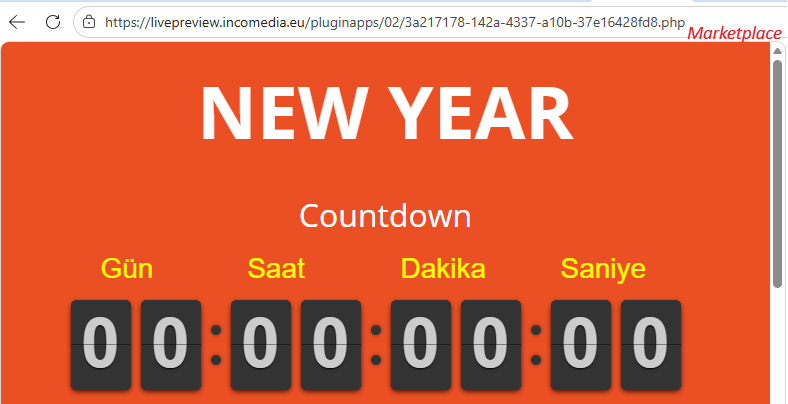
.
Autor
What kind of code?
It automatically update Flip Clock utility in Websitex5?
Please share.
Do i ichange this code in the project everytime?
(if it, I dont want to change it because it difficult to remember for me.)
Coder must do it i think.
Autor
You can findout my site:
https://rams100yil.com.tr/
...OK... here is the code that should work for your page:
<script>
/* cambio testo FlipClock x WSx5 by KolAsim */
(function ($) { function traduciFlipClockK() { var $clockK = $(".flip-clock-wrapper"); if (!$clockK.length) return false;
var traduzioniK = [ "Gün", "Saat", "Dakika", "Saniye" ];
$clockK.find(".flip-clock-label").each(function (index) { if (traduzioniK[index]) { $(this).text(traduzioni[index]); } }); return true; } if (!traduciFlipClockK()) { var observer = new MutationObserver(function () { if (traduciFlipClockK()) { observer.disconnect(); } }); observer.observe(document.body, { childList: true, subtree: true }); } })(jQuery);
</script>
...you need to paste this code at Step 3, in the properties for that page, under | Expert | Code | 3rd option: Before the closing </HEAD> tag...
.
ciao
.
Autor
I did it. Nothing changed...
and again see the "days" etc...
.. replace the code with thi:
<script>
/* cambio testo FlipClock x WSx5 by KolAsim */
(function ($) { function traduciFlipClockK() { var $clockK = $(".flip-clock-wrapper"); if (!$clockK.length) return false;
var traduzioniK = [ "Gün", "Saat", "Dakika", "Saniye" ];
$clockK.find(".flip-clock-label").each(function (index) { if (traduzioniK[index]) { $(this).text(traduzioniK[index]); } }); return true; } if (!traduciFlipClockK()) { var observer = new MutationObserver(function () { if (traduciFlipClockK()) { observer.disconnect(); } }); observer.observe(document.body, { childList: true, subtree: true }); } })(jQuery);
</script>
.
Autor
:-(( Still same.
It shows English words...
Is it exactly Before closing head tag section?
Autor
It worked...
I put the code in "before closing body" (5.th) section and it worked.
... ok ... I’ve checked the site. ...it works...
bye, ciao