
Blog funktioniert seit Upodate nicht mehr 
Auteur : Benjamin T.
Visité 471,
Followers 1,
Partagé 0
Hallo zusammen, der Blog funktioniert seit dem aktuellem Update nicht mehr.
Bitte dringend um Behebung des Problems!
Posté le
Das Problem wird hier auf englisch geschildert, siehe
>> https://helpcenter.websitex5.com/fr/post/277342
Der Nutzer hat es mit gedrückter linker Strg-Taste und Klick auf "Vorschau" sowie anschliessendem Expoert der Webseite ins Internet gelöst - mal selber auch versuchen.
Hello Benjamin,
I am sorry about the issue.
As Daniel recommended, I suggest regenerating the files with CTRL + Preview, and in addition to that, please check the settings of the Blog: Main Page.
If you are using Cover to the left/Contents to the right or Contents to the left/Cover to the right as the layout for the cards, please go to the Contents section and set the width for this section to a different value, such as 50% or 80%.
This change, should it be necessary because CTRL + Preview does not work, will be temporary, as we will soon release a fix.
I remain available.
Online translation:
Hallo Benjamin,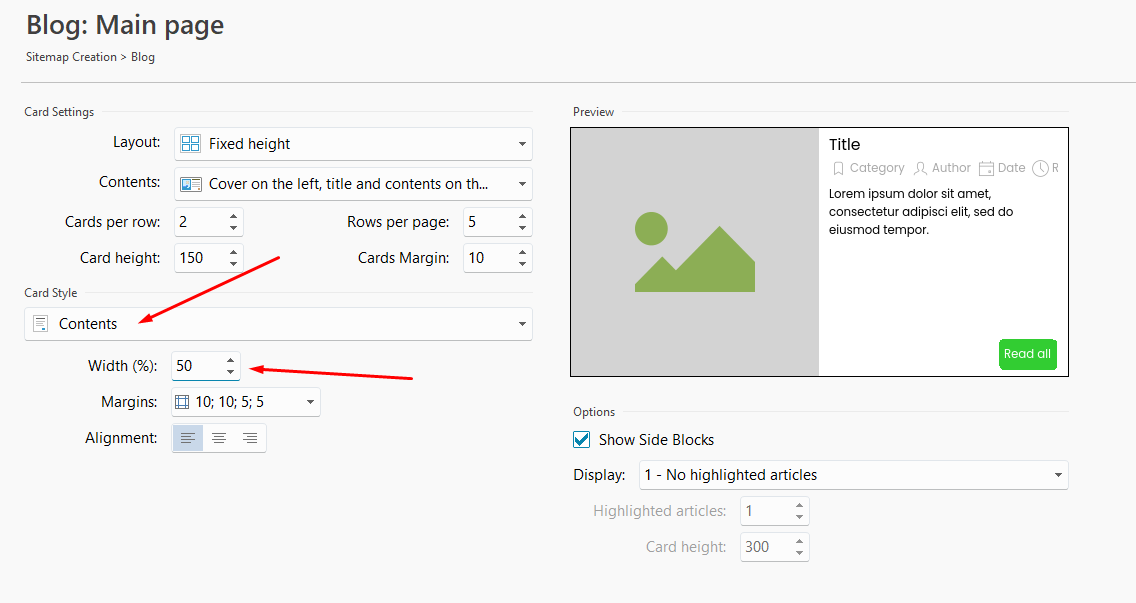
es tut mir leid, dass dieses Problem aufgetreten ist.
Wie Daniel bereits empfohlen hat, schlage ich vor, die Dateien mit STRG + Vorschau neu zu generieren. Zusätzlich prüfen Sie bitte die Einstellungen der Blog: Hauptseite.
Falls Sie für die Karten das Layout „Titelbild links/Inhalt rechts“ oder „Inhalt links/Titelbild rechts“ verwenden, wechseln Sie bitte zum Abschnitt Inhalt und stellen Sie die Breite dieses Bereichs auf einen anderen Wert ein, beispielsweise 50 % oder 80 %.
Diese Änderung ist – sofern sie erforderlich sein sollte, weil STRG + Vorschau das Problem nicht behebt – nur vorübergehend, da wir in Kürze eine Fehlerbehebung veröffentlichen werden.
Ich stehe Ihnen gerne weiterhin zur Verfügung.
Auteur
Hallo Eric, leider funktioniert der Tipp nicht
Hello Benjamin,
are you referring to both CTRL + Preview and changing the width?
If so, could you please provide me with a copy of the project? I would like to test the situation using the Beta version we are about to release, where we included a fix for the recent blog issue, so that I can ascertain whether you are encountering the same problem reported previously.
You can export it in Step 5 - Export, choosing the “Export the project” option to generate an IWZIP file, making sure not to use the options to include backup and preview files so that the size of the file is reduced.
You can then upload the file with SwissTransfer, TransferNow or similar services, and provide a download link to support @ incomedia.eu (without the spaces).
Thank you.
Online translation:
Hallo Benjamin,
beziehen Sie sich sowohl auf STRG + Vorschau als auch auf das Ändern der Breite?
Falls ja, könnten Sie mir bitte eine Kopie des Projekts zur Verfügung stellen? Ich möchte die Situation mit der Beta-Version testen, die wir in Kürze veröffentlichen werden und die bereits eine Fehlerbehebung für das kürzlich gemeldete Blog-Problem enthält. So kann ich feststellen, ob bei Ihnen dasselbe Problem auftritt.
Sie können das Projekt unter Schritt 5 – Export über die Option „Projekt exportieren“ als IWZIP-Datei exportieren. Achten Sie dabei bitte darauf, die Optionen zum Einbeziehen von Sicherungs- und Vorschaudateien nicht zu aktivieren, damit die Dateigröße möglichst gering bleibt.
Anschließend können Sie die Datei über SwissTransfer, TransferNow oder einen ähnlichen Dienst hochladen und den Download-Link an *** senden.
Vielen Dank.
Die E-Mailadresse wurde beim Post von Eric C. in *** verwandelt, deshalb noch einmal, siehe
support @ incomedia.eu (die 2 Leerzeichen entfenen)
Hello Benjamin,
I checked the project, and the issue is indeed different: there is a line break in the Title Tag of this article, it cannot be seen in the field directly, but if you copy and paste this in a notepad, you will notice it.
Please delete and add again the Tag Title for the article and the blog should be visible again.
I remain available.
Online translation:
Hallo Benjamin,
ich habe das Projekt überprüft, und das Problem ist tatsächlich ein anderes: Im Title-Tag dieses Artikels befindet sich ein Zeilenumbruch. Dieser ist im Feld selbst nicht sichtbar, aber wenn Sie den Inhalt kopieren und in einen Editor wie den Editor/Notepad einfügen, werden Sie ihn erkennen können.
Bitte löschen Sie den Title-Tag des Artikels und fügen Sie ihn anschließend erneut hinzu. Danach sollte der Blog wieder sichtbar sein.
Ich stehe Ihnen gerne weiterhin zur Verfügung.
Auteur
Hi Eric, vielen Dank für Deine Hilfe!
Die Ursache ist spannend, da der Blog die ganze Zeit bisher sichtbar war. Nun funktioniert er wieder.
Sehr gut!