
Pagination for content inside textbox object website x5 
Автор: Hanafi Salman
Просмотрено 1326,
Подписчики 3,
Размещенный 0
Hi..
Can you help me with a script on how to paginate the contents of a Textbox Object websiteX5 to avoid long paragraphs or text content of the page?
Thanks for help
Размещено
With the text object, there are tabs below the input field, which later appear above the text, see
Test page >> https://findelinks.de/123test-aufklappmenue-2/text-in-mehreren-sprachen.html
----
Автор
Thanks Daniel, I see.. that's one solution.. with the tab title
But what if there are, for example, 20 paragraphs and we want to divide every 3 or 4 paragraphs into one pagination..
Автор
Using Prev... Next... to switch between
The tabs in the text object can be added, renamed, moved and deleted.
-----
There are only the names of the tabs, but no Prev or Next.
Text object:
/ Tab 1 /
paragraph 1
paragraph 2
paragraph 3
paragraph 4
/ Tab 2 /
paragraph 5
paragraph 6
paragraph 7
paragraph 8
/ Tab 3 /
paragraph 9
paragraph 10
paragraph 11
paragraph 12
etc.
----------------------------------
Text in website
/ Tab1 / Tab 2 / Tabb3 /
paragraph 1
paragraph 2
paragraph 3
paragraph 4
__________________________________________
You could make a normal page with anchors, and then a little script that divides the page,
Example: https://bramminginfo.dk/hollenderskoven.html
If you have really many sections, you could use both the anchor"menu" and then also in the sections use text-objects with some few tabs.
This way you could have sections and sub-sections.
Is it something like that you mean?
Forgot: The page"menu" is located (fixed) in the left bottom of the page.
Hi Hanafi Salman:
Check out these two pages with examples of paginated tables. One doesn't have a search box, and the other includes one if there's a lot of data. Both tables display only 5 rows per page, as does the one with the search box.
The code is for embedding in an HTML object, which means we have to enter all the data manually.
The links are:
Without search box
With search box
Is this what you're looking for?
If so, I could send you the code so you can edit it. I haven't tested it in a text object because it's complicated and often breaks the code.
Haha... I think I reversed the links.

Автор
Thanks Daniel.. you are right, it can be solution for me to use tab and I can change the title with the "paragraph...", thank you so much
Автор
Hi John.. I am interested too with this way, can be applied with some textobject x5.... I've understood how to make the anchor in each textobject.. Would you please give the script for but the menu in the left bottom of the page? Thanks..
Автор
Thanks Miguel for sample of search and pagination.. It also can be used although enter all data manually, but it is possible make long text or paragraph too in every row, isn't it?
Please send the code.. thanks a lot
Okay, here's the code to insert into an HTML object.
-----------------------
<style>
/* Table styles */
.paginated-table {
width: 100%;
border-collapse: collapse;
font-family: sans-serif;
text-align: left;
}
.paginated-table thead th {
padding: 20px 10px;
background-color: #444;
color:#999;
border-bottom: 2px solid #333;
text-align: left;
}
.paginated-table tbody td {
padding: 10px;
border-bottom: 4px solid #777;
}
/* Pagination container styles */
.pagination-container {
text-align: center;
margin-top: 20px;
user-select: none;
}
/* Pagination button styles */
.pagination-container button {
display: inline-block;
padding: 6px 10px;
margin: 0 2px;
border: 2px solid #444;
background-color: #999;
color: #444;
cursor: pointer;
border-radius: 6px;
font-size: 0.75rem;
}
.pagination-container button:hover:not(:disabled) {
background-color: #444;
color: #ff4800;
}
.pagination-container button.active {
background-color: #555;
color: white;
border-color: #ff4800;
cursor: default;
}
.pagination-container button:disabled {
color: #ccc;
cursor: not-allowed;
border-color: #eee;
}
/* Search box */
#searchBox {
margin-bottom: 15px;
padding: 8px;
width: 320px;
border: 1px solid #666;
border-radius: 3px;
}
</style>
<!-- Caja de búsqueda -->
<input type="text" id="searchBox" placeholder="Buscar...">
<!-- Tabla -->
<table class="paginated-table" id="myPaginatedTable">
<thead>
<tr>
<th scope="col" style="width:10%;">ID</th>
<th scope="col" style="width:15%;">Name</th>
<th scope="col" style="width:75p%;">Objet</th>
</tr>
</thead>
<tbody>
<!-- Start of editing -->
<tr><td>1</td><td>Dato 1</td><td>Imagina una estrella brillante que nos recuerda que todo comenzó con una chispa de inspiración. O una ventana con nieve, donde cada copo trae consigo recuerdos nostálgicos de momentos pasados. También exploramos el significado de un regalo envuelto, porque lo que importa no siempre se ve a simple vista. Y no podemos olvidar las cartas escritas a mano, esas palabras que viajaron sin timbre, cargadas de emociones y anhelos. ¡Acompáñanos en este viaje literario y deja que cada cuento te hable al corazón!</td></tr>
<tr><td>2</td><td>Dato 2</td><td>Silla</td></tr>
<tr><td>3</td><td>Dato 3</td><td>Taburete</td></tr>
<tr><td>4</td><td>Dato 4</td><td>Cama</td></tr>
<tr><td>5</td><td>Dato 5</td><td>Escritorio</td></tr>
<tr><td>6</td><td>Dato 6</td><td>Ventana</td></tr>
<tr><td>7</td><td>Dato 7</td><td>Piso</td></tr>
<tr><td>8</td><td>Dato 8</td><td>Pared</td></tr>
<tr><td>9</td><td>Dato 9</td><td>Jardín</td></tr>
<tr><td>10</td><td>Dato 10</td><td>Terraza</td></tr>
<tr><td>11</td><td>Dato 11</td><td>Maceta</td></tr>
<tr><td>12</td><td>Dato 12</td><td>Lámpara</td></tr>
<!-- End of editing -->
</tbody>
</table>
<!-- Controles de paginación -->
<div class="pagination-container" id="paginationControls"></div>
<script>
function paginateTable(tableId, rowsPerPage) {
const table = document.getElementById(tableId);
const tbody = table.querySelector('tbody');
const allRows = Array.from(tbody.querySelectorAll('tr'));
let filteredRows = [...allRows];
let currentPage = 1;
const paginationControls = document.getElementById('paginationControls');
const searchBox = document.getElementById('searchBox');
function displayPage(page) {
currentPage = page;
allRows.forEach(row => row.style.display = 'none');
const totalPages = Math.ceil(filteredRows.length / rowsPerPage);
const startIndex = (page - 1) * rowsPerPage;
const endIndex = startIndex + rowsPerPage;
const pageRows = filteredRows.slice(startIndex, endIndex);
pageRows.forEach(row => row.style.display = '');
renderControls(totalPages);
}
function renderControls(totalPages) {
paginationControls.innerHTML = '';
// Botón Prev
const prevButton = document.createElement('button');
prevButton.innerHTML = '« Prev';
prevButton.disabled = currentPage === 1;
prevButton.addEventListener('click', () => displayPage(currentPage - 1));
paginationControls.appendChild(prevButton);
// Primera página
const firstButton = document.createElement('button');
firstButton.innerText = 1;
if (currentPage === 1) firstButton.classList.add('active');
firstButton.addEventListener('click', () => displayPage(1));
paginationControls.appendChild(firstButton);
// "..." si estamos lejos del inicio
if (currentPage > 4) {
const dots = document.createElement('button');
dots.innerText = '...';
dots.disabled = true;
paginationControls.appendChild(dots);
}
// Páginas cercanas a la actual
const start = Math.max(2, currentPage - 1);
const end = Math.min(totalPages - 1, currentPage + 1);
for (let i = start; i <= end; i++) {
const pageButton = document.createElement('button');
pageButton.innerText = i;
if (i === currentPage) pageButton.classList.add('active');
pageButton.addEventListener('click', () => displayPage(i));
paginationControls.appendChild(pageButton);
}
// "..." si faltan páginas al final
if (currentPage < totalPages - 3) {
const dots = document.createElement('button');
dots.innerText = '...';
dots.disabled = true;
paginationControls.appendChild(dots);
}
// Última página
if (totalPages > 1) {
const lastButton = document.createElement('button');
lastButton.innerText = totalPages;
if (currentPage === totalPages) lastButton.classList.add('active');
lastButton.addEventListener('click', () => displayPage(totalPages));
paginationControls.appendChild(lastButton);
}
// Botón Next
const nextButton = document.createElement('button');
nextButton.innerHTML = 'Next »';
nextButton.disabled = currentPage === totalPages;
nextButton.addEventListener('click', () => displayPage(currentPage + 1));
paginationControls.appendChild(nextButton);
}
// Filtrado con paginación
searchBox.addEventListener('input', () => {
const query = searchBox.value.toLowerCase().trim();
if (query === "") {
filteredRows = [...allRows]; // todas las filas
} else {
filteredRows = allRows.filter(row =>
row.innerText.toLowerCase().includes(query)
);
}
currentPage = 1;
displayPage(1);
});
displayPage(1);
}
paginateTable('myPaginatedTable', 5);
</script>
-----------------------
The section between "start of editing" and "end of editing" is what you'll need to change. Also, if you're creating more rows, copy and paste row #12. I hope that's clear.
You can edit the object's style as you like.
Regards.
Test with code from Miguel and HTML code <br><br> for line break and <b>Bold</b>, see
-----
-----
Also can use images, see my test page
>> https://findelinks.de/123test-aufklappmenue-2/suche-in-tabelle-mit-seitenzahl.html
-----
Автор
Thanks so much Miguel for the code..
Also thanks to Daniel for code solution to make break line, bold text and inserting images in the Miguel's script..
Thanks lots guys..
Автор
Sorry.. still waiting @John S for script that divides the page (Sideindeks)
like in the page link >> https://bramminginfo.dk/hollenderskoven.html
Hope the script will be useful too for others who need it. Thanks John..
I took some code from the page. I think this is what needed:
<script> $(function(){ //toggle branch $('#example_tree').find('span').click(function(){ $(this).parent().find('ul').toggle(); }); $('#example_tree').find('span').click(); });
</script>
<div id="sideindeks"><ul id="example_tree"><li><span>► Sideindeks</span><ul><li><a href="hollenderskoven.html#Anker_intro">Intro</a></li><li><a href="hollenderskoven.html#Anker_dammosesoen">Dammosesøen</a></li><li><a href="hollenderskoven.html#Anker_hollaenderen">Hollænderen</a></li><li><a href="hollenderskoven.html#Anker_gaarden">Gården</a></li><li><a href="hollenderskoven.html#Anker_skoven">Skoven</a></li><li><a href="hollenderskoven.html#Anker_fredningsforsoeg">Fredningsforsøg</a></li><li><a href="hollenderskoven.html#Anker_originalerne">Originalerne</a></li><li><a href="hollenderskoven.html#Anker_siska">Siska</a></li><li><a href="hollenderskoven.html#Anker_kratskellet">Kratskellet</a></li><li><a href="hollenderskoven.html#Anker_kilder">Kilder</a></li></ul></li></ul>
</div>
You put the code into a html-object, and then place the code on the page where you want it. And eventually give it a fixed position. Tell if you have problems.
And/or please tell how it ends up
(It > En) ...is this LINK from one of your pages...?...
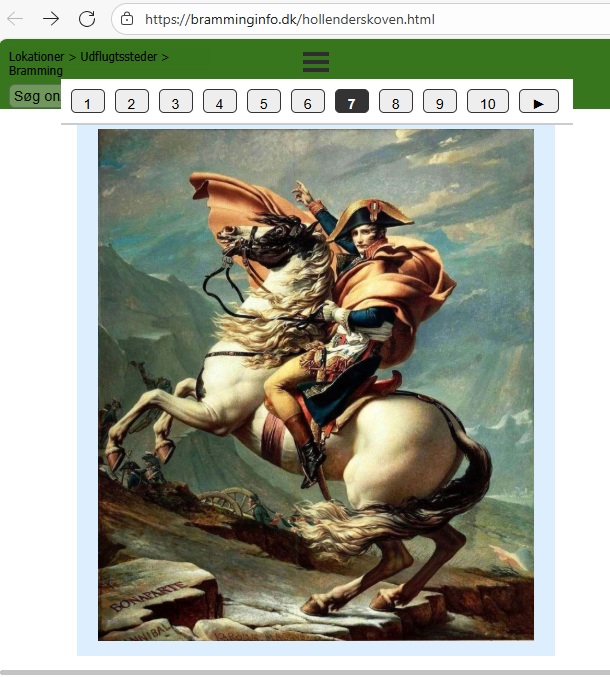
...if so, ...there's some code that conflicts with mine that doesn't allow me to evaluate it; you should eliminate it...
...create a simple header, without fixed objects, and without a StickyBar...
...in theory, starting from my invention of DIV_SINO 10 years ago, you could get a result similar to this "real" simulation:
.
ciao
.
If it's just about the numbers at the top and the arrows, then you can also use the text object.
-----
Автор
@KolAsim
No, the link is from @John.. to make floating sidebar short menu running
Автор
@John
Follow the script, here it is >> https://ica.web.id/sideindeks.html
Still need css code or additional code to make it running the same as like yours
Автор
@Daniel
Yes just change the tab title.. thanks
... if you're interested in my invention, you don't have to program anything in HTML; you just have to create the page normally in WebSiteX5, in a regular and consistent manner, as mentioned above...
...my code will hide all lines and activate only the line clicked in the browser/pager, as presented in my previous STAMP...
...if you're interested, you have to create a single long page like this:
...for example:
> line 1 +
title +
image +
text
-----------------X
> line 2 +
title +
image +
text
-----------------X
>> etc. + other lines...
> line 20 +
title +
image +
text
----------------X----end
-------------------------------------------
... ...if that's what you're interested in, and if you already have your own example of a long page, post the link so I can evaluate the situation, ...otherwise, ignore my post...
.
ciao
.
Автор
@KolAsim,
Here is the page link >> https://ica.web.id/pengajar.html
I use TableObject Website X5, perhaps can be divided into 5 rows per page..
Thanks
Автор
And I use TextObject Website X5, for pagination perhaps can be divided into 3 paragraphs per page
Page link >> https://ica.web.id/sejarah.html
Thanks for help KolAsim..
Автор
or using the button Prev and Next to move another page inside.. thanks
...it's not the structure I suggested in my previous post, it's completely different...
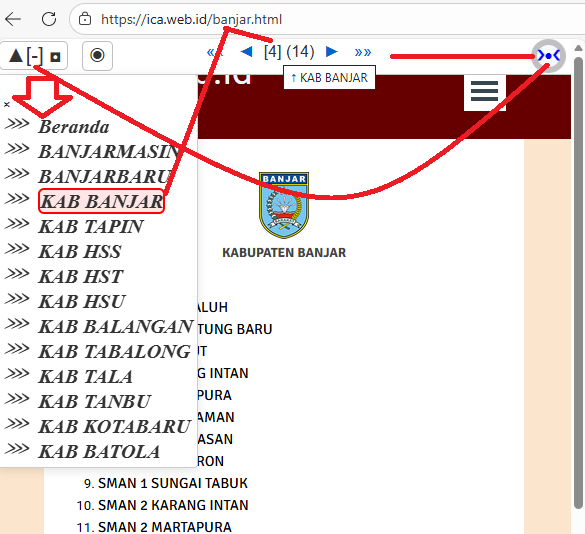
...however, in this case, you could use another EXTRA exclusive and unique invention of mine: my sequential paginator + sitemap...
...if you're interested in this, "blind box" (!), let me know...
.
ciao
.
Автор
I am sorry @KolAsim, I mean pagination to divide the page using TableObject or TextObject websiteX5, to avoid long rows of tableobject or long text/paragrapghs of textobject.. only for the object
https://ica.web.id/pengajar.html (I use tableobject) while https://ica.web.id/sejarah.html (textobject)
I am sorry if I misuderstand..
> line 1 +
title +
image +
text
-----------------X
> line 2 +
title +
image +
text
-----------------X
>> etc. + other lines...
I guess the data for every row in one TableObject websiteX5..
...if you're not interested in my code for my page layout method for your site's pages as per STAMP, then try making a long page, with tables and text, in separate lines, one above the other, with a layout similar to the one I mentioned...
...when you've made this sample page, let me know, and I'll come back here to check and see if anything can be done...
.
bye
Автор
Anyway, I just noticed carefully, looking at your capture above.. your method in sequential paginator + sitemap is very interesting and so unique, there is no need to click the pull down menu to move from one page to another.. more useful also.. I am interested..
... OK... take my code as is, "blindly", if you're okay with that, fine, otherwise leave it alone:
<script>
/**-- paginatore sequenziale + mappa del sito "esclusivo" x WSx5 by KolAsim --**/
$(document).ready(function () {
const objectK = "#imHeader_imMenuObject_01_container"; /** <<<<< controllare l'ID dell'oggetto MENU ===== **/
/**---K---**/
const stylesK = ` <style id="styleK"> body{top:50px !important} :root { --col-bg: #ffffff; --col-fg: #333333; --col-accent: #0066cc; --col-btn-bg: ghostwhite; --col-btn-fg: blue; } [data-theme="dark"] { --col-bg: #222; --col-fg: #ddd; --col-accent: #66aaff; --col-btn-bg: #333; --col-btn-fg: #ff5050; } body {padding-top:36px; background-color: var(--col-bg); color: var(--col-fg); transition: background-color 0.3s, color 0.3s; } #paginazioneK { background: var(--col-bg); color: var(--col-fg); font-family: sans-serif; position: fixed; top: 0; left: 0; width: 100%; height: 25px; padding: 5px; z-index: 100; text-align: center; display: none; border-bottom: solid 1px silver; } #paginazioneK a { color: var(--col-accent); text-decoration: none; margin: 0 5px; } #navigatoreK { position: fixed !important; top: 0px; right: 5px; font-weight: bold; background-color: var(--col-btn-bg); font-size: 14px; z-index: 100000; cursor: pointer; padding:6px 2px 6px 2px; border: 6px solid silver; border-radius: 50%; color: var(--col-btn-fg); } #apriK, #chiudiK, #temaK { position: fixed; top: 2px; left: 2px; z-index: 110; font-size: 20px; border: 1px solid silver; border-radius: 5px; cursor: pointer; background: var(--col-bg); color: var(--col-fg); padding: 2px 6px; } #temaK { left: 85px; } #sitemap-K { position: fixed; top: 35px; max-height: calc(100vh - 50px); width: auto; background: var(--col-bg); border: 1px solid #ccc; padding: 5px; border-radius: 4px; box-shadow: 0 3px 10px rgba(0,0,0,0.1); overflow-x: auto; overflow-y: auto; white-space: nowrap; display: none; z-index: 10001; } #sitemap-K .label-inner-wrapper { color: var(--col-accent); font-weight: bold; font-size: 25px; } #sitemap-K .imLevel:before { content: "◑"; margin-right: 10px; float:left; font-size: 25px !important; color: var(--col-accent); } #sitemap-K .label-inner-wrapper a { text-decoration: none; font-size: 20px; font-style: italic; color: var(--col-fg); } #sitemap-K .label-inner-wrapper a:before { content: "⋙"; margin-right: 10px; float: left; } #sitemap-K a.link-attivo-K { border: 2px solid red !important; border-radius:6px; background: rgba(255,0,0,0.1); } body.fade-out { opacity:0; transition: opacity 0.3s ease; } body.fade-in { opacity:1; transition: opacity 0.3s ease; } </style> `; $("head").append(stylesK); const htmlK = ` <div id="navigatoreK" title="Apre/Chiude Navigatore">❮●❯</div> <div id="sitemap-K"></div> <button id="apriK" title="Apri Mappa del Sito">▼[+] ☰</button> <button id="chiudiK" style = "display:none" title="Chiudi Mappa del Sito">▲[-] ◘</button> <button id="temaK" title="Cambia Tema">◉</button> `; $("body").prepend(htmlK); let nK = true; let temaDark = window.matchMedia("(prefers-color-scheme: dark)").matches; $("body").attr("data-theme", temaDark ? "dark" : "light"); $("#navigatoreK").on("click", function () { nK = !nK; if(nK) { $("#paginazioneK, #apriK, #temaK").slideDown(300);$("body").animate({ "padding-top": "36px" }, 400 ); } else {$("body").animate( { "padding-top": "0px" }, 400); $("#paginazioneK, #apriK, #chiudiK, #sitemap-K, #temaK").fadeOut(200); } $(this).text(nK ? "❯●❮" : "❮●❯"); }); $("#apriK").on("click", function () { $("#sitemap-K, #chiudiK").slideDown(300); $(this).fadeOut(150); setTimeout(() => { const $linkAttivo = $("#sitemap-K a.link-attivo-K"); if($linkAttivo.length) { const pos = $linkAttivo.position().top + $("#sitemap-K").scrollTop(); $("#sitemap-K").animate({ scrollTop: pos - 50 }, 400); } }, 350); }); $("#chiudiK").on("click", function () { $("#sitemap-K").slideUp(250); $("#apriK").delay(300).fadeIn(200); $(this).fadeOut(150); }); $("#temaK").on("click", function () { temaDark = !temaDark; $("#navigatoreK,#paginazioneK,#sitemap-K,#temaK,#apriK,#chiudiK") .attr("data-theme", temaDark ? "dark" : "light"); $(this).text("◑"); }); function extractLinksK() { const linksHTML = $(objectK).html(); $("#sitemap-K").html(linksHTML); $("#sitemap-K img").hide(); paginazioneK(); } function evidenziaLinkCorrenteK() { function normalizzaPercorso(url) { const a = document.createElement("a"); a.href=url; let path=a.pathname; if(path.endsWith("/")) path+="index.html"; return decodeURIComponent(path); } const pathAttuale = normalizzaPercorso(window.location.pathname); $("#sitemap-K a").each(function() { const href = $(this).attr("href"); if(!href) return; const hrefNorm = normalizzaPercorso(href); if(hrefNorm === pathAttuale) { $(this).addClass("link-attivo-K"); setTimeout(() => { const pos = $(this).position().top + $("#sitemap-K").scrollTop(); $("#sitemap-K").animate({ scrollTop: pos - 50 }, 400); }, 50); } }); } function paginazioneK() { const collegamentiK = $("#sitemap-K a"); const TotK = collegamentiK.length; function normalizzaPercorso(url) { const a = document.createElement("a"); a.href = url; let path = a.pathname; if (path.endsWith("/")) path += "index.html"; return decodeURIComponent(path); } const listalinkK = collegamentiK.map(function () { return normalizzaPercorso($(this).attr("href")); }).get(); const pathNorm = normalizzaPercorso(window.location.pathname); const indicePagina = listalinkK.findIndex(link => link === pathNorm); const indiceValido = indicePagina >= 0 ? indicePagina : 0; const paginatoreK = ` <div id="paginazioneK"> <span> <a class="zeroK" title="Prima pagina">««</a> <a class="indietroK" title="Pagina precedente">◄</a> <span id="indiceK" title="Pagina corrente">[${indiceValido + 1}]</span> <span id="tot_K" title="Totale pagine">(${TotK})</span> <a class="avantiK" title="Pagina successiva">►</a> <a class="ultimaK" title="Ultima pagina">»»</a> </span> </div>`; $("body").prepend(paginatoreK); function setLink(sel, cond, idx) { const $el = $(sel); if (cond) { $el.attr("href", listalinkK[idx]).css("opacity", "1"); } else { $el.removeAttr("href").css("opacity", "0.3"); } } setLink(".indietroK", indiceValido > 0, indiceValido - 1); setLink(".zeroK", indiceValido > 0, 0); setLink(".avantiK", indiceValido < TotK - 1, indiceValido + 1); setLink(".ultimaK", indiceValido < TotK - 1, TotK - 1); const linkAttivo = $("#sitemap-K a").eq(indiceValido); let nomePagina = linkAttivo.text().trim(); if (!nomePagina) { const href = linkAttivo.attr("href"); nomePagina = href ? href.split("/").pop() : "Pagina corrente"; } $("#indiceK").attr("title", "↑ " + nomePagina); function nomePaginaDaIndice(i) { const link = $("#sitemap-K a").eq(i); let nome = link.text().trim(); if (!nome) { const href = link.attr("href"); nome = href ? href.split("/").pop() : "Pagina"; } return nome; } if (indiceValido > 0) { const nome = nomePaginaDaIndice(0); $(".zeroK").attr("title", "← " + nome); } else { $(".zeroK").attr("title", "Prima pagina"); } if (indiceValido > 0) { const nome = nomePaginaDaIndice(indiceValido - 1); $(".indietroK").attr("title", "‹ " + nome); } else { $(".indietroK").attr("title", "Nessuna pagina precedente"); } if (indiceValido < TotK - 1) { const nome = nomePaginaDaIndice(indiceValido + 1); $(".avantiK").attr("title", "› " + nome); } else { $(".avantiK").attr("title", "Nessuna pagina successiva"); } if (indiceValido < TotK - 1) { const nome = nomePaginaDaIndice(TotK - 1); $(".ultimaK").attr("title", "→ " + nome); } else { $(".ultimaK").attr("title", "Ultima pagina"); } } setTimeout(() => { extractLinksK(); evidenziaLinkCorrenteK(); }, 1000); /*K*/ });
</script>
---------------------------------------------
.
ciao
.
...to apply the code all at once to all pages on your site, paste the code in Step_1 | Expert | /HEAD, that is, here:
.
ciao
.
Автор
It works KolAsim.. so nice and unique top bar..
When I click Prev◄/Next► button, the bar disappears, can make it always appears without clicking open/close navigator icon?
Thanks KolAsim, very useful to be applied..
...to avoid having to reprogram the code, add this CSS style code to the end of the SCRIPT, after the closing </script> tag:
<style>#paginazioneK{display:block!important}</style>
.
ciao
.
Автор
Yes it works KolAsim.. thanks so much
... I checked your online pages, the paginator is now visible, but it's not working properly...
... I'll check the code again to restore the functionality I intended...
... When I do, I'll let you know...
.
Bye
.
...I've re-checked my code, and it's working fine... ...if you're interested in replacing the code, and when you're ready, please let me know so I can get back to you with the changes...
ciao.