
Errors on website export 
Author: Terrance O.I am struggling with my eCommerce store and I would like some help.
First, I am receiving a couple of error messages that I can't figure out. Here is a screenshot of the one I'm most worried about.
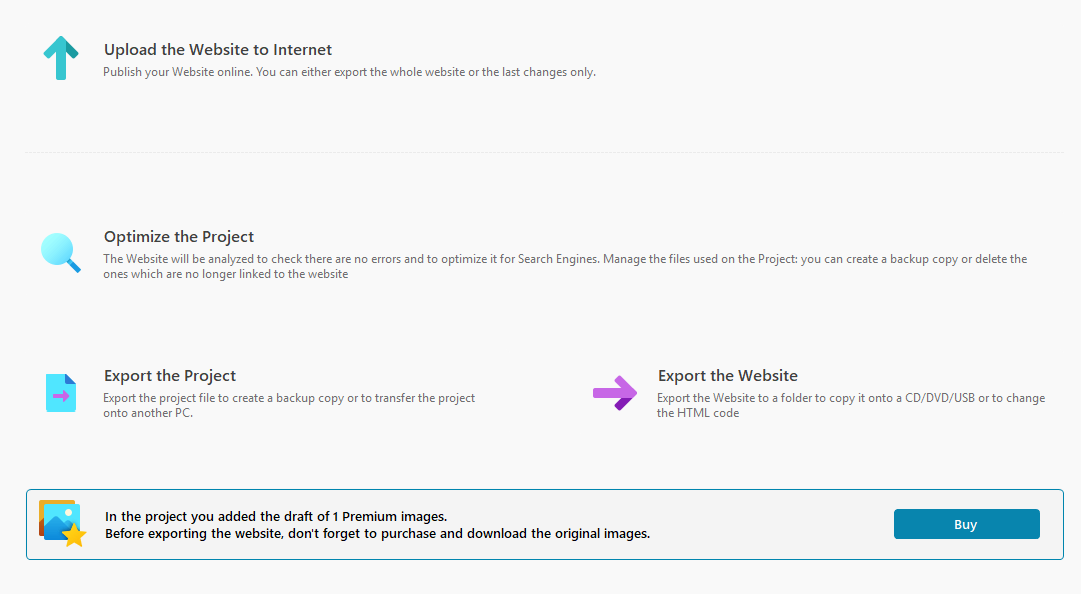
I attempted to use a prime image and this was the error I received when trying to export the finished product. I have since replaced the image with a free one and I'm still receiving this error. I have plenty of credits but when I went to pay for the first image, or even click on the buy button, I get a generic error code.
My next question is about using file share links for digital downloads. I have put in several weeks worth of labor time to add digital photos for sale in my online store and I have set up a special shared folder on my server and set up shared code links through gofile.me for customers to download their purchases. Is this going to work through your servers? I ask because I had one shared code link error that went away after I clicked ignore and exported the website. I'll find out shortly if it returns when I export again. That link that your server didn't like by the way, isn't attached to any of my products so it is likely some stray in the cache memory somewhere. I have attached a screenshot for your review.
My last question is about taxes. I am based in the U.S. but I might be selling products to the EU, Australia and Canada. I reviewed the help articles on setting up VAT for those who require it but what about US sales taxes? Is there something I can set up for that? Each state here has their own state sales tax amount. I was told by a US government official that I don't have to levy a sales tax for someone who buys something from another state as the customer is responsible for the sales tax. I know from my own experience that in intrastate commerce, the sales tax must be listed and paid by the customer. Can you help with that? It's a minor issue but I thought I would ask.
With regard to VAT taxes, should I use the VAT included option or VAT excluded option for selling to the EU from the US? Your set up help article wasn't clear about that.
The website is https://crann-na-beatha.com
Hi, in the meantime, I recommend you disable the website's cookie banner because you have two active.
Author
I have corrected the double cookie banner issue, thank you. I have attached another screenshot showing how I have set up the digital link. I tested the system I have set up and it does send me an email with the digital image but I am unable to do anything with the image as it's embedded in the email body. I expected to see a URL link for the customer to be able to download the file in a .jpg format, such as in this image
If I don't have this set up correctly, please advise and I will make the appropriate corrections.
By the way, I managed to get my US sales tax problems resolved on my end so don't worry about any of that. I just need help with the VAT, to include or exclude, those two errors on my export page and the digital link question. Thank you.
Author
Update: I may have fixed the eCommerce file share issue myself. I changed the digital file choice from internet file to local file and when I ran a test on my own, the link worked. Now I'm waiting for my beta testers to help me out to see if they can repeat the test successfully. I should know in a day or so.
I'm still getting those error codes on the export page though.
Hello Terrance,
is the image in question a vector image? If so, we have encountered issues with these and should be removing them from the premium images search results.
You also mentioned that you already replaced this but the alert still shows up, however, so could you please provide me with a copy of the project to take a closer look at this?
You can export it in Step 5 - Export, choosing the “Export the project” option to generate an IWZIP file.
You can then upload the file with SwissTransfer, TransferNow or similar services, and provide a download link to support @ incomedia.eu (without the spaces).
Thank you.
Author
I didn't check to see if it was a Vector image but I will do my best to provide you with a project file.
Author
I uploaded the project files to SwissTransfer and sent you the link via email as requested to ***.
Hello Terrance,
what address did you use to send the link? Was it the same one associated with your account?
I remain available.
Author
support @ incomedia.eu (without the spaces)
I can resend the link using the email address associated with my account.
Author
Link sent, addressed to ***- Attention Eric C.
Hello,
I sent you and e-mail from support to the address associated with your account, so that you can send the link in reply to my message.
I remain available.
Author
Email sent
Hello,
I received the link and will take a look at the project as soon as possible.
I remain available.
Hello,
the image in question can be found here:
Regarding your question about taxes, as I had not replied: unfortunately WebSite X5 does not have options to specify different tax percentages for states, as it only lists countries.
When it comes to displaying VAT, unless yours is a business to business e-commerce, VAT should be included in the price.
I remain available.
Author
Okay, I will fix that. What about that export error I sent the screenshot of? That points to a gofile.me link that I am not using anymore. How can I make that go away? I've enclosed another screenshot of the error.
Which brings me to another related question. In my online store, I have set up product pages for a bunch of digital photographs and, at first I was using digital http file links from a service called gofile.me. I have a server with a shared folder on it that I'm pulling the digital files from to sell to customers.
The gofile.me URL links were failing. Instead of customers receiving a message to download the files through gofile.me, the links in the emails came back with a .file extension, which is useless. In the product pages, I switched everything over to local file and added the file location from the server. It works, as far as the customer is concerned, but I'm worried about security for my server where the photos are being pulled from. I'm working with the server tech support people for possible options but I thought I would ask you to see if there is anything I should do within Website X5 Pro to also secure my network.
Hello,
you had provided a different screenshot earlier, so I was not aware of this error.
This error shows up because the link in question has been set as a folder in which to save comments for the Blog: Article page:
Regarding the settings for digital products, you could consider enabling the "Temporary download link" option.
I remain available.
Author
Thank you. I have made the edits. I actually had a file folder set up but somehow, I must have set the wrong input. That's what I get for doing all of this after long days.
As for my other question, I want to confirm something with Incomedia regarding the digital products page in the Product List page in the Shopping Cart.
I decided to go ahead and use the local file option on the Digital Product page and set a temporary download link. From what I was able to research through some of your obscure KB articles, this sets up an encrypted link that is only good for the alloted time. I debated over several days and changed between using a internet file option, using a shared URL relay link through Synology's NAS File Station (which you may not be familiar wiith), or the local file option a couple of times before settling on local file and your security option with the temporay download links.
I'm still concerned a bit about server file folder security and I would like to know your thoughts on using local file location and the temporary download link for customers. My main question is whether these customer links will show any IP and network locations in the addresses, like the gofile.me links were doing.
Author
I answered my own question as the link goes straight to File Explorer to save in a folder. Security issue solved. Now I have another question.
I want to sell products in the EU and I need to know if there is anything I need to set up on the shopping cart or product pages in order to be in compliance with EU VAT requirements. Can you help?
Hello Terrance,
if you have set the VAT to included, and have added a list of the VATs in various countries, you should already be set up.
I remain available.
Author
Very good. I have registered for a VAT OSS account in Ireland and I will add that to my Stripe platform once they accept my registration. PayPal is already set up to accept VAT. I believe we are ready to go. Thank you for all of your help.