
No Data management option in settings 
Author: Janine T.
Visited 515,
Followers 1,
Shared 0
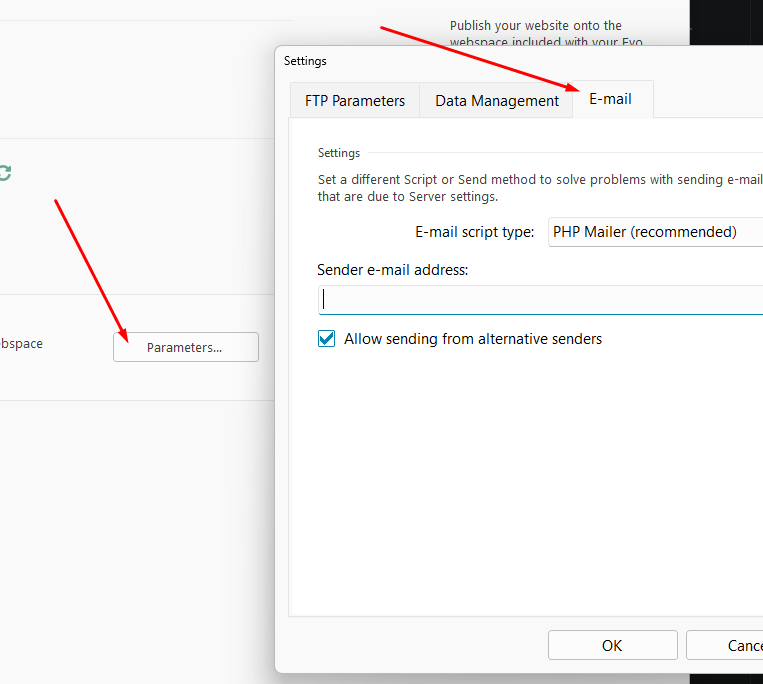
In pursuing an email sending problem, the Websitx5 guide tells me to "go to the Data Management window and select the Always use the following sender address option."
When I go to settings,there is no Data Management option.
Can anyone advise where it now is?
Posted on the
Questions:
Are there problems with sending emails to the contact form or the shop?
Are there problems with the email parameters?
Here you can find the instructions for the parameters, also for sending emails, see
----- Guide -----
How to export your website using an external Hosting provider
...
Now click on Parameters: in the following Server Settings window, type in the necessary parameters to connect to the server, to the database and to send the e-mails.
...
>> https://guide.websitex5.com/en/support/solutions/articles/44002246619
-----
Hello Janine,
could you clarify whether you read this in a guide here in the Help Center, or if it was mentioned by the AI assistant in WebSite X5, so that we may correct this if needed?
In the latest versions, the e-mail settings can be found at a different location: Step 5 - Export ---> Export website to the internet ---> Parameters, in the E-mail tab.
I remain available.
Author
I think it was in a guide in the help center. Sorry, but I'd done a bit of googling so am unsure exactly from where I'd been directed to the info advising to look for the advanced settings in the Step one settings page.
Maybe link the WebSiteX5 Guide here so that I can see what exactly the problem might be.
The English text in the post is difficult for me to understand and even the Google translation into German does not make the text any more understandable.