
Since version 2026.2.4 blog does not work anymore 
Author: Mendrik J.
Visited 474,
Followers 1,
Shared 0
Yesterday I updated to version 2026.2.4 and since then my blog did not work anymore in the preview. It works when I upload the website to the provider (one.com).
https://janmendrik.nl/blog/index.php
What can be the problem?
Posted on the
Hello Mendrik,
I am sorry about the issue.
We did not encounter this issue during our testing phase with 2026.2.4, nor had other reports of this by users who installed it as a Beta version.
Could you please check whether the situation persists if you press CTRL when launching Preview mode?
If so, please provide me with a copy of the project to investigate this directly?
You can export it in Step 5 - Export, choosing the “Export the project” option to generate an IWZIP file, and clicking CTRL while generating the file to generate a reduced size IWZIP for support purposes.
You can then upload the file with SwissTransfer, TransferNow or similar services, and provide a download link to support @ incomedia.eu (without the spaces).
Thank you.
Author
Could you please check whether the situation persists if you press CTRL when launching Preview mode?
I tried this for two websites: for one the Ctrl Preview worked (spinozakringsoest.nl), for an other it did not work (janmendrik.nl). I transfered both IXZIP fils (diagnostic to ***) via Swiss Transfer.
Hello Mendrik,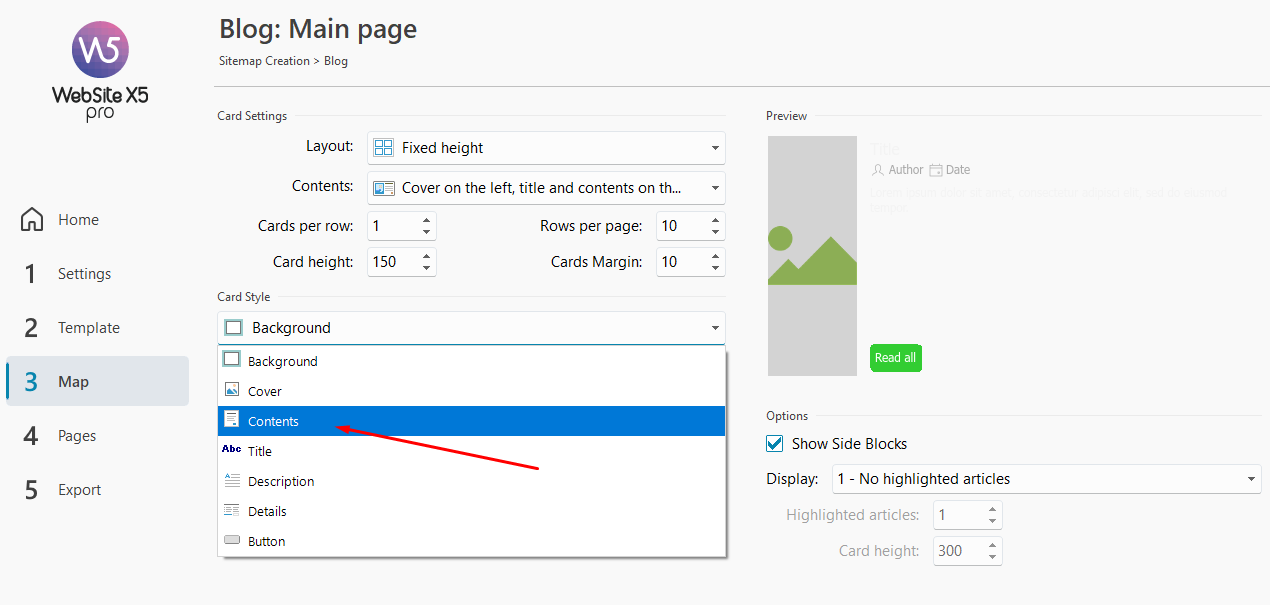
I could reproduce the issue with the janmendrik.nl project, and comparing it with the spinozakringsoest.nl I noticed that by changing the width of the Contents section from 75% to 80% che blog should be visible again.
I reported the issue, but for the time being I recommend modifying this value as a workaround, restoring it later on when we release a fix.
I remain available.
Author
Thanks Eric, for the helpful and quick response
The change from 75% to 80% works.