
Bug?I've made changes to the Code page, but they are not being used. 
Author: Nigel A.
Visited 543,
Followers 1,
Shared 0
I've changed the way that I'm doing Favicons, and this required a change on the Code page.
I deleted the old method, and added the new method. But none of those changes are going through after I do an Export. I've tried it a couple of times now, no idea what's wrong, or maybe it's a user error.
I've attached a jpg that shows the html and the Code page.
Posted on the
Have you tried clicking "Preview" at the top while holding down the left Ctrl key and waiting for the preview to load completely?
According to Incomedia, this causes WebSite X5 to rebuild the pages.
After that, perform a full export of the website to the internet.
Use the keyboard shortcut Ctrl + F5 in your browser to reload the file from the web server.
If none of that helps, you could perhaps post a link to the website or wait until Monday for the Incomedia staff to check the submitted project file (.iwzip).
Author
I tried all your solutions, and sadly none of them worked.
Thanks for your help.
... <div>. ... No! HEAD ...
ciao
.
Author
I took the entire secion out of "Code". It made no differance, still have the "old" information.
Try loading the project into a subdirectory (e.g., "only-test") for testing and see if the error persists there.
Could it be that there are multiple index files (index.php, index.html, etc.) and the wrong one is being loaded in the browser?
Author
Just checked. I only have index.html and that is getting updated.
Author
I did try Daniel's idea of a new folder. Same issue. Most strange. Even looking at the source of the preview page is incorrect.
...where did you put the <div> tag...?...
...it should go in the BODY or in an HTML Code Object.
...to avoid guesswork, it's best to post the entire code here...
.
Author
KolAsim ,
If you look at the jpg I provided in the post under yours, you'll see the <DIV> section was totally removed. All I had in the Code box was:
<link rel="apple-touch-icon" sizes="180x180" href="/apple-touch-icon.png">
<link rel="icon" type="image/png" sizes="32x32" href="/favicon-32x32.png">
<link rel="icon" type="image/png" sizes="16x16" href="/favicon-16x16.png">
<link rel="manifest" href="/site.webmanifest">
Then I suppose only this option remains:
... wait until Monday for the Incomedia staff to check the submitted project file (.iwzip).
Hello Nigel,
we offer limited support when it comes to matters related to custom code, but I will try ascertaining whether the issue is with the code itself, or instead a factor in WebSite X5.
What was the code you were previously using, which was working as intended?
Could you provide a copy of the project with the current code?
You can export it in Step 5 - Export, choosing the “Export the project” option to generate an IWZIP file, making sure not to use the options to include backup and preview files so that the size of the file is reduced.
You can then upload the file with SwissTransfer, TransferNow or similar services, and provide a download link to support @ incomedia.eu (without the spaces).
Tank you.
Author
It's actually code I was using for favicons. What I originally had was reasonably complex, so I wanted to simply how I was doing this.
Originally, the favicons used this header code:
<link rel="apple-touch-icon" sizes="57x57" href="/apple-icon-57x57.png">
<link rel="apple-touch-icon" sizes="60x60" href="/apple-icon-60x60.png">
<link rel="apple-touch-icon" sizes="72x72" href="/apple-icon-72x72.png">
<link rel="apple-touch-icon" sizes="76x76" href="/apple-icon-76x76.png">
<link rel="apple-touch-icon" sizes="114x114" href="/apple-icon-114x114.png">
<link rel="apple-touch-icon" sizes="120x120" href="/apple-icon-120x120.png">
<link rel="apple-touch-icon" sizes="144x144" href="/apple-icon-144x144.png">
<link rel="apple-touch-icon" sizes="152x152" href="/apple-icon-152x152.png">
<link rel="apple-touch-icon" sizes="180x180" href="/apple-icon-180x180.png">
<link rel="icon" type="image/png" sizes="192x192" href="/android-icon-192x192.png">
<link rel="icon" type="image/png" sizes="32x32" href="/favicon-32x32.png">
<link rel="icon" type="image/png" sizes="96x96" href="/favicon-96x96.png">
<link rel="icon" type="image/png" sizes="16x16" href="/favicon-16x16.png">
<link rel="manifest" href="/manifest.json">
<meta name="msapplication-TileColor" content="#ffffff">
<meta name="msapplication-TileImage" content="/ms-icon-144x144.png">
<meta name="theme-color" content="#ffffff">
so I deleted that in the Code box and replaced it with:
<link rel="apple-touch-icon" sizes="180x180" href="/apple-touch-icon.png">
<link rel="icon" type="image/png" sizes="32x32" href="/favicon-32x32.png">
<link rel="icon" type="image/png" sizes="16x16" href="/favicon-16x16.png">
<link rel="manifest" href="/site.webmanifest">
Unfortunately, I'm still getting that long first section, even though I deleted it from the Code box. And it is also writing that new section after it.
This happens on all my X5 websites, so you should be able to reproduce it easily on your end.
(It > De) ...vielleicht haben Sie den Code in einem anderen Bereich als den für Experten vorgesehenen platziert...
vielleicht haben Sie die Expertenbereiche in Schritt_1 und Schritt_3 nicht überprüft...
...!...im Website-Link in Ihrem Profil haben Sie zusätzlichen HTML-Code an der falschen Stelle eingefügt...!...
.
Author
I had to translate from German (?) and I don't know what " Schritt_1 and Schritt_3..." is.
If the favicon "code" doesn't go in "Code", where would it go?
KolAsim means "1 Settings" and "3 Map".
-----
Author
Daniel W.
Thank you, now it all makes sense.
Nigel.
Hello Nigel,
I tried to replicate the situation, but was unsuccessful: I first added the previous, longer code (in Step 1 - Settings ---> Statistics and Code, as from the first screenshot you sent it seems you were working on this section), exported, then replaced it with the shorter code and exported again.
Did you perhaps add the code in the Properties of some of your pages, as KolAsim was mentioning, in addition to Step 1 - Settings ---> Statistics and Code?
I would recommend checking there as well.
(It > En) .. .now I think he's figured out to check between Step_1 and Step_3...
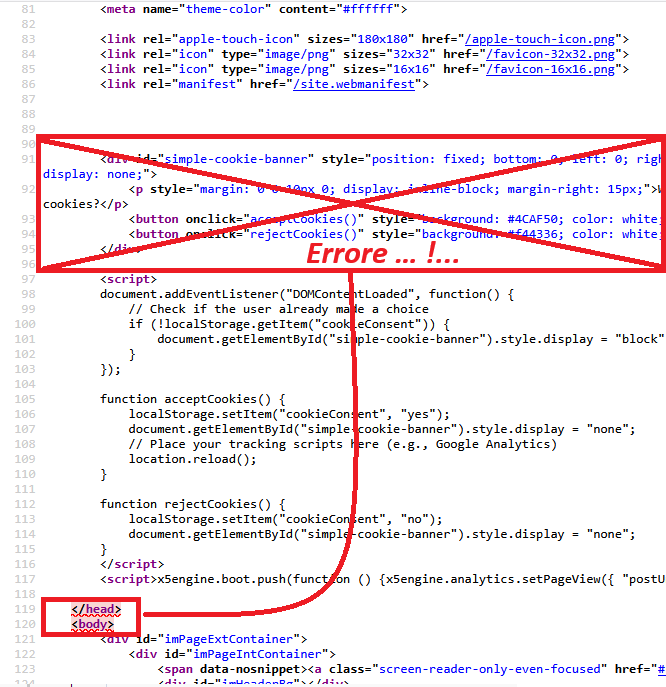
.. .now there are no repetitions...
...!...but there remains a major error that I had already reported:
.
ciao
.