
Buy Now Button 
Autor: Steve A.
Visitado 1390,
Followers 2,
Compartido 0
I have created an ecommerce site, all is working well. The only issue I have is that when the customer recieves confirmation of payment I get:
PayPal
Confirmed payment with PayPal
and then it also displays a Pay now button, even though the transaction has been completed.
How can I remove the Pay now button, and just leave the text saying Payment has been completed.
I don't want customers to think they haven't paid, and click on the Pay Now button.
Thanks
Publicado en
Hello Steve,
to clarify, are you referring to the button visible in the e-mail notification?
Thank you.
Autor
Here's a screenshot. The payment has already been confirmed and actioned. I don't want the customer getting another pay now option button. Thanks
Hello Steve,
unfortunately it is unclear where the screenshot was taken from, is it from the e-mail received by the user after placing the order?
Thank you.
Autor
Hi Eric,
Not being funny, but why would it be the email sent to the site owner to acknowledge payment?
This is what the customer recieves as a notification of the order.
Hello,
by user I was referring to the customer, not the website owner.
If the e-mail is what you are referring to, unfortunately the button cannot be removed, you could however change the text of the e-mail to clarify that it should be used only if the payment process was not completed or an error was encountered in it.
Autor
Hi Eric,
Thanks for your patience. I figured that might be the case. Hopefully Incomedia can work on the issue, as it's fundamentally flawed to send someone an opportunity to pay when theyve already paid.
Thanks for your time
Steve
Don't hold your breath, myself and other users have been complaining about this for years (not exaggerating) and all we get back is platitudes.
Hello, I'm having the same problem. Customers keep contacting me to complain that they're being asked to pay again in the email, even though they've already completed the payment online. I understand that the button is there as a security measure in case the online payment fails for some reason, but unfortunately, there's no way to inform the buyer about this!
@Eric, your suggestion to change the text doesn't help, because the text in the email is also displayed online in step 4 of the order process. There's simply no way that would work in both places without confusing the buyer.
Please provide a useful solution to this problem.
Hello Ed,
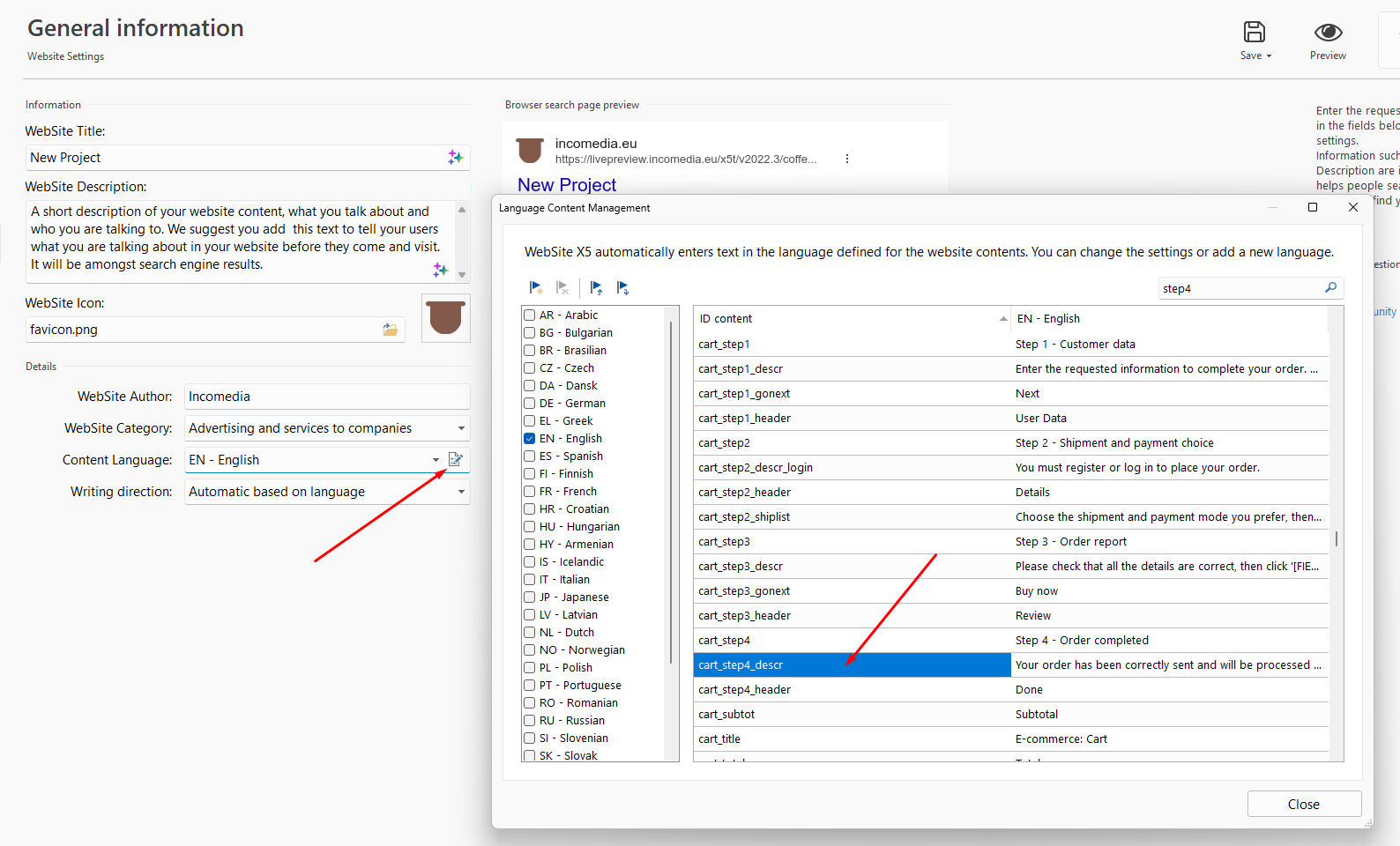
it is also possible to change the text shown at the end of the order.
If you go to Step 1 - Settings ---> General Information ---> Content Language, and look for the ID cart_step4_descr you will be able to replace the default text with another.
I remain available.
Hi Eric, thank you for the quick reply and the tip about the language content management. I've already edited some texts there, and it's a useful tool, but in this case, I wasn't referring to the introductory text, but rather the text about the payment method. Please excuse me if I wasn't clear enough.
This text can only be entered once and then appears both online and in the email to the customer.
Of course, I could now change the description text under cart step 4 and add information about payment via PayPal, but this text is the same for all orders. Not every customer pays with PayPal, and shops that only offer PayPal as a payment method are probably quite rare. Unfortunately, this suggestion isn't a useful solution either.
Why don't you consider removing the button from the email message? I would appreciate an honest answer.
Hello Ed,
it has not been considered a high-priority change so far, and so we have not worked on alternatives, such as making this optional, so far.
I will report the additional feedback of users in this post.
I remain available.