
Strange issue with the "Contact" plugin and captcha 
Auteur : Nigel A.
Visité 224,
Followers 1,
Partagé 0
I'm having an issue with the "Contact" form.
The attached screenshot shows the contact page. The one on the left is from the web server, and the one on the right is from the local preview.
As you can see, the preview shows the CAPTCHA correctly, but the web server version does not.
Any ideas as to why?
Kind regards to all,
Nigel.
Debian 12 (up to date)
Website X5 (up to date)
Posté le
Hello Nigel,
I am sorry about the issue.
Could you please use CTRL + Preview to regenerate the project files and then upload it again, choosing to export all files?
If the issue persists, please provide the URL of the page to check the situation in the browser.
Thank you, I remain available.
Auteur
Stranger and Stranger ....
I have a very simple website where I added a contact form. Now I have no CAPTCHA.
Not in Website X5 or after posting. No idea what I've done wrong.
https://twin-peaks-video.com/contact_nigel.html
Nigel.
Hello Nigel,
Captcha is not always present in a form, is the option active for the form on this website specifically?
Auteur
I apologise; what an "idiot" I am!! :)
This shows the issue: on Website X5, CAPTCHA is showing correctly; after upload, it has the words "Go to content" in the "box".
https://twin-peaks-video.com/contact_nigel.html
Sorry about that, Nigel.
In my Firefox browser, the "Yes" and "No" options from the cookie banner are displayed in the captcha window, see screenshot below. Perhaps this will help with troubleshooting.
-----
Auteur
But should it not look like this? "Check Word" makes no sense in this case.
This screenshot is from the same web page but in X5.
The iframe for the CAPTCHA contains the code for the cookie banner, as shown in the screenshot.
I don't know why the cookie banner code is included in the CAPTCHA iframe.
Perhaps you should check yourself how and where the code for the cookie banner was inserted.
Otherwise, other users or Incomedia staff might be able to help.
----- Screenshot -----
Auteur
Daniel, if you don't know, I can assure you I don't either! :)
The "Contact" plug-in is the only thing on that page. So whatever is happening seems to be created by X5.
You might want to delete the contact page from the sitemap and recreate it under the same name.
First, delete the faulty contact page on your web space and then export it to the web space.
If the error reappears and the cookie code was correctly inserted in WebSite X5, then Incomdia staff will likely need to examine the project as an IWZIP file (5 Export > Export Project).
Auteur
I have tried that; it's also happening on a couple of my other websites. This website never had the contact page until I tried it this morning.
Strange issue.
Hello,
inspecting the page I can see several 404 errors related to many elements, including those that would display the Captcha.
Did you try using CTRL + Preview before a full export, as I mentioned in one of my previous replies?
This should regenerate the project files, could you please check if the situation is unchanged even after this, if you have not tried?
I remain available.
... incorrect code has been inserted into the wrong section...
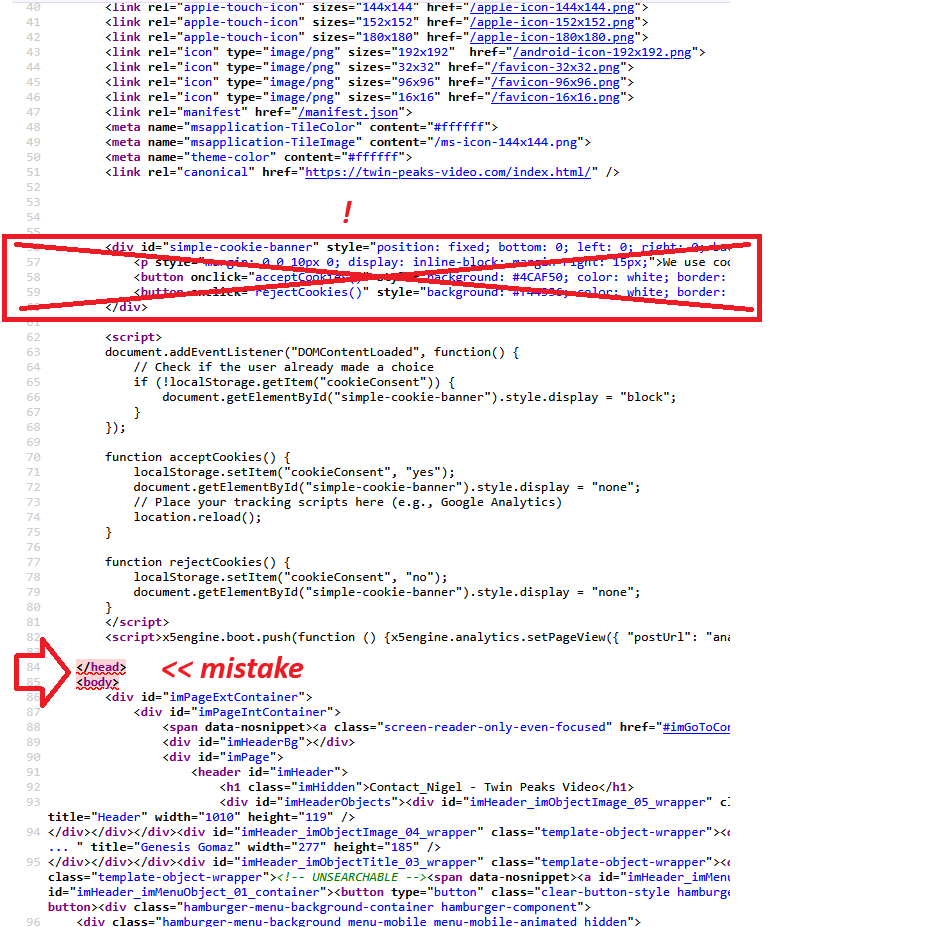
... the "simple-cookie-banner" HTML code must be placed in the Expert section | > /BODY, or alternatively within an HTML Code Object...
.
ciao
.
Auteur
Understood, but that does not explain why it works OK in preview mode, but not when the site is live.
So where should I put the "cookie" code? I looked again at the two plugins you have, but both are far too intrusive in size, and why do they link back to your server? They should be total standalone in my opinion.
ciao
.