
Database management problem 
Автор: Ahmed E.
Просмотрено 604,
Подписчики 1,
Размещенный 0
when I try to uplaod the website, it gives me error "The follwoing test failed: MySQL Database Settings" after the aprt of "Checkoimng PHP Compatibilty".
I hqd reached the host support and they ensure ALL requirements are suported form (Windows toLinus, PHP version and MYSQL as well), they advised me the error is with the WebSiteX5 upload app aas from their side everything is accessible and workng.
And when I Choose "Ignore" instread of "OK" it uplaod all the changes to the webite, but when someone try to submit any order gives error message "Generic Error"
what is your advise for this?
Размещено
The shop is probably using the database, but no database parameters have been specified.
-----
How to export your website using an external Hosting provider
...
Now click on Parameters: in the following Server Settings window, type in the necessary parameters to connect to the server, to the database and to send the e-mails.
...
>> https://guide.websitex5.com/en/support/solutions/articles/44002246619
-----
Автор
Thank yiu Daneil, B ut parameters are already entered and revised with hosting pan support.
not sure aht else is mssing or causing the test to fail?
Of course, I cannot check whether the data entered in the parameters is correct.
If necessary, enter the database parameters again if an error has crept in for whatever reason.
When copying data, invisible control characters can be copied, so enter the data by hand.
Be particularly careful with the password, as the characters are only displayed as dots.
Hello Ahmed,
in addition to what Daniel mentioned, could you check the situation if you use localhost as the Host Name in the database settings, instead of the current format you may be using? For example, an IP address.
I remain available.
Автор
Hi Daniel, I tried with host support to enter the IP one time and hostname another ime, it didn't esolvThe ssue. We even tried to change the password, it also didn't work. The host support uggested to try Filezilla as they tested and works fine to connect and transfer data! Is there a way to remove the database and rebuiLd again? maybe this could be resolved?
does WebsiteX5 have any type of remote support?
Hello Ahmed,
we do offer remote support for certain support requests, but as this is an issue involving the database parameters, it would not help unfortunately.
Could you provide a screenshot of the current settings you are using? Additionally, what is your provider?
The database parameters depend on the web hosting provider and the information you provide when creating the database in the web hosting provider's customer area.
Maybe the web hosting provider's support can create the database and give you the database parameters if you can't do it in the customer area.
----- Screenshot -----
Specifying a directory as shown in the screenshot cannot replace the database, as certain functions absolutely require a database.
Автор
Hi Daniel, the Host also tried to create a databse for me and they infomred me it's accessible and fine.
please find the screenshos form my WebsiteX5 and from my hosting file manager
Автор
another screenshot
Hello,
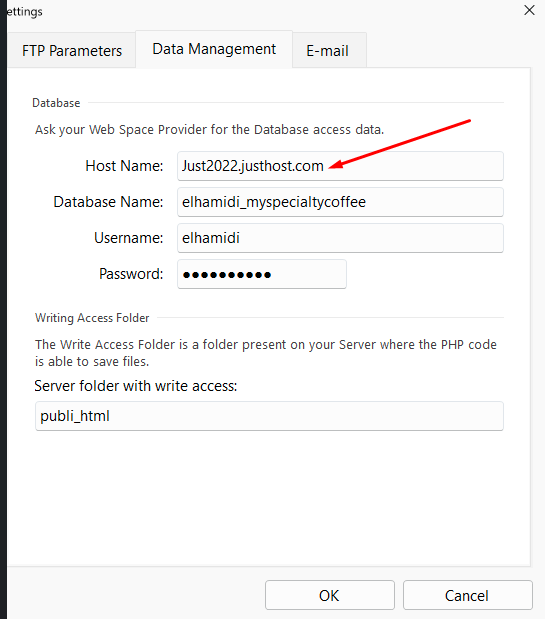
could you please also check the situation using localhost here instead of the current value?
If I enter justhost.com in the browser, I am redirected to bluehost.com in Germany and on their help page the AI replies that "localhost" would be required for "Host Name".
Since I'm neither on justhost.com nor on bluehost.com, I can't check this.
.
By the way:
For "Server folder with write access:" a / must be placed at the beginning, but the directory name must be without /.
-----
Server folder with write access:
/publi_html
-----
Автор
My host is Justhost (Bluehost) and when anyone tries to submit an order ti gives this message (it's connected to PayPal)!
Автор
I trid with BOT (with /) and without (/) nothing still worked!
is there a way to rebuild the databse and access, as when I click n Ignore ANY OTHER updated data is upoaded, but I get this Database issue in additon to the ayment issue (I just shared the screenshot as well)
The "Server folder with write access:" has nothing to do with the database, it can only be used for saving in a text file and only for a few functions.
Generic error is a general error message and the error log file from the web hosting provider would be required here, but it would be better for the Incomedia employees to answer this.
Hello Ahmed,
the folder with writing access should usually be a subfolder found inside the main folder, not the main folder itself.
If /public_html is the folder where files are published, you should create a subfolder with 777 permissions in it, and specify the name of this subfolder.
Regarding the database, did you try using localhost as mentioned?
Автор
I tried using localhost and also didnt work
is there a way to remove the database option (from Website5) and re-add again?
In WebSite X5, while holding down the left Ctrl key, click on "Preview" at the top and wait until the progress bar at the bottom has run all the way through. This will cause the pages to be rebuilt.
Then do a complete export of the website to the Internet, not just the updated files.
Then use the keyboard shortcut Ctrl + F5 in the browser to request the files from the web server again so that no old files from the browser cache are used.
If the database still doesn't work, then the database parameters could be incorrect.
Hello Ahmed,
there is not an actual reset, what you can do is removing the parameters from the fields and adding them again.
Just to clarify, are you actually intending to use functions that need a database to be operational, in your website?
Otherwise you also have the option of disabling them and leaving the Data Management section empty, save for the folder with writing access.
Автор
Hi Eric, I had removed the parameters, but got this message! I beleive I need to Remove and disable the database form the WebsiteX contents!
Автор
I tried to use WebsiteX5 AI to ask how to remove database, and it replied Step 1 – Settings > Advanced > Data Management! I dont see settings in my Agency version!
Hello Ahmed,
is that alert is displayed, it means you have functions that require the database to work.
Please check and disable these, for example:
- automatic registration (Step 1 - Settings ---> Access Management)
- push notifications (Step 1 - Settings ---> Website Management)
- WebSite X5 Analytics (Step 1 - Settings ---> Statistics and Code)
Автор
Hi Eric,
I managed to disable second and third option, but "automatic registration (Step 1 - Settings ---> Access Management)" not sure how to disable?
Hello Ahmed,
it may not necessarily be active, have you checked what mode you are using?
Автор
Manual, but still receiewving the Databse error?
Could it something else?
I dont want to rebuld the website again!
Hello Ahmed,
could you please send me a copy of the project?
I will check what is still active.
You can export it in Step 5 - Export, choosing the “Export the project” option to generate an IWZIP file, making sure not to use the options to include backup and preview files so that the size of the file is reduced.
You can then upload the file with SwissTransfer, TransferNow or similar services, and provide a download link to support @ incomedia.eu (without the spaces).
Thank you.