
Paypal button not showing 
Author: Ivo B.Hello Folks,
Just updated X5Pro to latest version.
For somewhat reason the PayPal button doesn't show up in final payment checkout page. Therefore, impossible to make payments.
I've already tried the Eric C. suggested method found in this older post.
"I recommend repeating the onboarding for PayPal with these steps:
1) Remove the PayPal Commerce Platform payment method.
2) Close WebSite X5.
3) Delete the folder named "browsercache" at the path C:\Users\YourUsername\AppData\Local\Incomedia\WebSite X5 - Pro.
4) Reopen WebSite X5 and add PayPal Commerce Platform again. After completing the procedure, click the settings button and check select the relevant options (in this case you can just add Credit cards for now).
5) Export all website files."
Done it several time but still without success. I’m no expert at all when it comes down to library, codes, scripts and all those technical matters.
Any idea on how can I fix it!
Thank you very much in advanced.
Sincerely,
Ivo
Hello Ivo,
I am sorry about the issue.
Could you provide the URL of your website in order to place an order as a test and inspect the page during the process?
I remain available.
Author
Hello Eric,
Thank you for your replay.
www.brazmodels.com
Sincerely,
Ivo
Hello,
inspecting the website, 2 separate errors occur during checkout.
You can fix one of them by correcting some settings in your project settings and in your hosting settings: in Step 5 - Expot ---> Upload to the internet, please use https://www.brazmodels.com/ as the URL of your website, and in your hosting control panel make sure to set up a redirection from https://brazmodels.com/ to https://www.brazmodels.com/
In addition to this URL misalignment, that triggers PayPal's security measures, there is also an error 500, which is an unspecified server error.
Please make sure to use a version of PHP between 8.2 and 8.5, and contact your hosting provider for additional information, as they should be able to check the server's error logs to find out more about the nature of the error.
I remain available.
Author
Hello Eric,
Thank you very much for your quick replay.
Unfortunately, your suggestions did not work and at the end, it even got worse.
Here is what I’ve done in sequence:
Here is where things got worse. If I type www.brazmodels.com in my browser, I get a message “This page isn’t working at the moment”. If I Google brazmodels, then I can open it.
For somewhat reason all the “add to cart” buttons disappeared from all products making impossible to add anything to the cart. They worked perfectly since years and till today's modifications. Found out that after last X5 update, for somewhat reason the software was directing the “add to cart” picture to an incorrect file name. The file name indicated in X5 had spaces between letter and but in the folder the file name has dashed-line between letters. I’ve never changed neither the file name nor the settings in X5. Also noted that all file names have dashed-line or underscore in-between letters. I never gererated them in such way, I always use spaces between letters.
Anyhow, to solve the issue, I’ve redirected to correct file for each single product. Three hours of work thrown straight in the bin to correct this issue. Thanks guys!
Afterwards, re-uploaded again the entire website. Now the “add to cart” works again but after completing the order, the PayPal button still doesn’t show up!
Enquired my hosting about the issue and here below is the response.
It is a generic 500 error.
The server error log itself contains no additional entries, but this failed request confirm that the PayPal button is not appearing because the site cannot obtain the PayPal client token. This points to the PayPal/WebSite X5 integration or its credentials/configuration rather than a general hosting outage.
Any further suggestions?
Thank you again in advanced.
Ivo
Hello Ivo,
I am sorry about the issue with the add to card buttons, I can see that this still persists on the Product Search page.
Regarding the error 500, unfortunately as it is a server-side error we cannot find out more about it, and it is unusual that the provider could not find out more about it.
If you can provide a copy of the project, I can confirm whether PayPal works as intended when the project is hosted elsewhere, and also take a look at the issue with the add to cart buttons.
You can export it in Step 5 - Export, choosing the “Export the project” option to generate an IWZIP file, making sure not to use the options to include backup and preview files so that the size of the file is reduced.
You can then upload the file with SwissTransfer, TransferNow or similar services, and provide a download link to support @ incomedia.eu (without the spaces).
Thank you.
Author
Hello Eric,
Thnk you very much for the detecting the missing button. Completely forgot to update the Product Search page.
Just sent to the indicated email, relative link.
Sincerely,
Ivo
Hello Ivo,
I could actually replicate the error 500 even on the version published on my hosting space, so I have reported the situation to the development team to investigate both our logs, and whether we detect anything unusual associated with your PayPal Merchant ID.
On the other hand, I did not notice the unusual behavior with the icons, and the exported file matched the one of the file added in the settings of the Product Catalog object and Product Search page in my upload.
Hello,
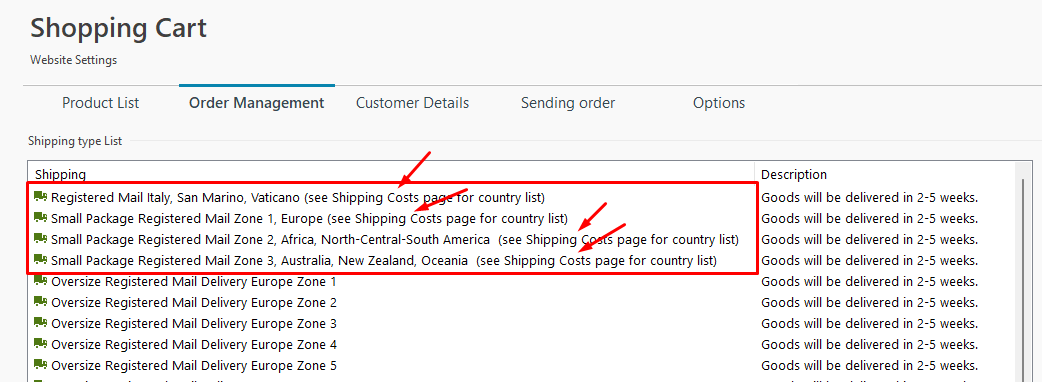
checking the logs, we identified the cause of the error: the presence of the " character in the information of the shipping methods.
I reported this issue to address it, in the meantime you can edit the affected shipping methods (the first 4 of the list):
Author
Hello Eric,
Thank you again for your quick replay and solution.
I’ve removed the quotation marks “” for the description text as you mentioned and now PayPal works perfectly! Fantastic, what a great relief!
Regarding the Add to Cart button. Also in this case, it could be a character type issue.
It is the add to cart image that disappeared from all the Product Catalog object and Product Search page. In the exported version dated Spt. 30th that I’ve sent you, I’ve already fixed the issue by re-addressing the button image of each product.
For my curiosity, I’ve opened my back-up version dated Sept. 13th 2026 as well as, most likely my very first back-up copy dated 2020. In both cases, in the product page, the button file name is “Baggage Cart 50 Paypal.jpg” (spaces between letters and numbers). See below image
I’ve configured everything in the product page at least six years ago. From the moment it worked, I’ve never changed it since then. The Add to Cart was picked from my local HD and had the same file name.
On Sept. 29th, updated to latest WebSiteX5 version. Played around only on the payment system and entirely republished my web site overwriting everything. At this point, all Add to Cart buttons disappeared.
Opened the product page and re-addressed to image. Instead of picking the image from where all my original images are stored on my HD, I’ve picked the one that software has renamed in “Baggage-Cart-50-PayPal.jpg” and located in the folder ….documents/Incomedia/WebSite X5 – Pro/Project/Preview/Images.
Now the same setup product page has the file name with dashed-lines.
Don’t know it is the correct practice, but it works. If you wish, I can send you also the exported version of my older back-up.
Thank you again for your help.
Sincerely,
Ivo